> ## Documentation Index
> Fetch the complete documentation index at: https://docs.kinetica.com/llms.txt
> Use this file to discover all available pages before exploring further.
# Jobs
Click **Jobs** in the top navigation menu to access the
[Job Manager](/content/admin/job_manager) interface.
The **Jobs** section is only available to users
with the *System Admin* permission.
## Running
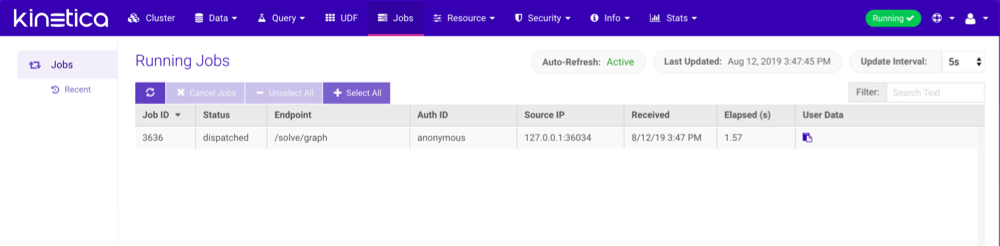
The **Running** page shows a list of currently executing jobs. Jobs can
be cancelled by selecting them and then clicking **Cancel Jobs**, though
most jobs are processed quickly enough to be finished by the time they appear in
the job listing. The listing is automatically refreshed at a selectable
interval, but can also be refreshed manually by clicking  . Jobs can be
searched for using **Filter**.
The **User Data** field corresponds to the user-defined tag submitted
when making the request, specified via the `job_user_data` options parameter.
Click
. Jobs can be
searched for using **Filter**.
The **User Data** field corresponds to the user-defined tag submitted
when making the request, specified via the `job_user_data` options parameter.
Click  to view it.
Insert, update, and delete requests **cannot** be cancelled.
Otherwise, most user-facing non-admin jobs are cancellable.
to view it.
Insert, update, and delete requests **cannot** be cancelled.
Otherwise, most user-facing non-admin jobs are cancellable.
 ## Recent
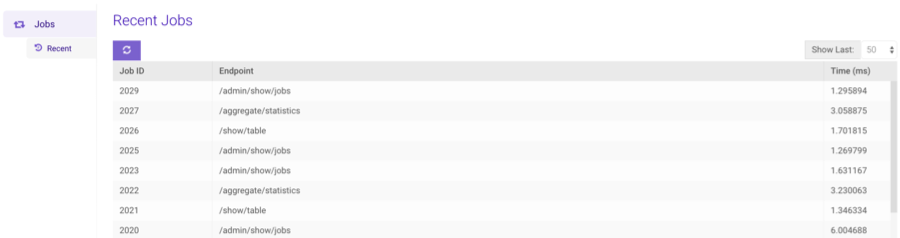
The **Recent** page shows a list of recently executed jobs and the
completion time for each. The number of recent jobs displayed can be selected
by clicking the **Show Last** drop-down. The list can be manually
refreshed by clicking .
## Recent
The **Recent** page shows a list of recently executed jobs and the
completion time for each. The number of recent jobs displayed can be selected
by clicking the **Show Last** drop-down. The list can be manually
refreshed by clicking .