> ## Documentation Index
> Fetch the complete documentation index at: https://docs.kinetica.com/llms.txt
> Use this file to discover all available pages before exploring further.
# Resource
All resource management related information can be found in the
**Resource** section of *GAdmin*, including tier definitions, resource
groups, and resource statistics. From this section, resource groups can
be created and managed. Consult [Resource Management](/content/rm/concepts) for
more information.
The **Resource** section is only available to users
with the *System Admin* permission.
## Tiers
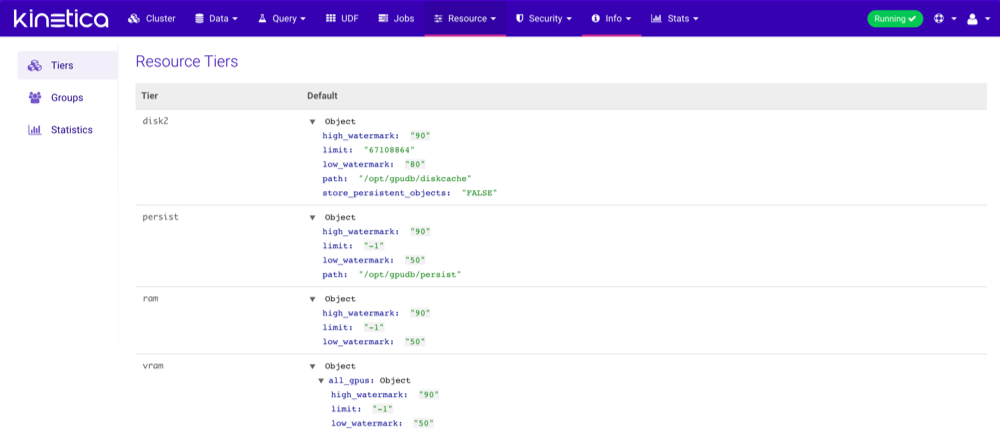
The **Tiers** page displays a summary of all
[tiers](/content/rm/concepts#rm-concepts-tiers) defined in
/opt/gpudb/core/etc/gpudb.conf.
 ## Groups
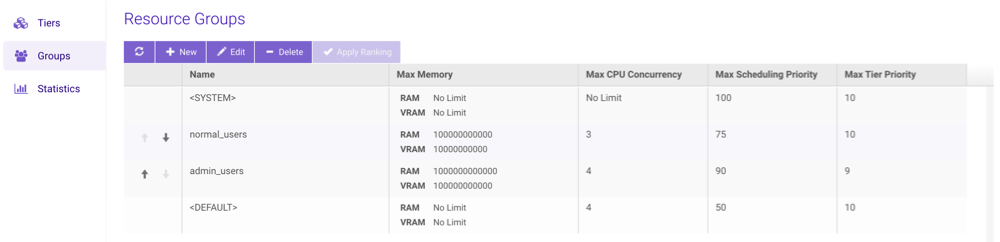
The **Groups** page displays all
[resource groups](/content/rm/concepts#rm-concepts-resource-groups) available for use in the
cluster. Click the arrows next to a non-system/non-default resource group to
change its ranking, then click **Apply Ranking** to save the ranking
change(s).
## Groups
The **Groups** page displays all
[resource groups](/content/rm/concepts#rm-concepts-resource-groups) available for use in the
cluster. Click the arrows next to a non-system/non-default resource group to
change its ranking, then click **Apply Ranking** to save the ranking
change(s).
 ### Creating Groups
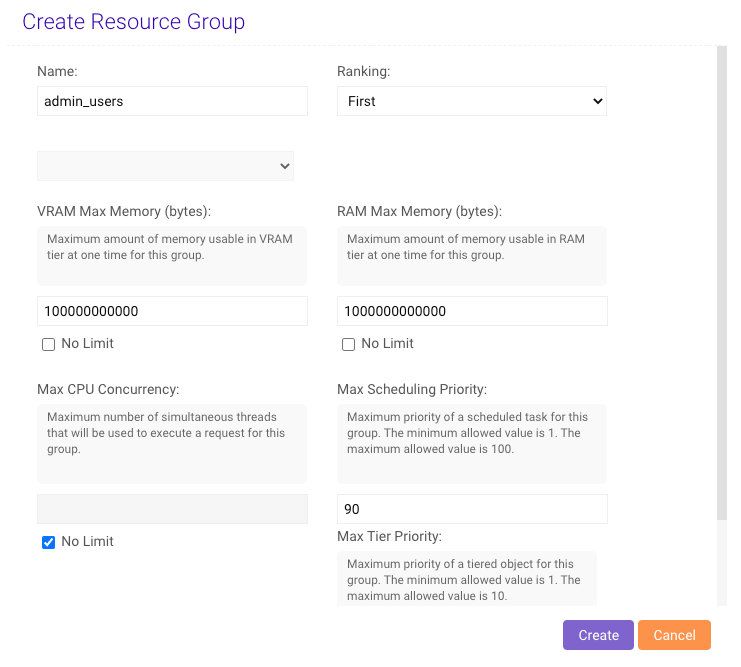
1. From the list of **Resource Groups**, click **New**.
2. Type a **Name** for the new resource group.
3. Configure the new group's ranking by selecting a predicate then selecting
another resource group (if necessary).
4. Provide the desired VRAM & RAM memory usage limits in bytes for the resource
group.
5. Provide a maximum number of CPUs that can be used concurrently for the group,
from `0` to *n* number of CPUs available to the cluster.
6. Provide a maximum [Scheduling Priority](/content/rm/concepts#rm-concepts-scheduling-priority) for the group, from
`1` to `100` where `1` is the lowest priority.
7. Provide a maximum tier [Eviction Priority](/content/rm/concepts#rm-concepts-eviction-priority) for the group,
from `1` to `10`.
8. Click **Create**.
### Creating Groups
1. From the list of **Resource Groups**, click **New**.
2. Type a **Name** for the new resource group.
3. Configure the new group's ranking by selecting a predicate then selecting
another resource group (if necessary).
4. Provide the desired VRAM & RAM memory usage limits in bytes for the resource
group.
5. Provide a maximum number of CPUs that can be used concurrently for the group,
from `0` to *n* number of CPUs available to the cluster.
6. Provide a maximum [Scheduling Priority](/content/rm/concepts#rm-concepts-scheduling-priority) for the group, from
`1` to `100` where `1` is the lowest priority.
7. Provide a maximum tier [Eviction Priority](/content/rm/concepts#rm-concepts-eviction-priority) for the group,
from `1` to `10`.
8. Click **Create**.
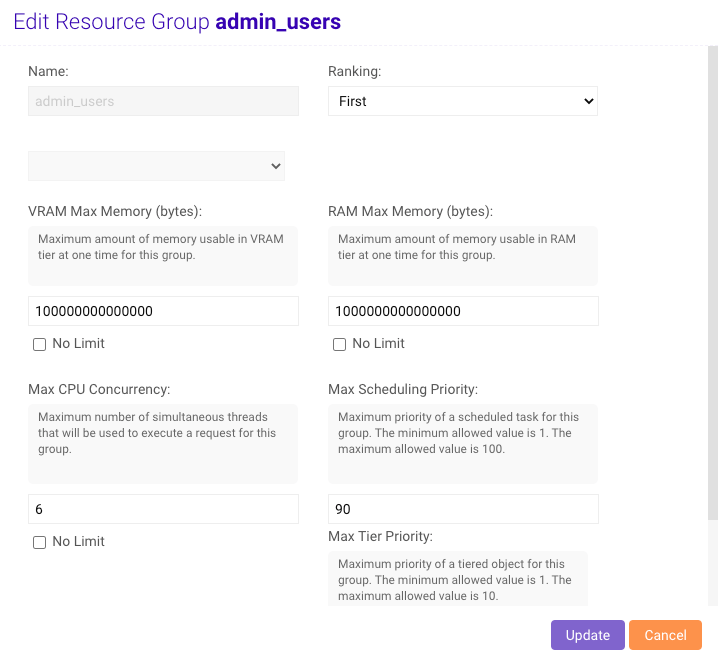
 ### Editing Groups
1. From the list of **Resource Groups**, select a group and click
**Edit**.
2. Update the VRAM and RAM memory usage limits as necessary.
3. Update the maximum CPU concurrency, [Scheduling Priority](/content/rm/concepts#rm-concepts-scheduling-priority),
and/or tier [Eviction Priority](/content/rm/concepts#rm-concepts-eviction-priority) as necessary.
4. Click **Update**.
### Editing Groups
1. From the list of **Resource Groups**, select a group and click
**Edit**.
2. Update the VRAM and RAM memory usage limits as necessary.
3. Update the maximum CPU concurrency, [Scheduling Priority](/content/rm/concepts#rm-concepts-scheduling-priority),
and/or tier [Eviction Priority](/content/rm/concepts#rm-concepts-eviction-priority) as necessary.
4. Click **Update**.
 ### Deleting Groups
1. From the list of **Resource Groups**, select a group and click
**Delete**.
2. Confirm the deletion by clicking **Delete** again.
All users in the deleted resource group will reverted back to being in
the [default resource group](/content/rm/configuration#rm-config-resource-group-default).
## Statistics
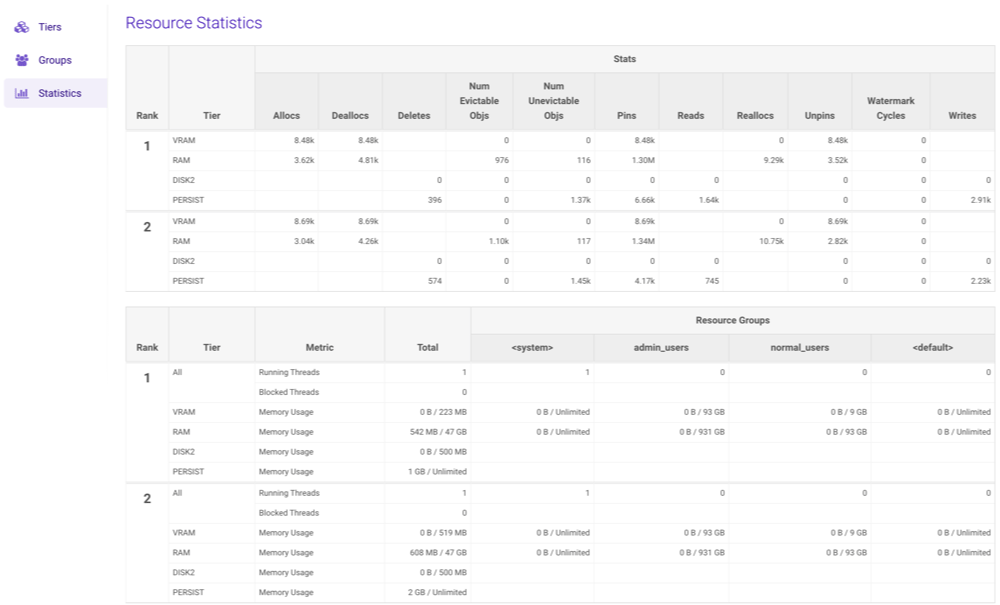
The **Statistics** page provides a detailed summary of each tier on
each rank in the cluster. Each tier has several sub-sections that can be
drilled into for detailed statistics.
### Deleting Groups
1. From the list of **Resource Groups**, select a group and click
**Delete**.
2. Confirm the deletion by clicking **Delete** again.
All users in the deleted resource group will reverted back to being in
the [default resource group](/content/rm/configuration#rm-config-resource-group-default).
## Statistics
The **Statistics** page provides a detailed summary of each tier on
each rank in the cluster. Each tier has several sub-sections that can be
drilled into for detailed statistics.