> ## Documentation Index
> Fetch the complete documentation index at: https://docs.kinetica.com/llms.txt
> Use this file to discover all available pages before exploring further.
# User
Click your username in the top navigation menu to review open *GAdmin* sessions,
change your password, or log out of *GAdmin*.
## Sessions
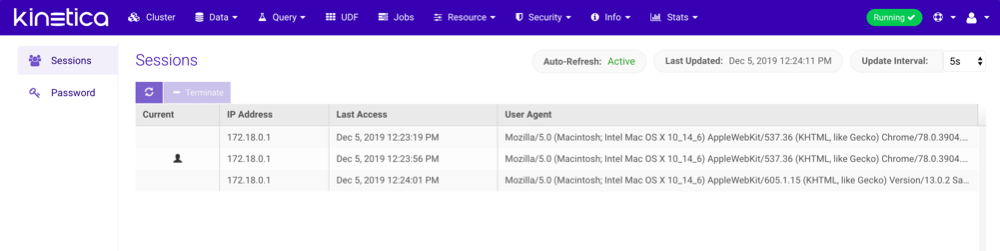
Click **Sessions** to open the list of currently open *GAdmin* sessions.
Select any of the sessions not designated as **Current** (displays the
 logo) and click **Terminate** to remotely terminate that
session. The user for the session will be forced to login again.
logo) and click **Terminate** to remotely terminate that
session. The user for the session will be forced to login again.
 ## Change Password
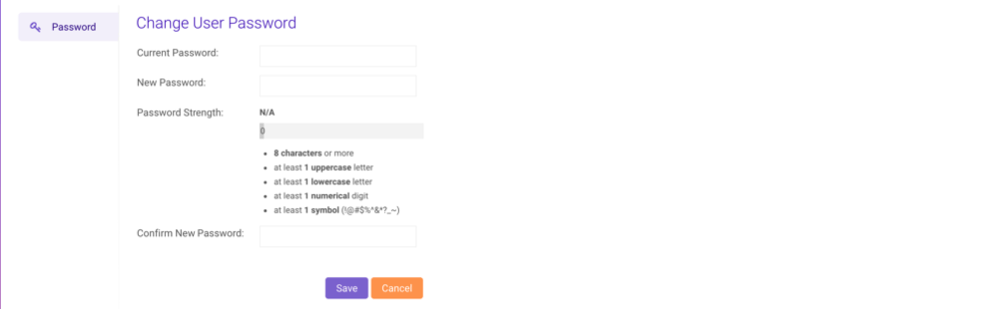
Click **Change Password** to change your password. The new password
must meet the password strength requirements listed. Click **Save** to
confirm the password change.
## Change Password
Click **Change Password** to change your password. The new password
must meet the password strength requirements listed. Click **Save** to
confirm the password change.
 ## Logout
Click **Logout** to end the current *GAdmin* session and return to the
login page.
## Logout
Click **Logout** to end the current *GAdmin* session and return to the
login page.