> ## Documentation Index
> Fetch the complete documentation index at: https://docs.kinetica.com/llms.txt
> Use this file to discover all available pages before exploring further.

# KAgent

<a id="kagent-concept" />

*KAgent* is a multi-faceted administration, installation, and configuration
management tool. It provides a centralized way to perform a consistent install
across an existing or yet-to-be-cloud-provisioned cluster of computers. *KAgent*
can also assist in automating tasks such as provisioning cloud hardware,
configuring cluster security, adding and removing nodes, data backup and
restoration, monitoring cluster health, managing and configuring cluster
[high availability](/content/ha/ha_architecture). It has both a graphical (web)
interface as well as a command line interface.

<a id="kagent-features" />

## Features

*KAgent* facilitates or directly performs the following operations:

* [Kinetica installation](/content/install/kagent_install)
* [Existing cluster addition](/content/admin/adding_cluster_kagent)
* [Cluster Back-ups](/content/admin/kagent/manage#kagent-ui-backups)
* [Cluster management](/content/admin/kagent/manage)
* [HA (Rings)](/content/admin/kagent/manage#kagent-ui-rings)
* Cluster [monitoring](/content/admin/monitoring_alerting) and
  [usage](/content/admin/kagent/usage)

## UI

The *KAgent* UI is usually available on port 8081
of the desired machine, so it can be accessed via `http://<kagent-host>:8081`.
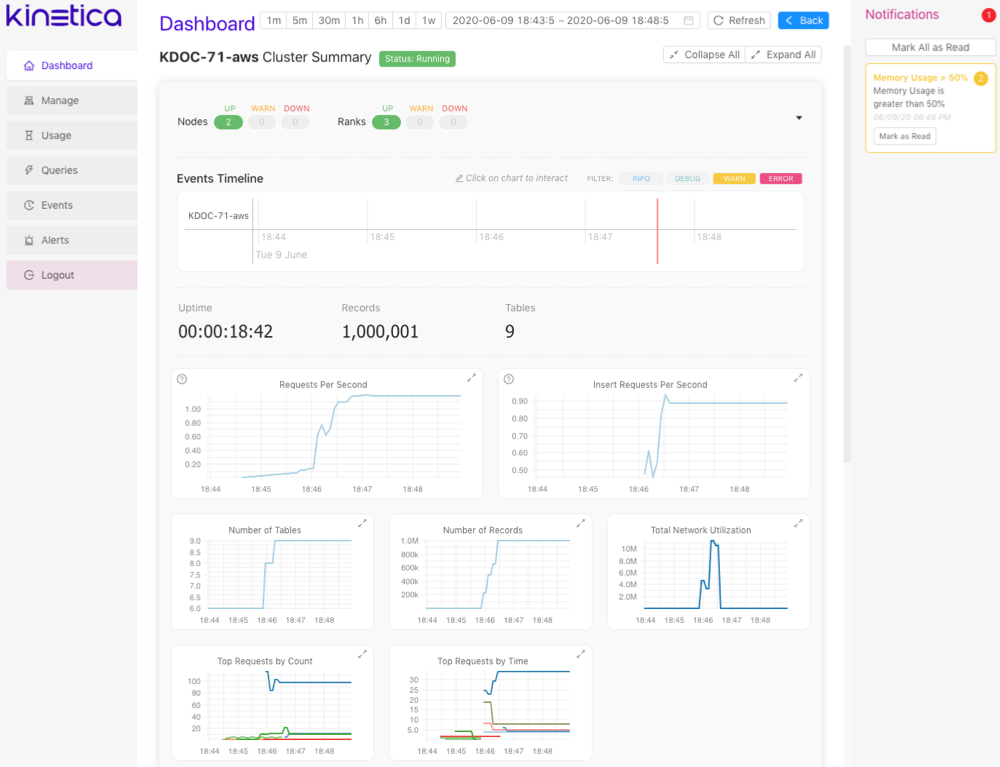
The *KAgent* UI has a navigation pane on the left-hand side and a
**Notifications** pane on the right-hand side. Review
[Logging In / Out](/content/admin/kagent/kagent#kagent-ui-logout) for information on accessing the *KAgent* UI.

<img src="https://mintcdn.com/kinetica/1z8mB2CQRb2B9bKF/content/admin/kagent/images/kagent_ui_dashboard_full.png?fit=max&auto=format&n=1z8mB2CQRb2B9bKF&q=85&s=aef1edcf9b1c3bee68609bb7de2fafbb" alt="../images/kagent_ui_dashboard_full.png" width="1000" height="767" data-path="content/admin/kagent/images/kagent_ui_dashboard_full.png" />

### Navigation

The navigation pane hosts quick access to all the features *KAgent* has to
offer. Available navigation menu options:

* [Dashboard](/content/admin/kagent/dashboard) -- Displays cluster health summary information. Not
  available until a new or existing cluster has been added to *KAgent*
* [Manage](/content/admin/kagent/manage) -- Hosts the
  *cluster management* and *cluster addition* / *cluster installation*
  interfaces.
* [Usage](/content/admin/kagent/usage) -- Displays cluster usage statistics. Not available until a
  new or existing cluster has been added to *KAgent*
* [Queries](/content/admin/kagent/queries) -- Displays a filterable log of all queries made against
  the given cluster
* [Events](/content/admin/kagent/events) -- Displays cluster events
* [Alerts](/content/admin/kagent/alerts) -- Displays cluster alerts
* **Logout** -- Logs out the current user. Not available until a new
  or existing cluster has been added to *KAgent*. Review
  [Logging In / Out](/content/admin/kagent/kagent#kagent-ui-logout) for more information

<a id="kagent-ui-notifications" />

### Notifications

The **Notifications** pane lists notifications from metric or event
[Alerts](/content/admin/kagent/alerts). If there are no unread notifications, click
**See Past Notifications** to open the
[Alert History](/content/admin/kagent/alerts#alert-history) . Click **Mark All as Read** to
mark all unread notifications as read; click **Mark as Read** to mark
an individual unread notification as read.

<a id="kagent-ui-logout" />

### Logging In / Out

Once a cluster is added to *KAgent* (either via the installation or cluster
addition process), users must login to *KAgent* any time they need to use
any of its [features](/content/admin/kagent/kagent#kagent-features). Conversely, if no clusters are
in *KAgent*, there's no need to login, and thus, there's no way to log out (the
button won't be available) until a cluster is added. To log into *KAgent*:

1. Navigate to *KAgent* (`http://<kagent-host>:8081`)
2. Provide a username for the **Username** field. Only System Admin
   users have access to *KAgent*.
3. Provide a password for the **Password** field.
4. Select a cluster from the **Authentication Cluster** drop-down menu.
5. Click **Log In**.

   <Note>
     Authenticating against a particular cluster does not restrict
     users from accessing other clusters that have been added to
     this particular instance of *KAgent*.
   </Note>

After a successful login, the *KAgent* UI displays the **Dashboard**
page by default.

To log out of *KAgent*:

1. From the *KAgent* UI (`http://<kagent-host>:8081`), click
   **Logout** in the navigation pane.

## CLI

The *KAgent* CLI is available via the `kagent` executable typically stored in
`/opt/gpudb/kagent/bin/`.

The form of the command is as follows:

```bash theme={null}
kagent [-h] [--debug] [--quiet] [-f <path>] [--kagent-dir <path>]
   [-o <format>] [--user <username>] [-v]
   < ring | cluster | node | log | check | factory-reset | monitor | refresh-config | update >
```

<a id="kagent-cli-params" />

### Options

<AccordionGroup>
  <Accordion title="< -h | --help >" id="<-h-|-help->" defaultOpen>
    Show the help menu.  When used following one of the subcommands, the subcommand-specific help menu will
    be shown.
  </Accordion>

  <Accordion title="--debug" id="debug" defaultOpen>
    Log debug messages.
  </Accordion>

  <Accordion title="--quiet" id="quiet" defaultOpen>
    Suppress all output messages.
  </Accordion>

  <Accordion title="< -f | --dbfile > <path>" id="<-f-|-dbfile->-<path>" defaultOpen>
    Path to KAgent cluster configuration database.
  </Accordion>

  <Accordion title="--kagent-dir <path>" id="kagent-dir-<path>" defaultOpen>
    Path to where KAgent and its playbooks reside.
  </Accordion>

  <Accordion title="< -o | --output > <format>" id="<-o-|-output->-<format>" defaultOpen>
    The output message format to use:

    * `human` - *(default)* output in human-readable form
    * `json` - output in JSON format
  </Accordion>

  <Accordion title="--user <username>" id="user-<username>" defaultOpen>
    Specify what user is performing the actions, for logging purposes.
  </Accordion>

  <Accordion title="< -v | --verbose >" id="<-v-|-verbose->" defaultOpen>
    Run ansible-playbook with `-vvv` to debug issues.
  </Accordion>
</AccordionGroup>

### Subcommands

| Subcommand       | Description                                                                                                          |
| ---------------- | -------------------------------------------------------------------------------------------------------------------- |
| `ring`           | [Manage rings](/content/admin/kagent/kagent#kagent-cli-ring).                                                        |
| `cluster`        | [Manage clusters](/content/admin/kagent/kagent#kagent-cli-cluster).                                                  |
| `node`           | [Manage nodes](/content/admin/kagent/kagent#kagent-cli-node).                                                        |
| `log`            | [Manage logs](/content/admin/kagent/kagent#kagent-cli-log).                                                          |
| `check`          | [Check cluster connectivity](/content/admin/kagent/kagent#kagent-cli-check).                                         |
| `factory-reset`  | [Reset KAgent to its original state and uninstall Kinetica packages](/content/admin/kagent/kagent#kagent-cli-reset). |
| `monitor`        | [Set a monitor for checking cluster connectivity](/content/admin/kagent/kagent#kagent-cli-monitor).                  |
| `refresh-config` | [Force a refresh of the clusters from current status](/content/admin/kagent/kagent#kagent-cli-refresh).              |
| `update`         | [Update global KAgent settings](/content/admin/kagent/kagent#kagent-cli-update).                                     |

<a id="kagent-cli-ring" />

### Ring

The form of the command to manage rings is as follows:

```bash theme={null}
kagent ring <command>
```

<AccordionGroup>
  <Accordion title="add [options] <name>" id="add-options-<name>" defaultOpen>
    Add a new ring with the given `name`.

    <div>
      <table class="table w-full [&_td]:min-w-[150px] [&_th]:text-left [&_td[data-numeric]]:tabular-nums">
        <thead>
          <tr>
            <th>Option</th>
            <th>Description</th>
          </tr>
        </thead>

        <tbody>
          <tr>
            <td><code>\< -a | --addr > \<addr></code></td>
            <td>Specify the load balancer address for the ring.</td>
          </tr>
        </tbody>
      </table>
    </div>
  </Accordion>

  <Accordion title="backup [options] <name>" id="backup-options-<name>" defaultOpen>
    Backup an existing ring with the given `name`.

    <div>
      <table class="table w-full [&_td]:min-w-[150px] [&_th]:text-left [&_td[data-numeric]]:tabular-nums">
        <thead>
          <tr>
            <th>Option</th>
            <th>Description</th>
          </tr>
        </thead>

        <tbody>
          <tr>
            <td><code>--backup-path \<path></code></td>
            <td>Specify the <code>path</code> in which the backup will be created.  Once given, will become the default backup path for subsequent backups.  Initial backup directory is <code>/opt/backups</code>.</td>
          </tr>
        </tbody>
      </table>
    </div>
  </Accordion>

  <Accordion title="control <name> <operation> <component>" id="control-<name>-<operation>-<component>" defaultOpen>
    Control the services of the ring with the given `name`.

    Apply one of the following operations:

    * `start`
    * `stop`
    * `restart`

    To one of the following components:

    * `gpudb`
    * `host_manager`
    * `tomcat`
    * `reveal`
    * `kml`
    * `stats`
    * `text_search`
    * `httpd`
    * `ha`
    * `mq`
    * `all_gpudb`
    * `all`
  </Accordion>

  <Accordion title="force-lock <name>" id="force-lock-<name>" defaultOpen>
    Force the ring with the given `name` to lock.
  </Accordion>

  <Accordion title="force-unlock <name>" id="force-unlock-<name>" defaultOpen>
    Force the ring with the given `name` to unlock.
  </Accordion>

  <Accordion title="gather-logs [options] <name>" id="gather-logs-options-<name>" defaultOpen>
    Download the logs from the ring with the given `name` to a destination on the *KAgent* host.

    <div>
      <table class="table w-full [&_td]:min-w-[150px] [&_th]:text-left [&_td[data-numeric]]:tabular-nums">
        <thead>
          <tr>
            <th>Option</th>
            <th>Description</th>
          </tr>
        </thead>

        <tbody>
          <tr>
            <td><code>--backtrace</code></td>
            <td>Add a process backtrace to the database process.</td>
          </tr>

          <tr>
            <td><code>--kagent-logs</code></td>
            <td>Add the *KAgent* logs to the archive, up to the point at which they are collected.</td>
          </tr>

          <tr>
            <td><code>--log-lines \<line\_count></code></td>
            <td>Specify the number of lines to collect from the log.  The first 100 lines are always saved.  Use <code>0</code> to collect the entire log or <code>ERROR</code> to collect only error log messages.  Default is <code>100,000</code> log lines.</td>
          </tr>

          <tr>
            <td><code>--output-dir \<path></code></td>
            <td>Specify the <code>path</code> where the log archive will be written. The directory must be writable by the **gpudb** user on the *KAgent* host.</td>
          </tr>

          <tr>
            <td><code>--package-verify</code></td>
            <td>Verify the installed *Kinetica* packages.</td>
          </tr>
        </tbody>
      </table>
    </div>
  </Accordion>

  <Accordion title="inspect <name>" id="inspect-<name>" defaultOpen>
    Inspect the details of the ring with the given `name`.
  </Accordion>

  <Accordion title="install <name>" id="install-<name>" defaultOpen>
    Install the HA platform on the ring with the given `name`.
  </Accordion>

  <Accordion title="list" id="list" defaultOpen>
    List all managed rings.
  </Accordion>

  <Accordion title="rabbit-recovery [options] <name>" id="rabbit-recovery-options-<name>" defaultOpen>
    Attempt a RabbitMQ recovery; the process will clear all queues.

    <div>
      <table class="table w-full [&_td]:min-w-[150px] [&_th]:text-left [&_td[data-numeric]]:tabular-nums">
        <thead>
          <tr>
            <th>Option</th>
            <th>Description</th>
          </tr>
        </thead>

        <tbody>
          <tr>
            <td><code>--proceed \<yes|no></code></td>
            <td>Pass the final recovery confirmation (<code>yes</code> or <code>no</code>).</td>
          </tr>
        </tbody>
      </table>
    </div>
  </Accordion>

  <Accordion title="remove <name>" id="remove-<name>" defaultOpen>
    Remove the ring with the given `name`.
  </Accordion>

  <Accordion title="update [options] <name>" id="update-options-<name>" defaultOpen>
    Update the details of the ring with the given `name`.

    <div>
      <table class="table w-full [&_td]:min-w-[150px] [&_th]:text-left [&_td[data-numeric]]:tabular-nums">
        <thead>
          <tr>
            <th>Option</th>
            <th>Description</th>
          </tr>
        </thead>

        <tbody>
          <tr>
            <td><code>--addr \<addr></code></td>
            <td>Specify the load balancer address for the ring.</td>
          </tr>

          <tr>
            <td><code>--ha-enabled \<yes|no></code></td>
            <td>Specify that HA has been enabled (<code>yes</code>) or not (<code>no</code>) for the ring.</td>
          </tr>
        </tbody>
      </table>
    </div>
  </Accordion>

  <Accordion title="upgrade [options] <name>" id="upgrade-options-<name>" defaultOpen>
    Upgrade Kinetica to the latest version on the ring with the given `name`.  This will perform a sequential
    in-place upgrade of each cluster within the ring.

    <div>
      <table class="table w-full [&_td]:min-w-[150px] [&_th]:text-left [&_td[data-numeric]]:tabular-nums">
        <thead>
          <tr>
            <th>Option</th>
            <th>Description</th>
          </tr>
        </thead>

        <tbody>
          <tr>
            <td><code>--offline-aaw-installer \<path></code></td>
            <td>Specify the file <code>path</code> or URL of the location for the *KML* installer package (rpm,deb).</td>
          </tr>

          <tr>
            <td><code>--offline-core-installer \<path></code></td>
            <td>Specify the file <code>path</code> or URL of the location for the *gpudb* installer package (rpm,deb).</td>
          </tr>

          <tr>
            <td><code>--offline-rabbit-installer \<path></code></td>
            <td>Specify the file <code>path</code> or URL of the location for the *gpudb HA* installer package (rpm,deb).</td>
          </tr>

          <tr>
            <td><code>--rabbit-drain-timeout \<timeout></code></td>
            <td>Specify the timeout in minutes that the upgrade will wait for queues to drain before beginning the upgrade. The upgrade will be aborted if the queues are not empty.  Default is <code>3</code>.</td>
          </tr>
        </tbody>
      </table>
    </div>
  </Accordion>
</AccordionGroup>

<a id="kagent-cli-cluster" />

### Cluster

The form of the command to manage clusters is as follows:

```bash theme={null}
kagent cluster <command>
```

<AccordionGroup>
  <Accordion title="backup [options] <name>" id="backup-options-<name>-2" defaultOpen>
    Backup the data on the cluster with the given `name`.

    <div>
      <table class="table w-full [&_td]:min-w-[150px] [&_th]:text-left [&_td[data-numeric]]:tabular-nums">
        <thead>
          <tr>
            <th>Option</th>
            <th>Description</th>
          </tr>
        </thead>

        <tbody>
          <tr>
            <td><code>--backup-path \<path></code></td>
            <td>Specify the <code>path</code> in which the backup will be created.  Once given, will become the default backup path for subsequent backups.  Initial backup directory is <code>/opt/backups</code>.</td>
          </tr>

          <tr>
            <td><code>--list-schedule</code></td>
            <td>List backup schedules by backup <code>type</code>.</td>
          </tr>

          <tr>
            <td><code>--schedule \<schedule></code></td>
            <td>Specify the backup schedule.  Use <code>now</code> to run an immediate backup. Use a quoted crontab-style expression to schedule a backup in *cron*. Use <code>never</code> to remove a backup schedule.  Default is <code>now</code>.</td>
          </tr>

          <tr>
            <td><code>--table-list \<list></code></td>
            <td>Specify a space-separated list of tables to backup.</td>
          </tr>
        </tbody>
      </table>
    </div>
  </Accordion>

  <Accordion title="backup-configuration-files [options] <name>" id="backup-configuration-files-options-<name>" defaultOpen>
    Backup all configuration files on the cluster with the given `name`.

    <div>
      <table class="table w-full [&_td]:min-w-[150px] [&_th]:text-left [&_td[data-numeric]]:tabular-nums">
        <thead>
          <tr>
            <th>Option</th>
            <th>Description</th>
          </tr>
        </thead>

        <tbody>
          <tr>
            <td><code>--backup-path \<path></code></td>
            <td>Specify the <code>path</code> in which the backup will be created.  Once given, will become the default backup path for subsequent backups.  Initial backup directory is <code>/opt/backups</code>.  The directory must be writable by the **gpudb** user on the *KAgent* host.</td>
          </tr>
        </tbody>
      </table>
    </div>
  </Accordion>

  <Accordion title="backup-schedule <name>" id="backup-schedule-<name>" defaultOpen>
    List scheduled backups on the cluster with the given `name`.
  </Accordion>

  <Accordion title="bootstrap-kagent [options] <name>" id="bootstrap-kagent-options-<name>" defaultOpen>
    Bootstrap the *KAgent* role to a different host in the cluster; further cluster management must happen
    through the *KAgent* on this different host.

    <div>
      <table class="table w-full [&_td]:min-w-[150px] [&_th]:text-left [&_td[data-numeric]]:tabular-nums">
        <thead>
          <tr>
            <th>Option</th>
            <th>Description</th>
          </tr>
        </thead>

        <tbody>
          <tr>
            <td><code>--kagent-hostname \<host></code></td>
            <td>Specify the name of the <code>host</code> where *KAgent* will be bootstrapped.</td>
          </tr>
        </tbody>
      </table>
    </div>
  </Accordion>

  <Accordion title="check-for-upgrades <name>" id="check-for-upgrades-<name>" defaultOpen>
    Check if upgrades are available on-line for the cluster with the given `name`.
  </Accordion>

  <Accordion title="clone [options]" id="clone-options" defaultOpen>
    Clone one cluster into another.

    <div>
      <table class="table w-full [&_td]:min-w-[150px] [&_th]:text-left [&_td[data-numeric]]:tabular-nums">
        <thead>
          <tr>
            <th>Option</th>
            <th>Description</th>
          </tr>
        </thead>

        <tbody>
          <tr>
            <td><code>--authentication \<yes|no></code></td>
            <td>Specify whether to copy (<code>yes</code>) or not copy (<code>no</code>) authentication settings.</td>
          </tr>

          <tr>
            <td><code>--data \<yes|no></code></td>
            <td>Specify whether to copy (<code>yes</code>) or not copy (<code>no</code>) data.</td>
          </tr>

          <tr>
            <td><code>--destination \<name></code></td>
            <td>Specify the <code>name</code> of the cluster to clone to.</td>
          </tr>

          <tr>
            <td><code>--graph \<yes|no></code></td>
            <td>Specify whether to copy (<code>yes</code>) or not copy (<code>no</code>) persisted graph information.</td>
          </tr>

          <tr>
            <td><code>--source \<name></code></td>
            <td>Specify the <code>name</code> of the cluster to clone from.</td>
          </tr>

          <tr>
            <td><code>--users \<yes|no></code></td>
            <td>Specify whether to copy (<code>yes</code>) or not copy (<code>no</code>) users and permissions.</td>
          </tr>
        </tbody>
      </table>
    </div>
  </Accordion>

  <Accordion title="control <name> <operation> <component>" id="control-<name>-<operation>-<component>-2" defaultOpen>
    Control the services of the cluster with the given `name`.

    Apply one of the following operations:

    * `start`
    * `stop`
    * `restart`

    To one of the following components:

    * `gpudb`
    * `host_manager`
    * `tomcat`
    * `reveal`
    * `kml`
    * `stats`
    * `text_search`
    * `httpd`
    * `ha`
    * `mq`
    * `all_gpudb`
    * `all`
  </Accordion>

  <Accordion title="gather-logs [options] <name>" id="gather-logs-options-<name>-2" defaultOpen>
    Download the logs from the cluster with the given `name` to a destination on the *KAgent* host.

    <div>
      <table class="table w-full [&_td]:min-w-[150px] [&_th]:text-left [&_td[data-numeric]]:tabular-nums">
        <thead>
          <tr>
            <th>Option</th>
            <th>Description</th>
          </tr>
        </thead>

        <tbody>
          <tr>
            <td><code>--backtrace</code></td>
            <td>Add a process backtrace to the database process.</td>
          </tr>

          <tr>
            <td><code>--kagent-logs</code></td>
            <td>Add the *KAgent* logs to the archive, up to the point at which they are collected.</td>
          </tr>

          <tr>
            <td><code>--log-lines \<line\_count></code></td>
            <td>Specify the number of lines to collect from the log.  The first 100 lines are always saved.  Use <code>0</code> to collect the entire log or <code>ERROR</code> to collect only error log messages.  Default is <code>100,000</code> log lines.</td>
          </tr>

          <tr>
            <td><code>--output-dir \<path></code></td>
            <td>Specify the <code>path</code> where the log archive will be written.  The directory must be writable by the **gpudb** user on the *KAgent* host.</td>
          </tr>

          <tr>
            <td><code>--package-verify</code></td>
            <td>Verify the installed *Kinetica* packages.</td>
          </tr>
        </tbody>
      </table>
    </div>
  </Accordion>

  <Accordion title="get-conf-properties <name>" id="get-conf-properties-<name>" defaultOpen>
    Show database configuration properties of the cluster with the given `name`.
  </Accordion>

  <Accordion title="get-logger [options] <name>" id="get-logger-options-<name>" defaultOpen>
    Show logger and logging level for the cluster with the given `name`.  To list the available loggers, run:

    ```bash theme={null}
    kagent cluster get-logger --ranks 0 <name>
    ```

    <div>
      <table class="table w-full [&_td]:min-w-[150px] [&_th]:text-left [&_td[data-numeric]]:tabular-nums">
        <thead>
          <tr>
            <th>Option</th>
            <th>Description</th>
          </tr>
        </thead>

        <tbody>
          <tr>
            <td><code>--logger \<name></code></td>
            <td>Specify the <code>name</code> of the logger to show.</td>
          </tr>

          <tr>
            <td><code>--ranks \<ranks></code></td>
            <td>Specify the number of the rank from which to retrieve logging config.</td>
          </tr>
        </tbody>
      </table>
    </div>
  </Accordion>

  <Accordion title="init [options] <name>" id="init-options-<name>" defaultOpen>
    Initialize a new cluster with the given `name`.

    <div>
      <table class="table w-full [&_td]:min-w-[150px] [&_th]:text-left [&_td[data-numeric]]:tabular-nums">
        <tbody>
          <tr>
            <td>Option</td>
            <td>Description</td>
          </tr>

          <tr>
            <td><code>--ring \<name></code></td>
            <td>Specify the name of the ring in which to place this cluster.</td>
          </tr>

          <tr>
            <td><code>\< -k | --ssh-key > \<path></code></td>
            <td>Specify the <code>path</code> to the SSH private key to use for cluster operations.</td>
          </tr>

          <tr>
            <td><code>\< -u | --ssh-user > \<username></code></td>
            <td>Specify the SSH <code>username</code> to use for cluster operations. This overrides the <code>KAGENT\_SSH\_USER</code> environment variable.</td>
          </tr>

          <tr>
            <td><code>\< -p | --ssh-password ></code> <code>\<password></code></td>
            <td>Specify the SSH <code>password</code> to use for the SSH user. This overrides the <code>KAGENT\_SSH\_PASS</code> environment variable.</td>
          </tr>

          <tr>
            <td><code>\< -su | --sudo-user ></code> <code>\<username></code></td>
            <td>Specify the sudo <code>username</code> to use for cluster operations, in the case where root logins are not allowed.</td>
          </tr>

          <tr>
            <td><code>--sudo-password \<password></code></td>
            <td>Specify the sudo <code>password</code> to use for the sudo user. This overrides the <code>KAGENT\_SUDO\_PASSWORD</code> environment variable.</td>
          </tr>

          <tr>
            <td><code>\< -admpass | --admin-pass ></code> <code>\<password></code></td>
            <td>Specify the *Kinetica* admin user <code>password</code>.</td>
          </tr>

          <tr>
            <td><code>--connect-via \<method></code></td>
            <td>Specify whether to connect to each node's internal IP address (<code>ip\_addr</code>) or public IP address (<code>public\_ip\_addr</code>).</td>
          </tr>

          <tr>
            <td><code>\< -inf |</code> <code>--infrastructure-provider ></code> <code>\<provider\_code></code></td>
            <td>Specify the cluster's infrastructure provider: <ul><li><code>onprem</code> - On-premise (bare-metal) installation, or a cloud-based installation not provisioned via *KAgent*</li></ul></td>
          </tr>

          <tr>
            <td><code>\< -lic | --lic-key > \<key></code></td>
            <td>Specify the license <code>key</code> to use for this cluster.</td>
          </tr>

          <tr>
            <td><code>--aws-access-key \<key></code></td>
            <td>Specify the *AWS* access key to use for cluster provisioning and operations. This overrides the <code>KAGENT\_AWS\_ACCESS\_KEY</code> environment variable.</td>
          </tr>

          <tr>
            <td><code>--aws-secret-key \<key></code></td>
            <td>Specify the *AWS* secret key to use for cluster provisioning and operations. This overrides the <code>KAGENT\_AWS\_SECRET\_KEY</code> environment variable.</td>
          </tr>

          <tr>
            <td><code>--aws-ssh-key-name \<name></code></td>
            <td>Specify the <code>name</code> of the SSH key to use to log into cluster nodes.  If none is provided, a key will be created.</td>
          </tr>

          <tr>
            <td><code>--azure-client-id \<id></code></td>
            <td>Specify the client <code>id</code> from the *Azure* login profile, usually found in <Badge color="gray">/.azure/credentials</Badge>. This overrides the <code>KAGENT\_AZURE\_CLIENT\_ID</code> environment variable.</td>
          </tr>

          <tr>
            <td><code>--azure-secret \<secret></code></td>
            <td>Specify the <code>secret</code> from the *Azure* login profile, usually found in <Badge color="gray">/.azure/credentials</Badge>. This overrides the <code>KAGENT\_AZURE\_SECRET</code> environment variable.</td>
          </tr>

          <tr>
            <td><code>--azure-subscription-id \<id></code></td>
            <td>Specify the subscription <code>id</code> from the *Azure* login profile, usually found in <Badge color="gray">/.azure/credentials</Badge>. This overrides the <code>KAGENT\_AZURE\_SUBSCRIPTION\_ID</code> environment variable.</td>
          </tr>

          <tr>
            <td><code>--azure-tenant \<tenant></code></td>
            <td>Specify the <code>tenant</code> from the *Azure* login profile, usually found in <Badge color="gray">/.azure/credentials</Badge>. This overrides the <code>KAGENT\_AZURE\_TENANT</code> environment variable.</td>
          </tr>

          <tr>
            <td><code>--cloud-region \<region></code></td>
            <td>Specify the *AWS* region, *Azure* location, or *GCP* zone for the cluster.</td>
          </tr>

          <tr>
            <td><code>--cloud-ssh-user \<username></code></td>
            <td>Specify the <code>username</code> to create a login for on *Azure* or *GCP* provisioned instances.</td>
          </tr>

          <tr>
            <td><code>--cloud-ssh-public-key-file \<path></code></td>
            <td>Specify the <code>path</code> to the public key to use for authentication on *Azure* or *GCP* instances.</td>
          </tr>

          <tr>
            <td><code>--gcp-project \<project></code></td>
            <td>Specify the *GCP* <code>project</code> with which this cluster should be associated.</td>
          </tr>

          <tr>
            <td><code>--gcp-service-account-file \<path></code></td>
            <td>Specify the *GCP* service account file (JSON) for the user.</td>
          </tr>
        </tbody>
      </table>
    </div>
  </Accordion>

  <Accordion title="inspect <name>" id="inspect-<name>-2" defaultOpen>
    Inspect the details of the cluster with the given `name`.
  </Accordion>

  <Accordion title="install [options] <name>" id="install-options-<name>" defaultOpen>
    Install *Kinetica* on a new cluster.  **Note:**  specifying any offline installer will switch the install to
    offline mode.

    <div>
      <table class="table w-full [&_td]:min-w-[150px] [&_th]:text-left [&_td[data-numeric]]:tabular-nums">
        <thead>
          <tr>
            <th>Option</th>
            <th>Description</th>
          </tr>
        </thead>

        <tbody>
          <tr>
            <td><code>--auto-config \<yes|no></code></td>
            <td>Whether to update (<code>yes</code>) or not update (<code>no</code>) the configuration on the cluster during install.  Default is to update the configuration.</td>
          </tr>

          <tr>
            <td><code>\< -c | --cuda > \<yes|no></code></td>
            <td>Whether to use a CUDA (GPU) build (<code>yes</code>) or Intel (CPU) build (<code>no</code>).</td>
          </tr>

          <tr>
            <td><code>--k8s-config-file \<path></code></td>
            <td>Specify the path to the kubeconfig file of the external K8s cluster which KML will use.</td>
          </tr>

          <tr>
            <td><code>--k8s-public-ip \<addr></code></td>
            <td>Specify the IP address at which the K8s cluster is accessible by the *Kinetica* cluster.</td>
          </tr>

          <tr>
            <td><code>\< -nv | --nvidia > \<yes|no></code></td>
            <td>Whether to install (<code>yes</code>) or not install (<code>no</code>) the Nvidia driver when none is detected.</td>
          </tr>

          <tr>
            <td><code>--open-firewall-ports \<yes|no></code></td>
            <td>Whether to open (<code>yes</code>) or not open (<code>no</code>) relevant firewall ports if an enabled firewall is detected.</td>
          </tr>

          <tr>
            <td><code>--offline-aaw-installer \<path></code></td>
            <td>Specify the file <code>path</code> or URL of the location for the *KML* installer package (rpm,deb).</td>
          </tr>

          <tr>
            <td><code>--offline-core-installer \<path></code></td>
            <td>Specify the file <code>path</code> or URL of the location for the *gpudb* installer package (rpm,deb).</td>
          </tr>

          <tr>
            <td><code>--offline-kagent-installer \<path></code></td>
            <td>Specify the file <code>path</code> or URL of the location for the *KAgent* installer package (rpm,deb).</td>
          </tr>

          <tr>
            <td><code>--offline-nvidia-installer \<path></code></td>
            <td>Specify the file <code>path</code> or URL of the location for the *Nvidia* installer package (rpm,deb).</td>
          </tr>

          <tr>
            <td><code>--offline-rabbit-installer \<path></code></td>
            <td>Specify the file <code>path</code> or URL of the location for the *gpudb HA* installer package (rpm,deb).</td>
          </tr>

          <tr>
            <td><code>--reserve-k8s-gpus \<number></code></td>
            <td>Specify the <code>number</code> of GPUs to reserve for K8s/UDF usage.</td>
          </tr>
        </tbody>
      </table>
    </div>
  </Accordion>

  <Accordion title="list" id="list-2" defaultOpen>
    List all managed clusters.
  </Accordion>

  <Accordion title="list-backup-contents [options] <name>" id="list-backup-contents-options-<name>" defaultOpen>
    List the contents of a backup on the cluster with the given `name`.

    <div>
      <table class="table w-full [&_td]:min-w-[150px] [&_th]:text-left [&_td[data-numeric]]:tabular-nums">
        <thead>
          <tr>
            <th>Option</th>
            <th>Description</th>
          </tr>
        </thead>

        <tbody>
          <tr>
            <td><code>--backup-path \<path></code></td>
            <td>Specify the <code>path</code> to the backup directory.</td>
          </tr>

          <tr>
            <td><code>--restore-from \<path></code></td>
            <td>Specify the backup whose contents will be listed; this will be the name of a backup directory under the path given in <code>--backup-path</code>.</td>
          </tr>
        </tbody>
      </table>
    </div>
  </Accordion>

  <Accordion title="list-backups [options] <name>" id="list-backups-options-<name>" defaultOpen>
    List the available backups on the cluster with the given `name`.

    <div>
      <table class="table w-full [&_td]:min-w-[150px] [&_th]:text-left [&_td[data-numeric]]:tabular-nums">
        <thead>
          <tr>
            <th>Option</th>
            <th>Description</th>
          </tr>
        </thead>

        <tbody>
          <tr>
            <td><code>--backup-path \<path></code></td>
            <td>Specify the <code>path</code> to the backup directory.</td>
          </tr>
        </tbody>
      </table>
    </div>
  </Accordion>

  <Accordion title="list-cluster-contents <name>" id="list-cluster-contents-<name>" defaultOpen>
    List all of the tables on the cluster with the given `name`.
  </Accordion>

  <Accordion title="preflight <name>" id="preflight-<name>" defaultOpen>
    Detect/regenerate environment settings for running *KAgent* commands on the cluster with the given `name`.
  </Accordion>

  <Accordion title="remove <name>" id="remove-<name>-2" defaultOpen>
    Remove the cluster with the given `name`.
  </Accordion>

  <Accordion title="restore [options] <name>" id="restore-options-<name>" defaultOpen>
    Restore the contents of a backup to the cluster with the given `name`.

    <div>
      <table class="table w-full [&_td]:min-w-[150px] [&_th]:text-left [&_td[data-numeric]]:tabular-nums">
        <thead>
          <tr>
            <th>Option</th>
            <th>Description</th>
          </tr>
        </thead>

        <tbody>
          <tr>
            <td><code>--backup-path \<path></code></td>
            <td>Specify the <code>path</code> to the backup directory.</td>
          </tr>

          <tr>
            <td><code>--preserve-persist \<yes|no></code></td>
            <td>Whether to move (<code>yes</code>) or not move (<code>no</code>) the existing database persist folder to a safe location before overwriting. Default is <code>no</code>.</td>
          </tr>

          <tr>
            <td><code>--restore-from \<path></code></td>
            <td>Specify the backup to restore; this will be the name of a backup directory under the path given in <code>--backup-path</code>.</td>
          </tr>

          <tr>
            <td><code>--table-list \<list></code></td>
            <td>Specify a space-delimited set of tables to restore from the backup.</td>
          </tr>
        </tbody>
      </table>
    </div>
  </Accordion>

  <Accordion title="secure [options] <name>" id="secure-options-<name>" defaultOpen>
    Secure the cluster with the given `name` by enabling HTTPS and/or authentication via *LDAP*, *Active*
    *Directory*, *Kerberos*, or *OAuth2*.  **Note:** All parameters relevant to the desired authentication
    mechanism must be specified upon each invocation of this command--no existing settings will be used as
    defaults.

    <div>
      <table class="table w-full [&_td]:min-w-[150px] [&_th]:text-left [&_td[data-numeric]]:tabular-nums">
        <thead>
          <tr>
            <th>Option</th>
            <th>Description</th>
          </tr>
        </thead>

        <tbody>
          <tr>
            <td><code>--ssl \<yes|no></code></td>
            <td>Whether to enforce (<code>yes</code>) or not enforce (<code>no</code>) SSL connections to the cluster via https.</td>
          </tr>

          <tr>
            <td><code>--generate-certs \<yes|no></code></td>
            <td>Whether to generate (<code>yes</code>) or not generate (<code>no</code>) self-signed certificates.  Certificates can also be assigned directly to each node with the [kagent node](/content/admin/kagent/kagent#kagent-cli-node) command.</td>
          </tr>

          <tr>
            <td><code>--authentication \<type></code></td>
            <td>Specify the <code>type</code> of authentication to use: <ul><li><code>none</code></li><li><code>ad</code></li><li><code>kerberos</code></li><li><code>ldap</code></li><li><code>oauth2</code></li></ul></td>
          </tr>

          <tr>
            <td><code>--connection-type \<type></code></td>
            <td>When using *LDAP*, the <code>type</code> to use (<code>ldap</code> | <code>ldaps</code>).</td>
          </tr>

          <tr>
            <td><code>--ldaps-cert \<path></code></td>
            <td>When using *LDAPS* and a certificate is necessary, the <code>path</code> of the *LDAP* certificate.</td>
          </tr>

          <tr>
            <td><code>--ldap-host \<name></code></td>
            <td>When using *LDAP*, the <code>name</code> of the *LDAP* bind host.</td>
          </tr>

          <tr>
            <td><code>--ldap-port \<port></code></td>
            <td>When using *LDAP*, the <code>port</code> to bind to.</td>
          </tr>

          <tr>
            <td><code>--ldap-base-filter \<filter></code></td>
            <td>When using *LDAP*, the <code>filter</code> to use when searching the directory for logins.</td>
          </tr>

          <tr>
            <td><code>--ldap-bind-user \<username></code></td>
            <td>When using *LDAP*, the <code>username</code> of the account to use when connecting to the directory.</td>
          </tr>

          <tr>
            <td><code>--ldap-bind-pwd \<password></code></td>
            <td>When using *LDAP*, the <code>password</code> of the account to use when connecting to the directory. This overrides the <code>KAGENT\_LDAP\_BIND\_PWD</code> environment variable.</td>
          </tr>

          <tr>
            <td><code>--kerberos-realm \<realm></code></td>
            <td>When using *Kerberos*, the <code>realm</code> to authenticate against.  For example: <code>MY-REALM.ACME.COM</code>.</td>
          </tr>

          <tr>
            <td><code>--kerberos-service-name \<name></code></td>
            <td>When using *Kerberos*, specify the *Kerberos* service location.  For example: <code>HTTP/kerb-server.acme.com</code>.</td>
          </tr>

          <tr>
            <td><code>--kerberos-keytab \<path></code></td>
            <td>When using *Kerberos*, specify the <code>path</code> to the keytab file to use.</td>
          </tr>

          <tr>
            <td><code>--external-auth-role-maps-file</code> <code>\<path></code></td>
            <td>When using *LDAP* or *AD*, the path to the JSON file containing the role maps used to limit authorization, mapping certain groups to *Kinetica* roles.  The mapping file should have the following format: .. code-block:: json \{ "role1": \["cn=g1,dc=abc,dc=com"], "role2": \[ "cn=g1,dc=abc,dc=com", "cn=g2,dc=abc,dc=com" ] }</td>
          </tr>

          <tr>
            <td><code>--ui-auth-type \<type></code></td>
            <td>The type of authentication to use when logging in to the UIs: <ul><li><code>none</code></li><li><code>openid-connect</code> - use with <code>--authentication oauth2</code> setups</li></ul></td>
          </tr>

          <tr>
            <td><code>--oauth-metadata-url \<url></code></td>
            <td>When using *OAuth*, the <code>url</code> that identifies the *OAuth* server settings.</td>
          </tr>

          <tr>
            <td><code>--oauth-user-claim \<claim></code></td>
            <td>When using *OAuth*, the name of the <code>claim</code> on the *OAuth* token representing the user's username in *Kinetica*.</td>
          </tr>

          <tr>
            <td><code>--oauth-cliend-id \<id></code></td>
            <td>When using *OAuth*, the <code>id</code> of the client used to connect to the *OAuth* server.</td>
          </tr>

          <tr>
            <td><code>--oauth-client-secret \<secret></code></td>
            <td>When using *OAuth*, the <code>secret</code> of the client used to connect to the *OAuth* server.</td>
          </tr>

          <tr>
            <td><code>--oauth-db-roles-claim \<claim></code></td>
            <td>When using *OAuth*, the name of the <code>claim</code> on the *OAuth* token that contains a comma-separated list of database roles that the user should be assigned.</td>
          </tr>

          <tr>
            <td><code>--oauth-reveal-roles-claim</code> <code>\<claim></code></td>
            <td>When using *OAuth*, the name of the <code>claim</code> on the *OAuth* token that contains a comma-separated list of *Reveal* roles that the user should be assigned.</td>
          </tr>

          <tr>
            <td><code>--oauth-gadmin-redirect-uri</code> <code>\<uri></code></td>
            <td>When using *OAuth*, the <code>url</code> that can be used as a return redirect for *GAdmin* from the *OAuth* server, necessary when the hostname or port the user is using to access *GAdmin* is different than those found on the standard public-facing URL.</td>
          </tr>

          <tr>
            <td><code>--oauth-reveal-redirect-uri</code> <code>\<uri></code></td>
            <td>When using *OAuth*, the <code>url</code> that can be used as a return redirect for *Reveal* from the *OAuth* server, necessary when the hostname or port the user is using to access *Reveal* is different than those found on the standard public-facing URL.</td>
          </tr>

          <tr>
            <td><code>--oauth-workbench-redirect-uri</code> <code>\<uri></code></td>
            <td>When using *OAuth*, the <code>url</code> that can be used as a return redirect for *Workbench* from the *OAuth* server, necessary when the hostname or port the user is using to access *Workbench* is different than those found on the standard public-facing URL.</td>
          </tr>

          <tr>
            <td><code>--offline-httpd-oauth-installer</code> <code>\<path></code></td>
            <td>When using *OAuth*, the <code>path</code> of the file or URL for the add-on *OAuth* <code>httpd</code> module installer package (rpm, deb).</td>
          </tr>
        </tbody>
      </table>
    </div>
  </Accordion>

  <Accordion title="set-conf-properties [options] <name>" id="set-conf-properties-options-<name>" defaultOpen>
    Set database configuration properties for the cluster with the given `name`.

    <div>
      <table class="table w-full [&_td]:min-w-[150px] [&_th]:text-left [&_td[data-numeric]]:tabular-nums">
        <thead>
          <tr>
            <th>Option</th>
            <th>Description</th>
          </tr>
        </thead>

        <tbody>
          <tr>
            <td><code>--properties-map \<map></code></td>
            <td>Specify a <code>map</code> of key-value pairs of database configuration parameters to set.  For example: .. code-block:: json \{"np1.load\_vectors\_on\_migration":"always"}</td>
          </tr>
        </tbody>
      </table>
    </div>
  </Accordion>

  <Accordion title="set-logger [options] <name>" id="set-logger-options-<name>" defaultOpen>
    Set logger and logging level for the cluster with the given `name`.

    <div>
      <table class="table w-full [&_td]:min-w-[150px] [&_th]:text-left [&_td[data-numeric]]:tabular-nums">
        <thead>
          <tr>
            <th>Option</th>
            <th>Description</th>
          </tr>
        </thead>

        <tbody>
          <tr>
            <td><code>--level \<level></code></td>
            <td>Specify the <code>level</code> of logging for the selected logger(s).  One of: <ul><li><code>TRACE</code></li><li><code>DEBUG</code></li><li><code>INFO</code></li><li><code>WARN</code></li><li><code>ERROR</code></li><li><code>FATAL</code></li><li><code>OFF</code></li></ul></td>
          </tr>

          <tr>
            <td><code>--logger \<name></code></td>
            <td>Specify the <code>name</code> of the logger to modify.</td>
          </tr>

          <tr>
            <td><code>--ranks \<ranks></code></td>
            <td>Specify the number of the rank to where the logging modification will be applied.  A comma-separated list of rank numbers can be used to specify multiple ranks to modify; e.g., <code>0,3,4</code>.  Use <code>-1</code> to apply the modification across the cluster.</td>
          </tr>
        </tbody>
      </table>
    </div>
  </Accordion>

  <Accordion title="uninstall <name>" id="uninstall-<name>" defaultOpen>
    Remove the cluster with the given `name`, including all components except this instance of *KAgent*.
  </Accordion>

  <Accordion title="update [options] <name>" id="update-options-<name>-2" defaultOpen>
    Modify select parameters of the cluster with the given `name`.

    <div>
      <table class="table w-full [&_td]:min-w-[150px] [&_th]:text-left [&_td[data-numeric]]:tabular-nums">
        <thead>
          <tr>
            <th>Option</th>
            <th>Description</th>
          </tr>
        </thead>

        <tbody>
          <tr>
            <td><code>--connect-via \<method></code></td>
            <td>Specify whether to connect to each node's internal IP address (<code>ip\_addr</code>) or public IP address (<code>public\_ip\_addr</code>).</td>
          </tr>

          <tr>
            <td><code>--is-installed \<yes|no></code></td>
            <td>Whether to mark (<code>yes</code>) or not mark (<code>no</code>) this cluster as installed.</td>
          </tr>

          <tr>
            <td><code>--move-to-ring \<name></code></td>
            <td>Specify the <code>name</code> of an existing ring to move this cluster into.</td>
          </tr>
        </tbody>
      </table>
    </div>
  </Accordion>

  <Accordion title="verify [options] <name>" id="verify-options-<name>" defaultOpen>
    Verify connectivity and basic configuration of the cluster with the given `name`.

    <div>
      <table class="table w-full [&_td]:min-w-[150px] [&_th]:text-left [&_td[data-numeric]]:tabular-nums">
        <thead>
          <tr>
            <th>Option</th>
            <th>Description</th>
          </tr>
        </thead>

        <tbody>
          <tr>
            <td><code>--include-dependency</code></td>
            <td>Include info from related cluster services like *RabbitMQ*.</td>
          </tr>

          <tr>
            <td><code>--status-only</code></td>
            <td>Only gather the service status on the nodes.</td>
          </tr>
        </tbody>
      </table>
    </div>
  </Accordion>

  <Accordion title="write-inventory [options] <name>" id="write-inventory-options-<name>" defaultOpen>
    Write out an inventory file for the cluster with the given `name`.

    <div>
      <table class="table w-full [&_td]:min-w-[150px] [&_th]:text-left [&_td[data-numeric]]:tabular-nums">
        <thead>
          <tr>
            <th>Option</th>
            <th>Description</th>
          </tr>
        </thead>

        <tbody>
          <tr>
            <td><code>\< -i | --inventory-dir > \<path></code></td>
            <td>The <code>path</code> to write the inventory file to.  Default is <code>./ansible-inventory-\<cluster\_name></code>.</td>
          </tr>

          <tr>
            <td><code>--vault-password \<password></code></td>
            <td>Specify the password to use for the Ansible vault. This overrides the <code>KAGENT\_VAULT\_PASSWORD</code> environment variable.</td>
          </tr>
        </tbody>
      </table>
    </div>
  </Accordion>
</AccordionGroup>

<a id="kagent-cli-node" />

### Node

The form of the command to manage nodes is as follows:

```bash theme={null}
kagent node <command>
```

<AccordionGroup>
  <Accordion title="discover-hostname [options] <name>" id="discover-hostname-options-<name>" defaultOpen>
    Attempt to auto-discover (and update) the hostname of the node with the given `name`.
  </Accordion>

  <Accordion title="gather-logs [options] <name>" id="gather-logs-options-<name>-3" defaultOpen>
    Download the logs from the node with the given `name` to a destination on the *KAgent* host.

    <div>
      <table class="table w-full [&_td]:min-w-[150px] [&_th]:text-left [&_td[data-numeric]]:tabular-nums">
        <thead>
          <tr>
            <th>Option</th>
            <th>Description</th>
          </tr>
        </thead>

        <tbody>
          <tr>
            <td><code>--backtrace</code></td>
            <td>Add a process backtrace to the database process.</td>
          </tr>

          <tr>
            <td><code>--kagent-logs</code></td>
            <td>Add the *KAgent* logs to the archive, up to the point at which they are collected.</td>
          </tr>

          <tr>
            <td><code>--log-lines \<line\_count></code></td>
            <td>Specify the number of lines to collect from the log.  The first 100 lines are always saved.  Use <code>0</code> to collect the entire log or <code>ERROR</code> to collect only error log messages.  Default is <code>100,000</code> log lines.</td>
          </tr>

          <tr>
            <td><code>--output-dir \<path></code></td>
            <td>Specify the <code>path</code> where the log archive will be written.  The directory must be writable by the **gpudb** user on the *KAgent* host.</td>
          </tr>

          <tr>
            <td><code>--package-verify</code></td>
            <td>Verify the installed *Kinetica* packages.</td>
          </tr>
        </tbody>
      </table>
    </div>
  </Accordion>

  <Accordion title="init [options] <name> <addr> <cluster>" id="init-options-<name>-<addr>-<cluster>" defaultOpen>
    Initialize a new node with the given `name` and IP `addr` on the given `cluster`.  The `name` must
    be unique across all nodes in the cluster.

    <div>
      <table class="table w-full [&_td]:min-w-[150px] [&_th]:text-left [&_td[data-numeric]]:tabular-nums">
        <thead>
          <tr>
            <th>Option</th>
            <th>Description</th>
          </tr>
        </thead>

        <tbody>
          <tr>
            <td><code>--cloud-instance-name \<name></code></td>
            <td>Specify an optional <code>name</code> for the node.</td>
          </tr>

          <tr>
            <td><code>--cloud-instance-type \<type></code></td>
            <td>Specify the <code>type</code> of the node, based on the cloud provider.</td>
          </tr>

          <tr>
            <td><code>--data-size \<size></code></td>
            <td>Specify the <code>size</code> of the storage to allocate for the node in GB.</td>
          </tr>

          <tr>
            <td><code>--gcp-gpu-card \<card></code></td>
            <td>Specify the GPU <code>card</code> to attach to the node (if available and using *GCP* as the provider).</td>
          </tr>

          <tr>
            <td><code>--public-ip-addr \<addr></code></td>
            <td>Specify the IP <code>addr</code> of the node accessible outside the DMZ, if applicable.</td>
          </tr>

          <tr>
            <td><code>--public-hostname \<hostname></code></td>
            <td>Specify the <code>hostname</code> of the node accessible outside the DMZ, if applicable.</td>
          </tr>

          <tr>
            <td><code>--roles \<list></code></td>
            <td>Specify a comma-separated <code>list</code> of roles for the node. <div><table class="table w-full [&_td]:min-w-[150px] [&_th]:text-left [&_td[data-numeric]]:tabular-nums">  <thead>  <tr>    <th>Role</th>    <th>Description</th>  </tr>  </thead>  <tbody>  <tr>    <td><code>head</code></td>    <td>Head node for the cluster</td>  </tr>  <tr>    <td><code>worker</code></td>    <td>One of the worker nodes in the cluster</td>  </tr>  <tr>    <td><code>graph</code></td>    <td>[Graph](/content/graph_solver/network_graph_solver) node</td>  </tr>  <tr>    <td><code>kml</code></td>    <td>[KML](/content/ml/concepts) node</td>  </tr>  <tr>    <td><code>ha\_queue</code></td>    <td>*RabbitMQ* node for [ring resiliency](/content/ha)</td>  </tr>  <tr>    <td><code>kagent</code></td>    <td>Bootstrapped in-cluster *KAgent* for cluster/ring management</td>  </tr>  </tbody></table></div></td>
          </tr>

          <tr>
            <td><code>--ssh-port \<port></code></td>
            <td>Specify the <code>port</code> to use for SSH connections to the node.</td>
          </tr>

          <tr>
            <td><code>--ssl-cert \<path></code></td>
            <td>Specify the <code>path</code> to the SSL certificate for the node.</td>
          </tr>

          <tr>
            <td><code>--ssl-key \<path></code></td>
            <td>Specify the <code>path</code> to the SSL key for the node.</td>
          </tr>
        </tbody>
      </table>
    </div>
  </Accordion>

  <Accordion title="inspect <name>" id="inspect-<name>-3" defaultOpen>
    Inspect the details of the node with the given `name`.
  </Accordion>

  <Accordion title="list" id="list-3" defaultOpen>
    List all managed nodes.
  </Accordion>

  <Accordion title="remove [options] <name>" id="remove-options-<name>" defaultOpen>
    Remove the node with the given `name`.

    <div>
      <table class="table w-full [&_td]:min-w-[150px] [&_th]:text-left [&_td[data-numeric]]:tabular-nums">
        <thead>
          <tr>
            <th>Option</th>
            <th>Description</th>
          </tr>
        </thead>

        <tbody>
          <tr>
            <td><code>\< -f | --force ></code></td>
            <td>Always remove the node, even if some aspect of the removal fails.</td>
          </tr>
        </tbody>
      </table>
    </div>
  </Accordion>

  <Accordion title="update [options] <name>" id="update-options-<name>-3" defaultOpen>
    Modify select parameters of the node with the given `name`.

    <div>
      <table class="table w-full [&_td]:min-w-[150px] [&_th]:text-left [&_td[data-numeric]]:tabular-nums">
        <thead>
          <tr>
            <th>Option</th>
            <th>Description</th>
          </tr>
        </thead>

        <tbody>
          <tr>
            <td><code>--public-hostname \<hostname></code></td>
            <td>Specify the <code>hostname</code> of the node accessible outside the DMZ, if applicable.</td>
          </tr>

          <tr>
            <td><code>--ssl-cert \<path></code></td>
            <td>Specify the <code>path</code> to the SSL certificate for the node.</td>
          </tr>

          <tr>
            <td><code>--ssl-key \<path></code></td>
            <td>Specify the <code>path</code> to the SSL key for the node.</td>
          </tr>
        </tbody>
      </table>
    </div>
  </Accordion>
</AccordionGroup>

<a id="kagent-cli-log" />

### Log

The form of the command to manage *KAgent* logs is as follows:

```bash theme={null}
kagent log <command>
```

<AccordionGroup>
  <Accordion title="list [options]" id="list-options" defaultOpen>
    Show a list of *KAgent* log events.

    <div>
      <table class="table w-full [&_td]:min-w-[150px] [&_th]:text-left [&_td[data-numeric]]:tabular-nums">
        <thead>
          <tr>
            <th>Option</th>
            <th>Description</th>
          </tr>
        </thead>

        <tbody>
          <tr>
            <td><code>\< -n | --number > \<number></code></td>
            <td>Specify the maximum <code>number</code> of log events to show.</td>
          </tr>
        </tbody>
      </table>
    </div>
  </Accordion>
</AccordionGroup>

<a id="kagent-cli-check" />

### Check

This command is used to ensure that all the nodes of a cluster are up by
checking for connectivity and then interjecting *spare* nodes, if available, to
fill in any gaps.

The form of the command to perform this check is as follows:

```bash theme={null}
kagent check [options]
```

<AccordionGroup>
  <Accordion title="--retry-count <number>" id="retry-count-<number>" defaultOpen>
    Specify the `number` of connectivity check retries before failing over nodes.
  </Accordion>

  <Accordion title="--retry-delay <seconds>" id="retry-delay-<seconds>" defaultOpen>
    Specify the `seconds` to wait between each connectivity check retry.
  </Accordion>
</AccordionGroup>

<a id="kagent-cli-reset" />

### Factory Reset

This command uninstalls all *Kinetica* packages and resets *KAgent*
configurations to an out-of-the-box condition.  No directories will be removed
unless requested.

The form of the command to perform a factory reset is as follows:

```bash theme={null}
kagent factory-reset [options]
```

<AccordionGroup>
  <Accordion title="--clear-data <yes|no>" id="clear-data-<yes|no>" defaultOpen>
    Whether to remove (`yes`) or not remove (`no`) directories left by the installation.  Default is to
    not remove directories.
  </Accordion>

  <Accordion title="--proceed <yes|no>" id="proceed-<yes|no>" defaultOpen>
    Whether to automatically proceed (`yes`) or ask for confirmation (`no`) before performing a reset.
  </Accordion>
</AccordionGroup>

<a id="kagent-cli-monitor" />

### Monitor

This command sets a monitor for checking cluster connectivity.

The form of the command is as follows:

```bash theme={null}
kagent monitor [options]
```

<AccordionGroup>
  <Accordion title="--interval <schedule>" id="interval-<schedule>" defaultOpen>
    Specify how often the check command will be run, in crontab format.  Default is `*/5 * * * *`.
  </Accordion>

  <Accordion title="--retry-count <number>" id="retry-count-<number>-2" defaultOpen>
    Specify the `number` of check retries before failing over a node.
  </Accordion>

  <Accordion title="--retry-delay <seconds>" id="retry-delay-<seconds>-2" defaultOpen>
    Specify the `seconds` to wait between each check retry.
  </Accordion>
</AccordionGroup>

<a id="kagent-cli-refresh" />

### Refresh Config

This command forces a refresh of the cluster configuration and roles, given its current status.

The form of the command is as follows:

```bash theme={null}
kagent refresh-config
```

<a id="kagent-cli-update" />

### Update

This command updates global *KAgent* settings.

The form of the command is as follows:

```bash theme={null}
kagent update [options]
```

<AccordionGroup>
  <Accordion title="--is-bootstrapped <yes|no>" id="is-bootstrapped-<yes|no>" defaultOpen>
    Whether to mark this *KAgent* as bootstrapped (`yes`) or not (`no`).  A bootstrapped
    *KAgent* is one that is deployed into a cloud-provisioned cluster during installation.  This
    marking will determine which set of IPs this *KAgent* will use in connecting via SSH to the
    cluster nodes.
  </Accordion>

  <Accordion title="--force-bootstrap-unlock <yes|no>" id="force-bootstrap-unlock-<yes|no>" defaultOpen>
    Whether to remove (`yes`) or not remove (`no`) the lock placed on this *KAgent* if it had
    been used to bootstrap an in-cluster *KAgent*.
  </Accordion>
</AccordionGroup>
