> ## Documentation Index
> Fetch the complete documentation index at: https://docs.kinetica.com/llms.txt
> Use this file to discover all available pages before exploring further.

# Upgrade

Upgrading to *Kinetica* **7.2** is facilitated through the use of
[KAgent](/content/admin/kagent/kagent).  *KAgent* **7.2** provides the
ability to upgrade existing *Kinetica* clusters managed by *KAgent* **7.1** or
clusters that are not managed at all.

Upgrading requires the system be *Kinetica* **7.1** or newer.  If running a
*Kinetica* version prior to that, refer to the
[Kinetica 7.1 Upgrade instructions](https://docs.kinetica.com/7.1/admin/upgrade/)
for details on upgrading to **7.1** first, and then refer back to this guide to
complete the upgrade to version **7.2**.

## Migration Guide

See [Migrating To Kinetica 7.2](/content/install/migration_guide) for considerations that should be made
before deciding to upgrade.

## Pre-Upgrade Actions

Before upgrading to *Kinetica* **7.2** perform the following checks & tasks to
ensure the system is ready to be upgraded.

### Checks

* Ensure that the system being upgraded is *Kinetica* **7.1**.
* Ensure that 8GB of disk space is available on the directory mount used for
  installation on each node.
* If performing an offline upgrade, ensure that all installation packages are
  available to the machine initiating the upgrade (the one that will log into
  *KAgent* and kick off the installation).

<a id="upgrade-tasks" />

### Tasks

* [Back up](/content/admin/backup_restore#backrest-backup) data & configuration files.
* If [AAW](https://docs.kinetica.com/7.1/aaw/overview/) is being used, terminate all [ingests](https://docs.kinetica.com/7.1/aaw/data/) and [deployed models](https://docs.kinetica.com/7.1/aaw/deployments/).

<a id="upgrade-actions" />

## Upgrade Actions

If upgrading an on-premise *Kinetica* ring or one hosted in the cloud, the ring
can be upgraded in place.

The upgrade path is dependent upon whether the *Kinetica 7.1* cluster is
currently being managed by *KAgent*.

* [Managed Cluster Upgrade](#managed-cluster-upgrade)
* [Unmanaged Cluster Upgrade](#unmanaged-cluster-upgrade)

<a id="managed-cluster-upgrade" />

### Managed Cluster Upgrade

If the cluster to upgrade is already managed by *KAgent* **7.1**, upgrade
*KAgent* to version **7.2**, and then upgrade the cluster.

1. Upgrade KAgent.

   *KAgent* can be upgraded in place, whether it resides on a server inside or
   outside the cluster.  After copying the *KAgent* package to the server hosting
   *KAgent*, upgrade the package using the standard procedures for a local package:

   1. Stop the current *KAgent* process:

      ```
      service kagent stop
      ```
   2. Upgrade the *KAgent* application based on host operating system:

      * On RHEL:

        ```
        sudo yum upgrade ./kagent-<version>.<architecture>.rpm
        ```
      * On Debian/Ubuntu:

        ```
        sudo apt upgrade ./kagent-<version>.<architecture>.deb
        ```

   This upgrades the package in the directory <Badge color="gray">/opt/gpudb/kagent</Badge> and
   starts the `kagent_ui` service.

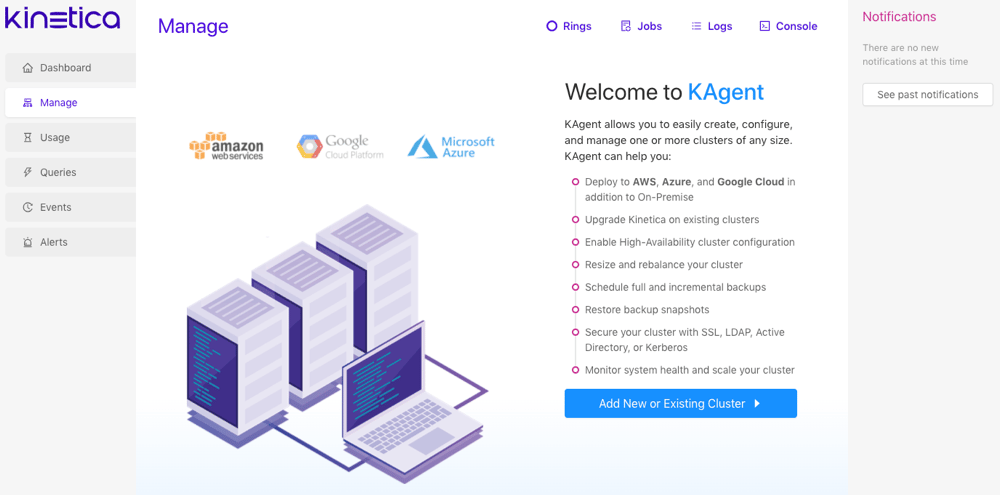
2. Start *KAgent*.

   <img src="https://mintcdn.com/kinetica/47teRgjGtbiLXAyb/content/install/img/kagent_start.png?fit=max&auto=format&n=47teRgjGtbiLXAyb&q=85&s=4d54f9bb11aae310940988dfd0437b69" alt="../../install/img/kagent_start.png" width="1000" height="495" data-path="content/install/img/kagent_start.png" />

   To access the [KAgent UI](/content/admin/kagent/kagent):

   1. Ensure the *KAgent* service is started:

      ```
      service kagent_ui status
      ```
   2. Browse to the *KAgent* application using IP or host name:

      ```
      http://<kagent-host>:8081/kagent
      ```
   3. If *KAgent* is associated with one or more *Kinetica* clusters, log in using
      the credentials for that cluster.  If *KAgent* has not been associated with
      any clusters yet, the application will load without prompting.

3. Click **Upgrade Ring**.

4. For each ring to upgrade, click **Upgrade** on that ring, and follow
   these steps to upgrade the ring:

   1. Confirm that all tasks under **Tasks** have been performed, then
      check the checkboxes and click **Start**.
   2. If performing an offline upgrade, upload all the *Kinetica* **7.2**
      install packages.  When done, or if performing an online upgrade, click
      **Next**.
   3. Click **Upgrade** and then click **Yes** to begin the
      *Kinetica* **7.2** upgrade process.
   4. Click **Close** when the upgrade is complete.

<a id="unmanaged-cluster-upgrade" />

### Unmanaged Cluster Upgrade

If the cluster to upgrade is **not** managed by *KAgent* **7.1**, install
*KAgent* **7.2**, add the cluster, and upgrade it to **7.2**.

1. Install *KAgent*.

   *KAgent* can be deployed as a RHEL, Ubuntu, or SUSE installation package on any
   server inside or outside the cluster.

   Automatically download & install the latest *KAgent* version using these
   commands:

   <CodeGroup>
     ```bash RHEL 8 theme={null}
     KAGENT_REPO=https://repo.kinetica.com/yum/7.2/CentOS/8/x86_64
     KAGENT_PKG=$(wget -q -O - ${KAGENT_REPO} | sed 's/<[^>]*>//g' | grep -o "kagent.*ga.*rpm " | sort -V | tail -1)
     wget ${KAGENT_REPO}/${KAGENT_PKG}
     sudo yum install ./${KAGENT_PKG}
     ```

     ```bash Ubuntu 20 theme={null}
     KAGENT_REPO=https://repo.kinetica.com/debian/7.2/Ubuntu/focal/binary-amd64
     KAGENT_PKG=$(wget -q -O - ${KAGENT_REPO} | sed 's/<[^>]*>//g' | grep -o "kagent.*ga.*deb " | sort -V | tail -1)
     wget ${KAGENT_REPO}/${KAGENT_PKG}
     sudo apt install ./${KAGENT_PKG}
     ```

     ```bash Ubuntu 22 theme={null}
     KAGENT_REPO=https://repo.kinetica.com/debian/7.2/Ubuntu/jammy/binary-amd64
     KAGENT_PKG=$(wget -q -O - ${KAGENT_REPO} | sed 's/<[^>]*>//g' | grep -o "kagent.*ga.*deb " | sort -V | tail -1)
     wget ${KAGENT_REPO}/${KAGENT_PKG}
     sudo apt install ./${KAGENT_PKG}
     ```

     ```bash SUSE 15 theme={null}
     KAGENT_REPO=https://repo.kinetica.com/yum/7.2/SUSE/15.3/x86_64
     KAGENT_PKG=$(wget -q -O - ${KAGENT_REPO} | sed 's/<[^>]*>//g' | grep -o "kagent.*ga.*rpm " | sort -V | tail -1)
     wget ${KAGENT_REPO}/${KAGENT_PKG}
     sudo zypper install ./${KAGENT_PKG}
     ```
   </CodeGroup>

   Alternatively, visit the `KAGENT_REPO` link below to search for a specific
   version of *KAgent*, change `KAGENT_PKG` to that version on **line 2**, and
   then run the modified commands to download & install that version:

   <CodeGroup>
     ```bash RHEL 8 theme={null}
     KAGENT_REPO=https://repo.kinetica.com/yum/7.2/CentOS/8/x86_64
     KAGENT_PKG=kagent-7.2.0.4.20240326024429.ga-0.x86_64.el8.rpm
     wget ${KAGENT_REPO}/${KAGENT_PKG}
     sudo yum install ./${KAGENT_PKG}
     ```

     ```bash Ubuntu 20 theme={null}
     KAGENT_REPO=https://repo.kinetica.com/debian/7.2/Ubuntu/focal/binary-amd64
     KAGENT_PKG=kagent_7.2.0.4.20240326024429.ga-0_amd64.ubuntu20.04.deb
     wget ${KAGENT_REPO}/${KAGENT_PKG}
     sudo apt install ./${KAGENT_PKG}
     ```

     ```bash Ubuntu 22 theme={null}
     KAGENT_REPO=https://repo.kinetica.com/debian/7.2/Ubuntu/jammy/binary-amd64
     KAGENT_PKG=kagent_7.2.0.4.20240326024429.ga-0_amd64.ubuntu22.04.deb
     wget ${KAGENT_REPO}/${KAGENT_PKG}
     sudo apt install ./${KAGENT_PKG}
     ```

     ```bash SUSE 15 theme={null}
     KAGENT_REPO=https://repo.kinetica.com/yum/7.2/SUSE/15.3/x86_64
     KAGENT_PKG=kagent-7.2.0.4.20240326024429.ga-0.x86_64.sles15.3.rpm
     wget ${KAGENT_REPO}/${KAGENT_PKG}
     sudo zypper install ./${KAGENT_PKG}
     ```
   </CodeGroup>

   This installs the package to the directory <Badge color="gray">/opt/gpudb/kagent</Badge> and
   registers and starts the `kagent_ui` service. *KAgent* will open port `8081`
   on the local firewall (if enabled).

2. Start *KAgent*.

   <img src="https://mintcdn.com/kinetica/47teRgjGtbiLXAyb/content/install/img/kagent_start.png?fit=max&auto=format&n=47teRgjGtbiLXAyb&q=85&s=4d54f9bb11aae310940988dfd0437b69" alt="../../install/img/kagent_start.png" width="1000" height="495" data-path="content/install/img/kagent_start.png" />

   To access the [KAgent UI](/content/admin/kagent/kagent):

   1. Ensure the *KAgent* service is started:

      ```
      service kagent_ui status
      ```
   2. Browse to the *KAgent* application using IP or host name:

      ```
      http://<kagent-host>:8081/kagent
      ```
   3. If *KAgent* is associated with one or more *Kinetica* clusters, log in using
      the credentials for that cluster.  If *KAgent* has not been associated with
      any clusters yet, the application will load without prompting.

3. [Add the cluster to upgrade to KAgent](/content/admin/adding_cluster_kagent),
   choosing the *on-premise* deployment method, regardless of the way in which
   the cluster is actually provisioned.

4. For each additional cluster to upgrade:

   1. Click **+ Cluster**
   2. [Add the cluster to upgrade to KAgent](/content/admin/adding_cluster_kagent#admin-add-cluster), choosing
      the *on-premise* deployment method

5. Click **Rings** at the top of the page.

6. Click **Upgrade** on the ring to upgrade to *Kinetica* **7.2**

7. If performing an offline upgrade, upload all the *Kinetica* **7.2** install
   packages.  When done, or if performing an online upgrade, click
   **Upgrade** and then click **Yes** to begin the
   *Kinetica* **7.2** upgrade process.

## Post-Upgrade Actions

* If [AAW](https://docs.kinetica.com/7.1/aaw/overview/) was being used in the *ring* that was upgraded:

  * recreate all [ingests](/content/ml/concepts#ml-data) that were previously active
  * redeploy all [models](/content/sql/ml#sql-ml-import-model) that were
    previously active

* [Upgrade database clients](/content/admin/upgrade#upgrade-database-clients), if needed.

<a id="upgrade-database-clients" />

### Upgrading Database Clients

Any native API clients or ODBC/JDBC drivers can be updated to take advantage of
new features in *Kinetica* **7.2**.

<a id="upgrade-database-clients-apis" />

#### Native APIs

The instructions for upgrading to the latest APIs can be found in their
respective manuals:

* [C++ Developer Guide](/content/guides/cpp_guide)
* [Java Developer Guide](/content/guides/java_guide)
* [JavaScript Developer Guide](/content/guides/js_guide)
* [Node.js Developer Guide](/content/guides/nodejs_guide)
* [Python Developer Guide](/content/guides/python_guide)

<a id="upgrade-database-clients-drivers" />

#### JDBC

See [JDBC](/content/connectors/sql_guide#jdbc) for the latest JDBC clients and related
configuration.

#### ODBC

Be sure to remove older versions of the driver before installing new ones.

<p><strong>Remove Previous Windows ODBC Drivers</strong></p>

To remove the old drivers:

1. Launch **ODBC Data Source Administrator**
   *(64-bit or 32-bit, as needed)*.
2. Select any entry with a **Driver** name of `Kinetica ODBC Driver`.
3. Optionally, click the **Configure** button to open up the driver
   properties window and record any settings that could be reused with the new
   driver (username, SSL Certificate path, etc.).
4. Click the **Remove** button.
5. Click the **Yes** button to confirm the removal.
6. Repeat this process until all older drivers have been removed.

<p><strong>Install New ODBC/JDBC Drivers</strong></p>

See [ODBC](/content/connectors/sql_guide#odbc) for the latest ODBC clients and related
configuration.