> ## Documentation Index
> Fetch the complete documentation index at: https://docs.kinetica.com/llms.txt
> Use this file to discover all available pages before exploring further.
# File Explorer
The *File Explorer* can be used to manage
[directories](/content/tools/kifs_api#kifs-directory) & [files](/content/tools/kifs_api#kifs-file)
in [Kinetica File System (KiFS)](/content/tools/kifs).
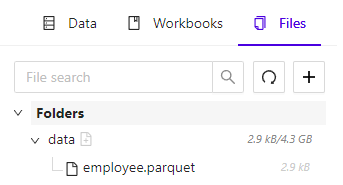 To access the *File Explorer*, in [Workbench](/content/admin/workbench),
click the **Files** tab of the left-hand navigation pane.
## General Features
At the top of the *File Explorer* tab are several file/directory actions:
* Search box - filter displayed files & directories, by name; directory matches
will result in all files in that directory being displayed
* Refresh icon - refresh the list of displayed files & directories
* **+** icon - create a new directory or upload a file
## File List
The *File Explorer* displays a list of top-level directories and the set of
files contained within them. Each file is shown with its relative path to its
containing directory and its total size on disk. Each directory shows the
cumulative size of all files contained within it.
Clicking on a directory will open a context menu with the following options:
* **Upload New File** - upload a file into this directory
* **Import** - open up the import wizard for this directory
* **Delete** - delete this directory and any files contained
within it
Clicking on a file will open a context menu with the following options:
* **Download** - download a local copy of this file
* **Import** - open up the file import wizard for this file
* **Delete** - delete this file from *KiFS*
* **Multi-Select** - turn on multi-select mode and select this
file, allowing for the deletion of multiple files at once
To access the *File Explorer*, in [Workbench](/content/admin/workbench),
click the **Files** tab of the left-hand navigation pane.
## General Features
At the top of the *File Explorer* tab are several file/directory actions:
* Search box - filter displayed files & directories, by name; directory matches
will result in all files in that directory being displayed
* Refresh icon - refresh the list of displayed files & directories
* **+** icon - create a new directory or upload a file
## File List
The *File Explorer* displays a list of top-level directories and the set of
files contained within them. Each file is shown with its relative path to its
containing directory and its total size on disk. Each directory shows the
cumulative size of all files contained within it.
Clicking on a directory will open a context menu with the following options:
* **Upload New File** - upload a file into this directory
* **Import** - open up the import wizard for this directory
* **Delete** - delete this directory and any files contained
within it
Clicking on a file will open a context menu with the following options:
* **Download** - download a local copy of this file
* **Import** - open up the file import wizard for this file
* **Delete** - delete this file from *KiFS*
* **Multi-Select** - turn on multi-select mode and select this
file, allowing for the deletion of multiple files at once