> ## Documentation Index
> Fetch the complete documentation index at: https://docs.kinetica.com/llms.txt
> Use this file to discover all available pages before exploring further.
# Workbook Explorer
The *Workbook Explorer* can be used to manage *Workbooks*.
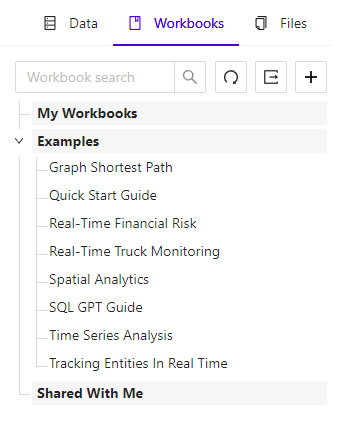 To access the *Workbook Explorer*, in
[Workbench](/content/admin/workbench), click the
**Workbooks** tab of the left-hand navigation pane.
## General Features
At the top of the *Workbook Explorer* tab are several workbook actions:
* Search box - filters displayed workbooks, by name
* Refresh icon - refreshes the list of displayed workbooks
* **+** icon - adds a new workbook
## Workbook Lists
The *Workbook Explorer* has two lists of workbooks:
* **My Workbooks** - workbooks created by the current user
* **Examples** - workbooks that are provided with *Workbench* for
exploring the various features of *Kinetica*
* **Shared With Me** - workbooks shared with the current user
Clicking on the name of any workbook will open it in the right-hand pane. If a
workbook is open in the right-hand pane, is will be marked
**Open** in the *Workbook Explorer*.
To access the *Workbook Explorer*, in
[Workbench](/content/admin/workbench), click the
**Workbooks** tab of the left-hand navigation pane.
## General Features
At the top of the *Workbook Explorer* tab are several workbook actions:
* Search box - filters displayed workbooks, by name
* Refresh icon - refreshes the list of displayed workbooks
* **+** icon - adds a new workbook
## Workbook Lists
The *Workbook Explorer* has two lists of workbooks:
* **My Workbooks** - workbooks created by the current user
* **Examples** - workbooks that are provided with *Workbench* for
exploring the various features of *Kinetica*
* **Shared With Me** - workbooks shared with the current user
Clicking on the name of any workbook will open it in the right-hand pane. If a
workbook is open in the right-hand pane, is will be marked
**Open** in the *Workbook Explorer*.