> ## Documentation Index
> Fetch the complete documentation index at: https://docs.kinetica.com/llms.txt
> Use this file to discover all available pages before exploring further.
# Jobs
The *Jobs* interface is situated in the right-hand pane of *Kinetica's*
[Workbench](/content/admin/workbench) administration application. It can
be used to view the status of the user-initiated and system-level jobs running
within the database.
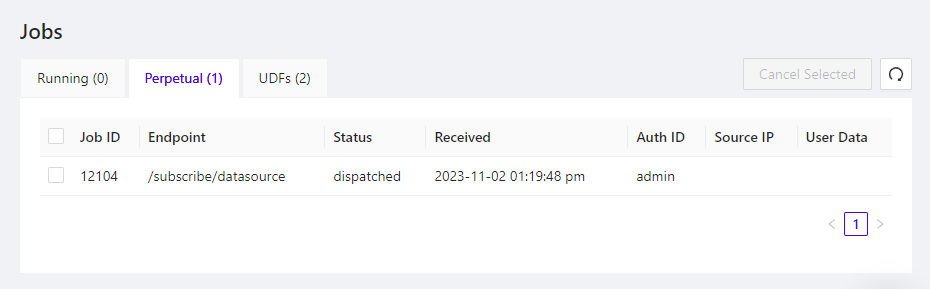 To access the *Jobs* page, in *Workbench*, click the
**Jobs** menu item. This will open the list of running jobs in
the right-hand pane. Additionally, there are several action buttons:
* **Cancel Selected** - stop any selected jobs from running
*
To access the *Jobs* page, in *Workbench*, click the
**Jobs** menu item. This will open the list of running jobs in
the right-hand pane. Additionally, there are several action buttons:
* **Cancel Selected** - stop any selected jobs from running
*  - refresh the displayed list of jobs
Three tabs allow separate viewing of the different job types:
* **Running** -
jobs currently being executed within the database
* **Perpetual** -
subscriptions made via
[Kafka data sources](/content/load_data/by_source/kafka).
* **UDFs** -
both user-defined and system-level [UDFs](/content/sql/udf); click
**View** to display detail about the corresponding UDF, as well
as its execution history
- refresh the displayed list of jobs
Three tabs allow separate viewing of the different job types:
* **Running** -
jobs currently being executed within the database
* **Perpetual** -
subscriptions made via
[Kafka data sources](/content/load_data/by_source/kafka).
* **UDFs** -
both user-defined and system-level [UDFs](/content/sql/udf); click
**View** to display detail about the corresponding UDF, as well
as its execution history