> ## Documentation Index
> Fetch the complete documentation index at: https://docs.kinetica.com/llms.txt
> Use this file to discover all available pages before exploring further.
# Reveal: An Overview
*Reveal* is a visual data exploration and insight discovery tool. It allows
users who may or may not have extensive experience with big data or data
analysis to quickly build charts and graphs in a meaningful way to explore their
dataset. *Reveal* was designed to be interactive and easy to use.
*Reveal* is a *Python Flask* web application with a mostly *React* frontend. By
default, it uses *SQLite* as its application data storage engine. To begin
visualizing data, *Reveal* must first be connected to your RDBMS datastore.
While *Reveal* can and does work with other flavors of databases, it is most
powerful when connected to *Kinetica*. *Kinetica* allows this through a custom
ODBC driver/connector via *Reveal's SQLAlchemy* interface.
Reveal can be accessed via:
* `http://:8088/` *(non-SSL)*
* `https://:8444/` *(SSL)*
## Features
* A rich set of charts, diagrams, and map visualizations based on industry
standards such as *D3* and *OpenLayers*
* Custom dashboards and sharing with other users
* Fine-grained security model allowing creation of custom roles with specific
user permissions to features and datasets.
* Intuitive and easy-to-use data exploration tool to experiment with various
visualizations and parameters to create insightful charts. Selecting columns,
aggregations, and metrics is as simple as using dropdowns.
* *SQL Lab* tool allows users to interact directly with their datasets via
direct SQL statements.
## Security
*Reveal* allows for unlimited number of user accounts, each with their own roles
and permissions. All user logins and feature/data accesses are logged in the
*Action Log* for audit purposes. It is implemented via *Flask AppBuilder (FAB)*,
which provides all the aforementioned features.
Usernames & passwords must be synced between Reveal and the
database.
For details on configuring security within *Reveal*, see
[Reveal User/Role Management](/content/security/reveal).
For details on configuring *Reveal* in a secure environment, see the
[HTTPD + SSL](/content/security/sec_configuration#httpd-ssl-config) section of [Security Configuration](/content/security/sec_configuration#enable-httpd-ssl).
### Roles/Permissions
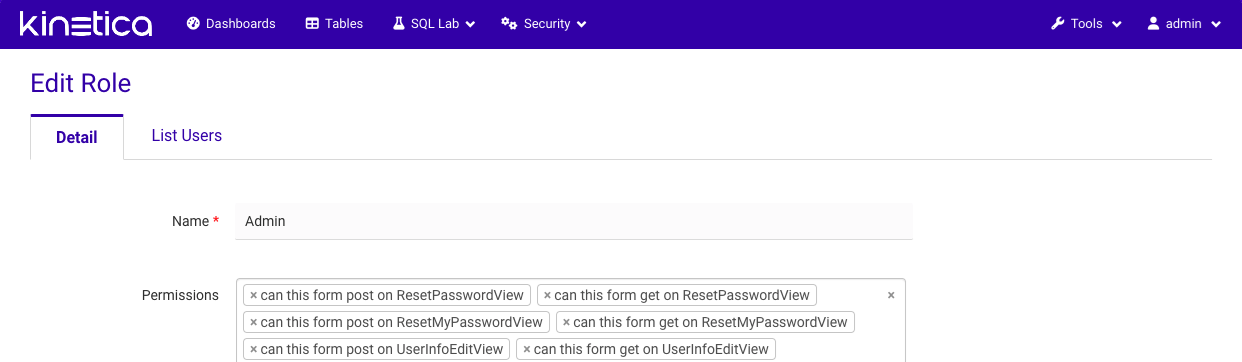
By default, *Reveal* is installed with several roles ranging from full admin
rights to public view-only. However, it is very easy to create custom roles with
specific sets of permissions. You'll notice that the permissions framework is
fine-grained and gives complete control over access to the application.
Each role associates a set of permissions with one or more users, and each user
can be assigned one or more roles for access. This allows for roles to be
constructed based on the type of user, containing all necessary permissions for
that type; or roles can be constructed with logical groupings of features, and
several of these feature roles can be assigned to each user. *Reveal* provides
flexibility in designing the security model.
 ## Tables
To explore data, specific table(s) from the connected database(s) must be added
to *Reveal*. "Adding" a table simply makes *Reveal* aware of the table and
allows for the addition of custom configurations and other metadata that will
help in creating visualizations. Adding a new table is as easy as providing the
table and database name.
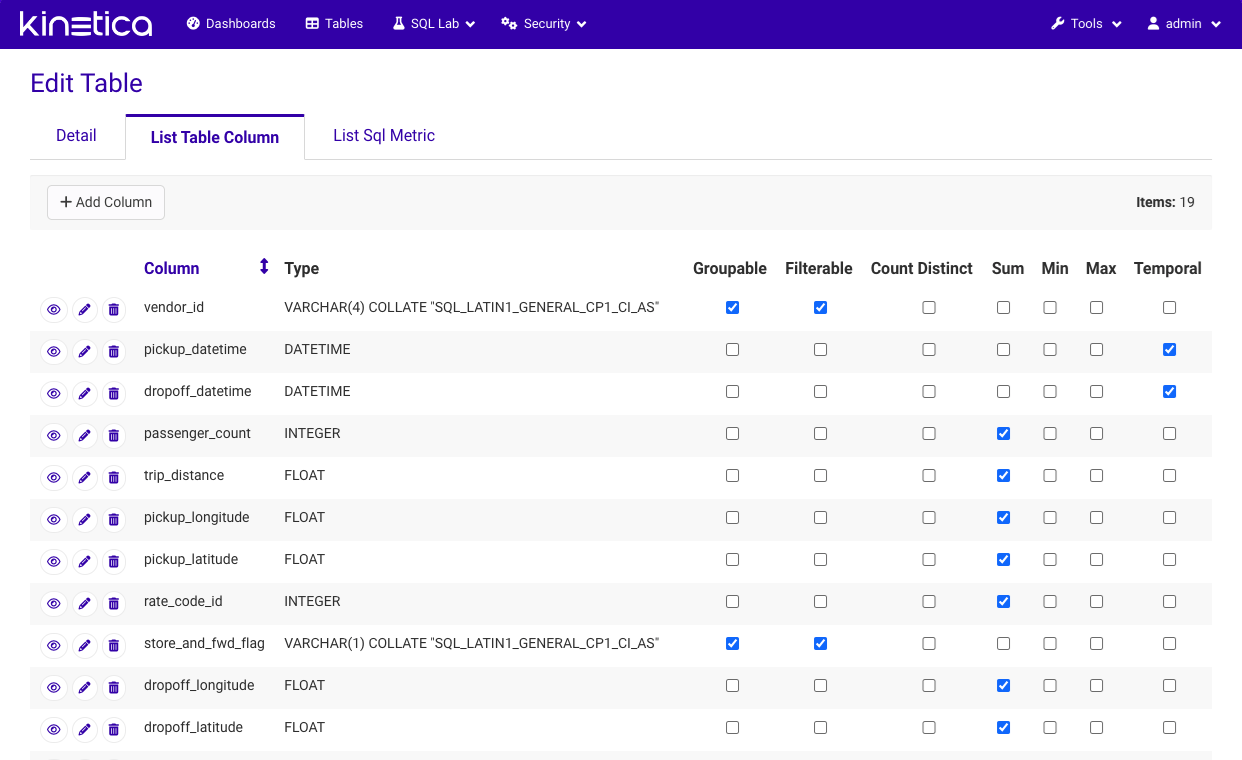
Configuring a table, on the other hand, will sometimes require a little bit more
effort, simply because the *Reveal* platform is so powerful. *Reveal* allows for
additional configuration of its columns and also aggregates/metrics. For
example, table columns can be designated as **groupable**, **filterable**,
and/or **countable**. Custom metrics can be added of types **count**, **sum**,
and/or **avg**, to name a few. Fortunately, upon first initialization of tables
in *Reveal*, a lot of the columns will be preconfigured based on their
datatypes. A few useful metrics will also have been added for the user.
## Tables
To explore data, specific table(s) from the connected database(s) must be added
to *Reveal*. "Adding" a table simply makes *Reveal* aware of the table and
allows for the addition of custom configurations and other metadata that will
help in creating visualizations. Adding a new table is as easy as providing the
table and database name.
Configuring a table, on the other hand, will sometimes require a little bit more
effort, simply because the *Reveal* platform is so powerful. *Reveal* allows for
additional configuration of its columns and also aggregates/metrics. For
example, table columns can be designated as **groupable**, **filterable**,
and/or **countable**. Custom metrics can be added of types **count**, **sum**,
and/or **avg**, to name a few. Fortunately, upon first initialization of tables
in *Reveal*, a lot of the columns will be preconfigured based on their
datatypes. A few useful metrics will also have been added for the user.
 ## Slices
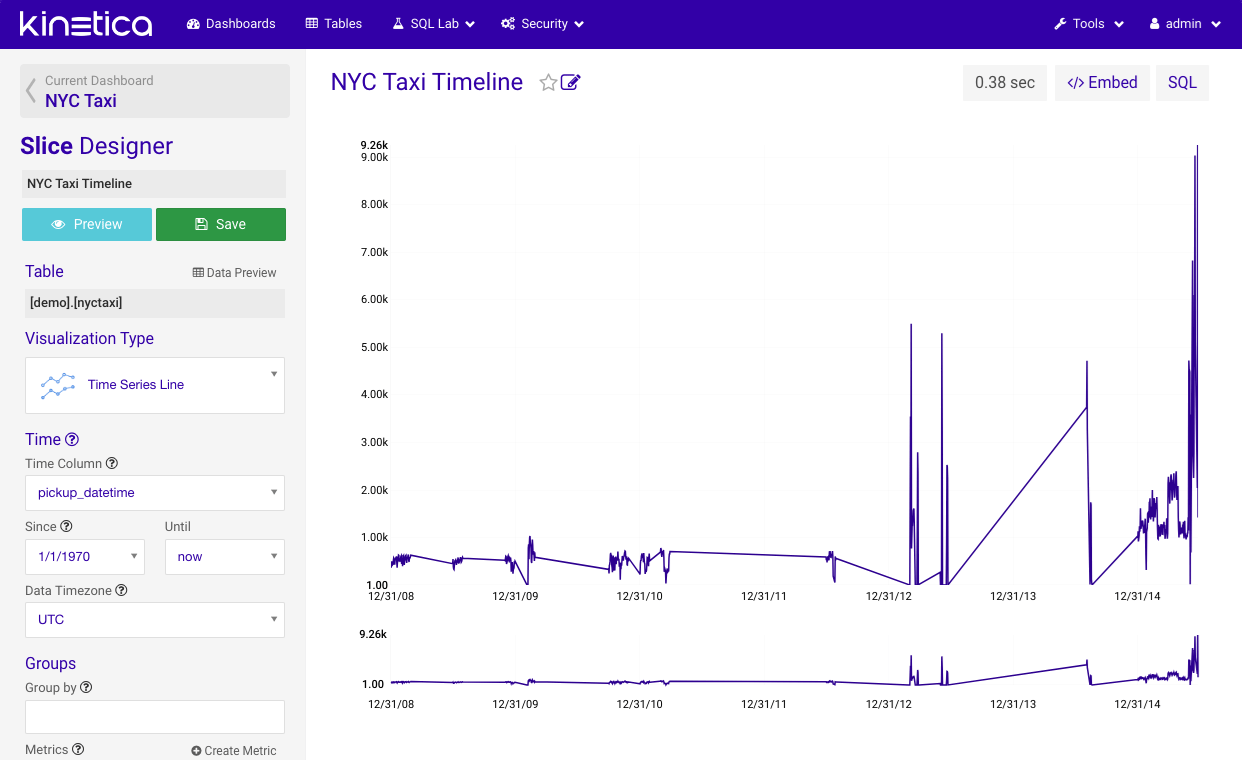
A *slice* represents a specific view on data, whether it be a chart, map, or
even text. But simply put, they are the visualizations or widgets the user will
be creating and adding to their dashboards. Each *slice* is only connected to a
single table and a single chart type. This simplicity is the basis for the
platform which encourages creating as many *slices* as you need and mixing and
matching them in multiple dashboards, each providing different insights.
A *filter slice* can be used to set a default date/time filter for a dashboard.
When applied, any dashboard that is opened will automatically be filtered on the
range specified. Ranges can be either fixed (*02/02/2022* - *02/03/2022*) or
relative (*5 days ago* - *now*). Users can also expand the range after the
dashboard is loaded. This is useful for situations where a dashboard is backed
by very large base tables, but only a smaller set is needed on a regular basis.
## Slices
A *slice* represents a specific view on data, whether it be a chart, map, or
even text. But simply put, they are the visualizations or widgets the user will
be creating and adding to their dashboards. Each *slice* is only connected to a
single table and a single chart type. This simplicity is the basis for the
platform which encourages creating as many *slices* as you need and mixing and
matching them in multiple dashboards, each providing different insights.
A *filter slice* can be used to set a default date/time filter for a dashboard.
When applied, any dashboard that is opened will automatically be filtered on the
range specified. Ranges can be either fixed (*02/02/2022* - *02/03/2022*) or
relative (*5 days ago* - *now*). Users can also expand the range after the
dashboard is loaded. This is useful for situations where a dashboard is backed
by very large base tables, but only a smaller set is needed on a regular basis.
 ### Chart Types
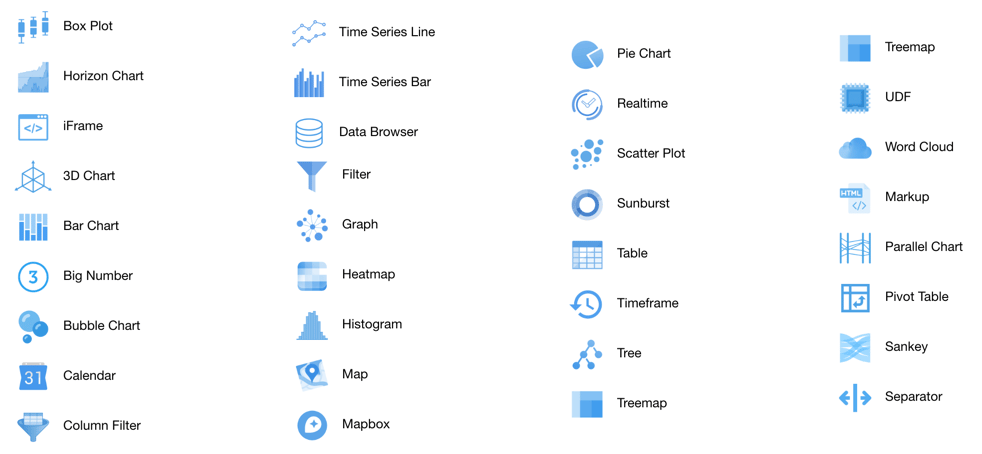
*Reveal* comes bundled with many useful types of visualizations that should
cover most common use cases. Each type requires custom configuration based on
how they visualize data. Not only will the *slices* display independently in
dashboards, cross-filtering can also be applied across various slices in the
dashboard.
### Chart Types
*Reveal* comes bundled with many useful types of visualizations that should
cover most common use cases. Each type requires custom configuration based on
how they visualize data. Not only will the *slices* display independently in
dashboards, cross-filtering can also be applied across various slices in the
dashboard.
 The [Reveal SDK](/content/bi/reveal/sdk) can be used to create custom chart types to support
custom *slices*.
## Dashboards
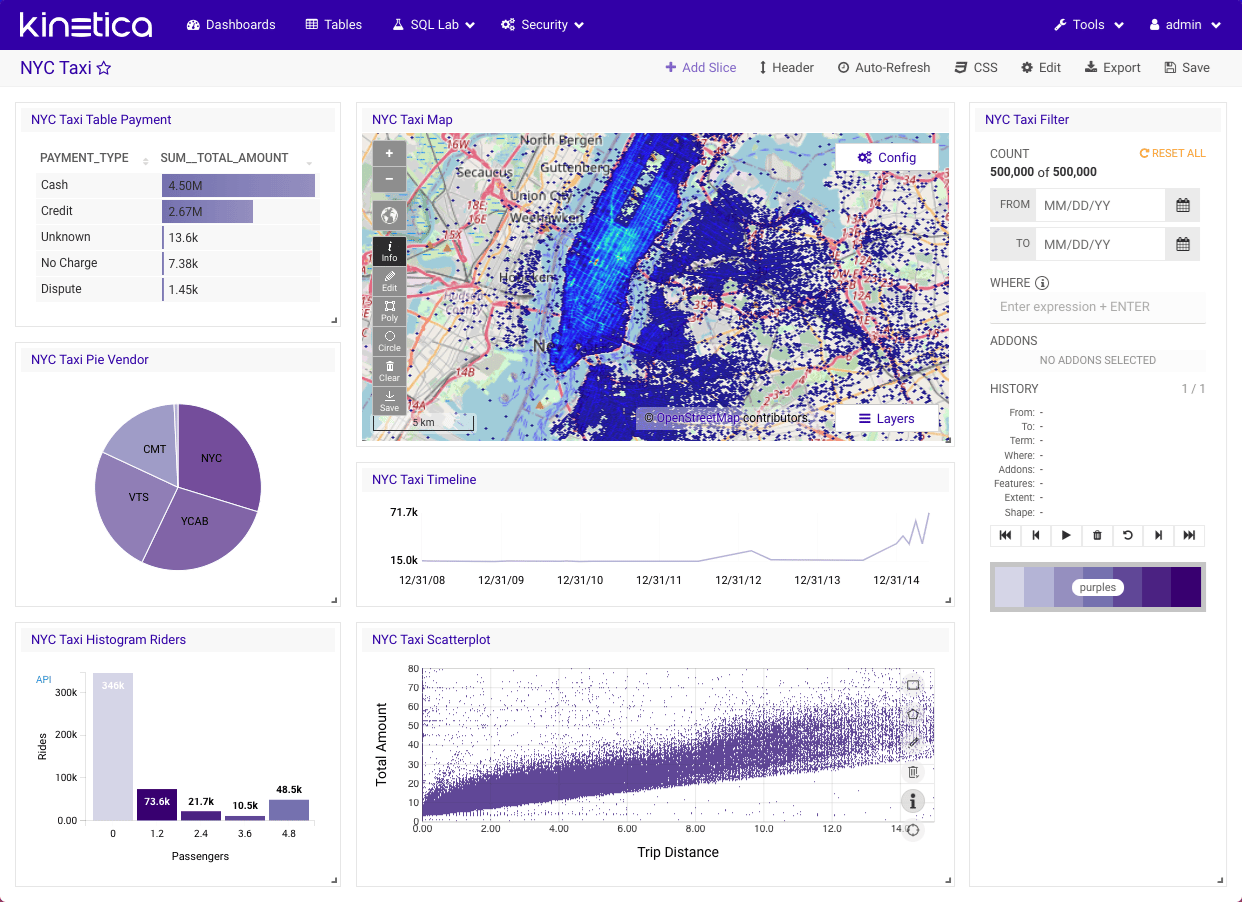
The *dashboard* is, in a sense, the "final" product that is consumed by users of
*Reveal*. All previous steps make the *dashboard* possible. The *dashboard* is a
mix and match of all the *slices* available to the user. *Slices* can be added,
positioned, sized, and arranged in any way desired. *Dashboards* can be shared
with other users that have access.
*Dashboards* can be loaded from external files using
[SQL](/content/sql/reveal).
The [Reveal SDK](/content/bi/reveal/sdk) can be used to create custom chart types to support
custom *slices*.
## Dashboards
The *dashboard* is, in a sense, the "final" product that is consumed by users of
*Reveal*. All previous steps make the *dashboard* possible. The *dashboard* is a
mix and match of all the *slices* available to the user. *Slices* can be added,
positioned, sized, and arranged in any way desired. *Dashboards* can be shared
with other users that have access.
*Dashboards* can be loaded from external files using
[SQL](/content/sql/reveal).
 ### Cross-Filtering
To enable cross-filtering, the *Filter* *slice* **must be** included in the
*dashboard*. The *Filter slice* acts as an agent that manages flow and
communication of data between all the other *slices* in the *dashboard*. It is
also responsible for filtering history, caching, and state management. Some of
the other chart types are also interactive in the sense that they themselves can
trigger a filter which will be applied to the *dashboard*. For example, clicking
on a section of a Pie Chart will apply a filter for the value of that section.
## SQL Lab
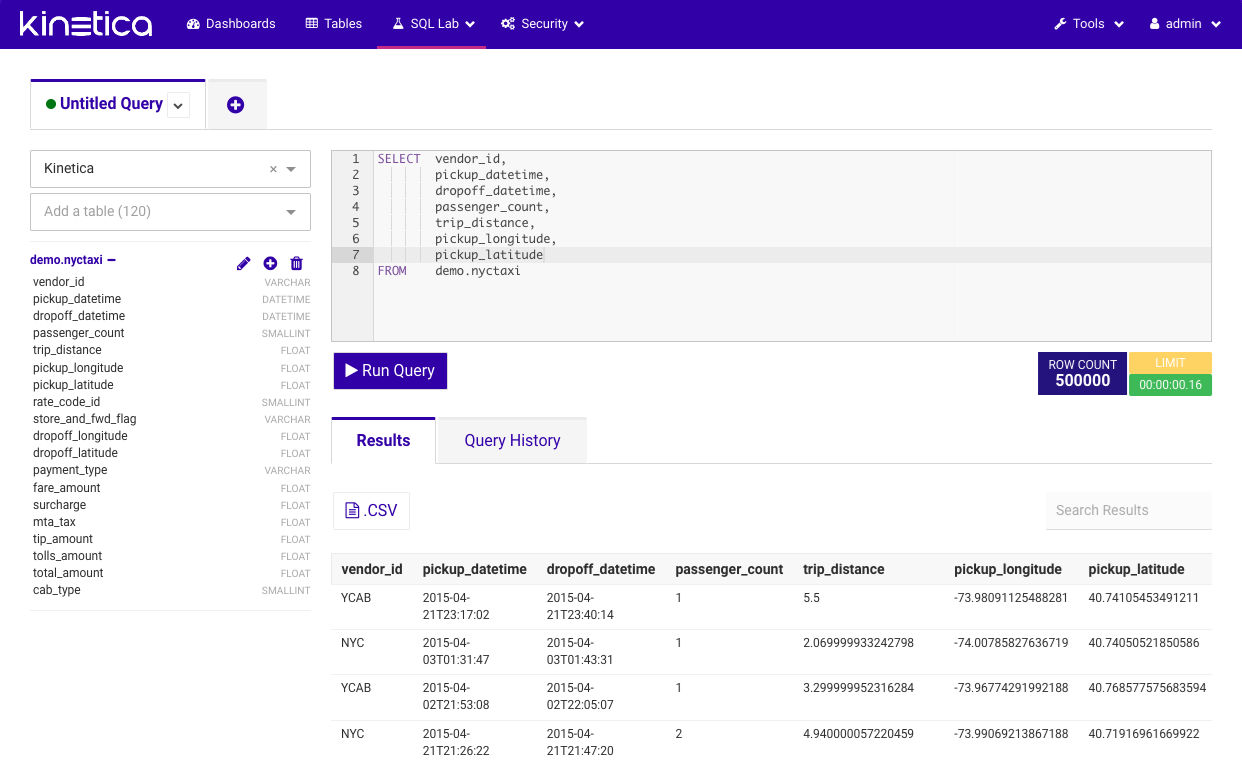
*SQL Lab* is simply a SQL IDE provided in *Reveal* that allows users to directly
interact with their data via SQL statements. Several additional features include:
* Multi-tab environment, which enables working with many queries simultaneously
* Browseable metadata of the database: tables, columns, indexes, and partitions
* Query history, which records previously executed queries and their statistics
### Cross-Filtering
To enable cross-filtering, the *Filter* *slice* **must be** included in the
*dashboard*. The *Filter slice* acts as an agent that manages flow and
communication of data between all the other *slices* in the *dashboard*. It is
also responsible for filtering history, caching, and state management. Some of
the other chart types are also interactive in the sense that they themselves can
trigger a filter which will be applied to the *dashboard*. For example, clicking
on a section of a Pie Chart will apply a filter for the value of that section.
## SQL Lab
*SQL Lab* is simply a SQL IDE provided in *Reveal* that allows users to directly
interact with their data via SQL statements. Several additional features include:
* Multi-tab environment, which enables working with many queries simultaneously
* Browseable metadata of the database: tables, columns, indexes, and partitions
* Query history, which records previously executed queries and their statistics
 ## Reveal in an iFrame
In order to run *Reveal* from within an inline frame:
1. Uncomment the session cookie settings in the *Reveal*
`/opt/gpudb/connectors/reveal/etc/config.py` configuration file:
```
# Enable for embedding inside iframe
# by setting SECURE to True and SAMESITE to 'None'
SESSION_COOKIE_HTTPONLY = True
SESSION_COOKIE_SECURE = True
SESSION_COOKIE_SAMESITE = 'None'
```
2. Restart *Reveal*:
```
/opt/gpudb/core/bin/gpudb reveal-restart
```
## Reveal in an iFrame
In order to run *Reveal* from within an inline frame:
1. Uncomment the session cookie settings in the *Reveal*
`/opt/gpudb/connectors/reveal/etc/config.py` configuration file:
```
# Enable for embedding inside iframe
# by setting SECURE to True and SAMESITE to 'None'
SESSION_COOKIE_HTTPONLY = True
SESSION_COOKIE_SECURE = True
SESSION_COOKIE_SAMESITE = 'None'
```
2. Restart *Reveal*:
```
/opt/gpudb/core/bin/gpudb reveal-restart
```