> ## Documentation Index
> Fetch the complete documentation index at: https://docs.kinetica.com/llms.txt
> Use this file to discover all available pages before exploring further.
# Kinetica Reader/Writer for FME
## Overview
This *Kinetica* reader and writer plug-in enables FME to read attribute data
from *Kinetica* and write attribute data to *Kinetica*. General geometric data
can be stored as [WKT](/content/location_intelligence/geo_objects#geometry-types) in a standard string field and
geometric points can be stored as a pair of float fields. While there are no
specific geometric field types, *Kinetica* can render *WKT* and coordinates as
[WMS](/content/api/rest/wms_rest) maps and have functions which operate on them.
The connector API, source code, and install/config instructions can be found at:
* [https://github.com/kineticadb/kinetica-connector-fme](https://github.com/kineticadb/kinetica-connector-fme)
## Kinetica Quick Facts
| | |
| ----------------------- | ----------------------------- |
| Format Type Identifier | KINETICA |
| Reader/Writer | Both |
| Licensing Level | FME Professional Edition & up |
| Typical File Extensions | N/A |
| Generic Color Support | N/A |
| Schema Required | Yes |
| Transaction Support | No |
| Geometry Type Attribute | WKT |
## Kinetica Geometry Support
*Kinetica* supports any geometry which can be expressed in *WKT* format.
Additionally, point data can be stored in longitude and latitude fields.
## Kinetica Reader Parameters
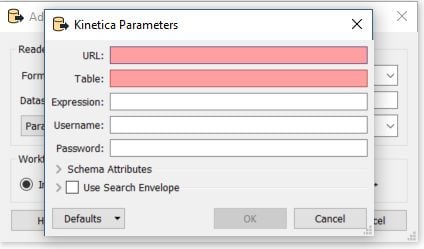 * **URL**: The URL of the *Kinetica* server (ex. http\://\:9191).
* **Table**: The name of the table to read from.
* **Expression**: An optional *Kinetica* filter expression. This
parameter is only needed if you wish to filter data from the source table,
rather than read the whole table. See [Expressions](/content/concepts/expressions) for details.
* **Username**: The username to use in authenticating to *Kinetica*.
* **Password**: The password to use in authenticating to *Kinetica*.
* **URL**: The URL of the *Kinetica* server (ex. http\://\:9191).
* **Table**: The name of the table to read from.
* **Expression**: An optional *Kinetica* filter expression. This
parameter is only needed if you wish to filter data from the source table,
rather than read the whole table. See [Expressions](/content/concepts/expressions) for details.
* **Username**: The username to use in authenticating to *Kinetica*.
* **Password**: The password to use in authenticating to *Kinetica*.
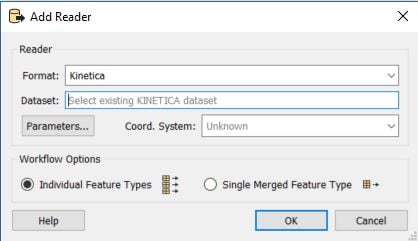 * **Dataset**: Each reader must be given a unique *Dataset* name.
## Kinetica Writer Parameters
* **Dataset**: Each reader must be given a unique *Dataset* name.
## Kinetica Writer Parameters
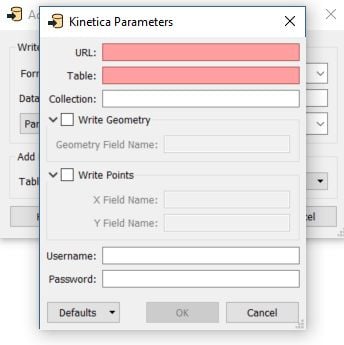 * **URL**: The URL of the *Kinetica* server (ex.
[http://localhost:9191;CombinePrepareAndExecute=1;RowsPerFetch=20000](http://localhost:9191;CombinePrepareAndExecute=1;RowsPerFetch=20000)).
* **Table**: The name of the table to write to.
* **Collection**: The name of the schema containing the target
table. This is an optional parameter. It is only needed if you would like to
create the table in a specific schema; otherwise, the *default schema* will be
used.
* **Geometry Field Name**: The name of the field to insert the *WKT*
representation of the geometry into. If you will be using the *Kinetica WMS*
service, this field should be named `WKT`. Available when
**Write Geometry** is checked.
* **X Field Name**: The name of the field to insert longitude data into.
The *Kinetica WMS* service assumes longitude is stored in the field `x`, but
another field name can be specified. Available when **Write Points**
is checked.
* **Y Field Name**: The name of the field to insert latitude data into.
The *Kinetica WMS* service assumes latitude is stored in the field `y`, but
another field name can be specified. Available when **Write Points**
is checked.
* **Username**: The username to use in authenticating to *Kinetica*.
* **Password**: The password to use in authenticating to *Kinetica*.
* **URL**: The URL of the *Kinetica* server (ex.
[http://localhost:9191;CombinePrepareAndExecute=1;RowsPerFetch=20000](http://localhost:9191;CombinePrepareAndExecute=1;RowsPerFetch=20000)).
* **Table**: The name of the table to write to.
* **Collection**: The name of the schema containing the target
table. This is an optional parameter. It is only needed if you would like to
create the table in a specific schema; otherwise, the *default schema* will be
used.
* **Geometry Field Name**: The name of the field to insert the *WKT*
representation of the geometry into. If you will be using the *Kinetica WMS*
service, this field should be named `WKT`. Available when
**Write Geometry** is checked.
* **X Field Name**: The name of the field to insert longitude data into.
The *Kinetica WMS* service assumes longitude is stored in the field `x`, but
another field name can be specified. Available when **Write Points**
is checked.
* **Y Field Name**: The name of the field to insert latitude data into.
The *Kinetica WMS* service assumes latitude is stored in the field `y`, but
another field name can be specified. Available when **Write Points**
is checked.
* **Username**: The username to use in authenticating to *Kinetica*.
* **Password**: The password to use in authenticating to *Kinetica*.
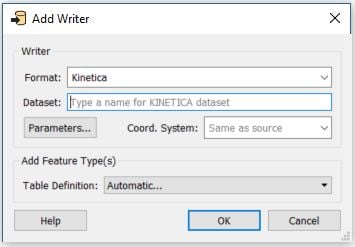 * **Dataset**: Each writer must be given a unique *Dataset* name.
## Kinetica Reader and/or Writer Feature Type: User Attributes
To access User Attributes, open the **Feature Type** dialog by clicking
the gear
* **Dataset**: Each writer must be given a unique *Dataset* name.
## Kinetica Reader and/or Writer Feature Type: User Attributes
To access User Attributes, open the **Feature Type** dialog by clicking
the gear  button on a feature type in the workspace. These parameters
are applicable only to the selected feature type.
The *User Attributes* of the *Feature Type* are listed on the
**User Attributes** tab.
button on a feature type in the workspace. These parameters
are applicable only to the selected feature type.
The *User Attributes* of the *Feature Type* are listed on the
**User Attributes** tab.
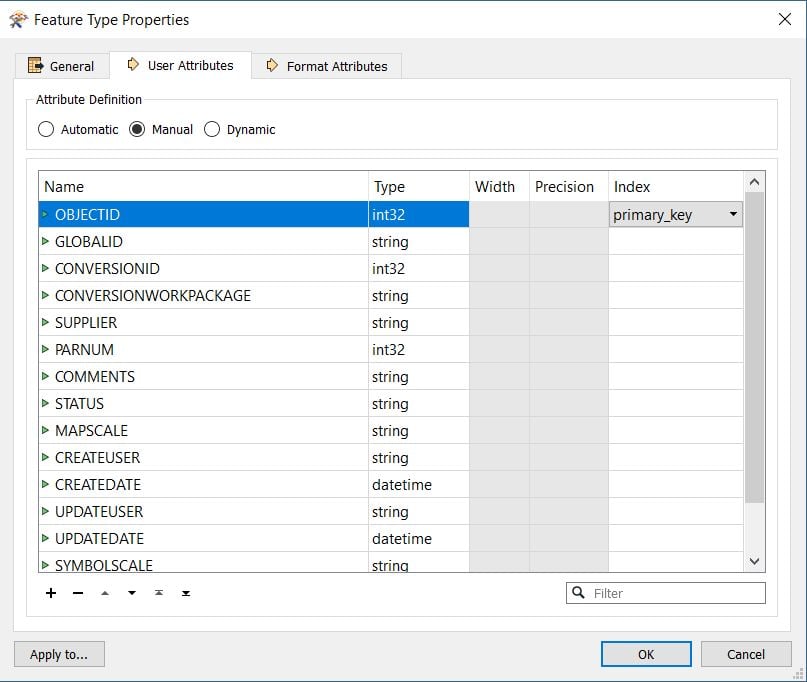 The Kinetica writer supports the following types:
* int8
* int16
* int32
* int64
* real32
* real64
* string
* date
* time
* datetime
* IPv4
* decimal
* timestamp
* WKT
Additionally, you can specify fields as [primary\_key](/content/concepts/tables#primary-key),
and give them [data handling properties](/content/concepts/types#types-data-handling) like
**text\_search** and **dict**.
## Testing
Data in *Kinetica* can be viewed and edited through
[GAdmin](/content/admin/gadmin).
The Kinetica writer supports the following types:
* int8
* int16
* int32
* int64
* real32
* real64
* string
* date
* time
* datetime
* IPv4
* decimal
* timestamp
* WKT
Additionally, you can specify fields as [primary\_key](/content/concepts/tables#primary-key),
and give them [data handling properties](/content/concepts/types#types-data-handling) like
**text\_search** and **dict**.
## Testing
Data in *Kinetica* can be viewed and edited through
[GAdmin](/content/admin/gadmin).