> ## Documentation Index
> Fetch the complete documentation index at: https://docs.kinetica.com/llms.txt
> Use this file to discover all available pages before exploring further.
# Multiple Routing on Seattle Road Network
> Solve graph with multiple destinations using a road network
The following is a complete example, using the *Python API*, of solving a graph
created with Seattle road network data for a multiple routing problem via the
[/solve/graph](/content/api/rest/solve_graph_rest) endpoint. For more information on
Graphs & Solvers, see [Graphs & Solvers Concepts](/content/graph_solver/network_graph_solver).
## Prerequisites
The prerequisites for running the multiple routing solve graph example are
listed below:
* Graph server enabled
* Python API
* [Solve graph script](https://raw.githubusercontent.com/kineticadb/kinetica-docs/master/content/examples/python/graph/solve_graph_seattle_multi_route.py)
* [Seattle road network CSV file](https://raw.githubusercontent.com/kineticadb/kinetica-docs/master/content/examples/data/road_weights.csv)
### Python API Installation
Depending on the target operating system, a Python virtual environment may need
to be installed first:
* [Python Virtual Environment](#python-virtual-environment)
The native *Kinetica Python API* is accessible through the following means:
* [PyPI](#pypi)
* [Git](#git)
#### Python Virtual Environment
A Python virtual environment is necessary to install in an operating environment
where Python is externally managed.
1. Install a Python virtual environment:
```bash theme={null}
python3 -m venv .venv
```
2. Activate the Python virtual environment:
```bash theme={null}
source .venv/bin/activate
```
#### PyPI
1. Install the API:
```bash theme={null}
pip3 install gpudb
```
2. Test the installation:
```python theme={null}
python3 -c "import gpudb;print('Import Successful')"
```
If *Import Successful* is displayed, the API has been installed as is ready
for use.
#### Git
1. In the desired directory, run the following, but be sure to replace
`` with the name of the installed Kinetica version,
e.g., `v7.2`:
```bash theme={null}
git clone -b release/ --single-branch https://github.com/kineticadb/kinetica-api-python.git
```
2. Change directory into the newly downloaded repository:
```bash theme={null}
cd kinetica-api-python
```
3. In the root directory of the unzipped repository, install the Kinetica API:
```bash theme={null}
sudo pip3 install .
```
4. Test the installation (*Python3* is necessary for running the API example):
```bash theme={null}
python3 examples/example.py
```
### Data File
The example script references the road\_weights.csv data file,
mentioned in the [Prerequisites](#prerequisites), in the current local directory, by default.
This directory can specified as a parameter when running the example script.
## Script Detail
This example is going to demonstrate solving for the shortest possible route
between destination points and a source point located in a Seattle road network.
### Constants
Several constants are defined at the beginning of the script:
* `SCHEMA` -- the name of the schema in which the tables supporting the
graph creation and match operations will be created
The schema is created during the table setup portion of the
script because the schema must exist prior to creating the
tables that will later support the graph creation and match
operations.
* `TABLE_SRN` -- the name of the table into which the Seattle road network
dataset is loaded
* `GRAPH_S` -- the Seattle road network graph
* `TABLE_GRAPH_S_MRSOLVED` -- the solved Seattle road network graph using the
`MULTIPLE_ROUTING` solver type
```python Constant Definitions theme={null}
SCHEMA = "graph_s_seattle_multi_route"
TABLE_SRN = SCHEMA + ".seattle_road_network"
GRAPH_S = SCHEMA + ".seattle_road_network_graph"
TABLE_GRAPH_S_MRSOLVED = GRAPH_S + "_multiple_routing_solved"
```
### Graph Creation
One graph is used for the multiple routing solve graph example utilized in the
script: `seattle_road_network_graph`, a graph based on the Seattle road
network dataset (the CSV file mentioned in [Prerequisites](#prerequisites)).
The `seattle_road_network_graph` graph is created with the following
characteristics:
* It is [directed](/content/graph_solver/network_graph_solver#directed-graphs) because the roads in the graph have
directionality (one-way and two-way roads)
* It has no explicitly defined *nodes* because the example relies on implicit
*nodes* attached to the defined *edges*
* The *edges* are identified by `WKTLINE`, using WKT LINESTRINGs from the
`WKTLINE` column of the `seattle_road_network` table. The road segments'
directionality (`DIRECTION`) is derived from the `TwoWay` column of the
`seattle_road_network` table.
* The *weights* (`VALUESPECIFIED`) are represented using the time taken to
travel the segment found in the `time` column of the
`seattle_road_network` table. The *weights* are matched to the *edges* using
the same `WKTLINE` column as *edges* (`EDGE_WKTLINE`) and the same
`TwoWay` column as the *edge* direction (`EDGE_DIRECTION`).
* It has no inherent `restrictions` for any of the nodes or edges in the graph
* It will be replaced with this instance of the graph if a graph of the same
name exists (`recreate`)
```python Create Seattle Road Network Graph theme={null}
create_s_graph_response = kinetica.create_graph(
graph_name = GRAPH_S,
directed_graph = True,
nodes = [],
edges = [
TABLE_SRN + ".WKTLINE AS WKTLINE",
TABLE_SRN + ".TwoWay AS DIRECTION"
],
weights = [
TABLE_SRN + ".WKTLINE AS EDGE_WKTLINE",
TABLE_SRN + ".TwoWay AS EDGE_DIRECTION",
TABLE_SRN + ".time AS VALUESPECIFIED"
],
restrictions = [],
options = {
"recreate": "true"
}
)
```
### Multiple Routing
Before the `seattle_road_network_graph` graph is solved, the source node and
destination nodes are defined.
```python Define Source & Destination Locations theme={null}
source_node = "POINT(-122.1792501 47.2113606)"
destination_nodes = [
"POINT(-122.2221 47.5707)",
"POINT(-122.541017 47.809121)",
"POINT(-122.520440 47.624725)",
"POINT(-122.467915 47.427280)"
]
```
Next, the graph is solved with the solve results being exported to the response:
```python Solve Graph theme={null}
kinetica.solve_graph(
graph_name = GRAPH_S,
solver_type = "MULTIPLE_ROUTING",
source_nodes = [source_node],
destination_nodes = destination_nodes,
solution_table = TABLE_GRAPH_S_MRSOLVED
)
```
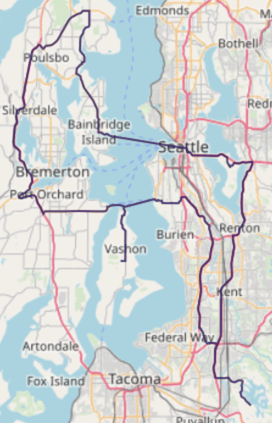
The cost for the source node to visit the destination nodes is represented as
time in minutes:
```text Solve Graph Results theme={null}
+---------------------+
| Cost (in minutes) |
|---------------------|
| 241.249 |
+---------------------+
```
The solution output to WMS:
 ## Download & Run
Included below is a complete example containing all the above requests, the data
files, and output.
* [Multiple routing solve graph script](https://raw.githubusercontent.com/kineticadb/kinetica-docs/master/content/examples/python/graph/solve_graph_seattle_multi_route.py)
* [Seattle road network data file](https://raw.githubusercontent.com/kineticadb/kinetica-docs/master/content/examples/data/road_weights.csv)
* [Python output](https://raw.githubusercontent.com/kineticadb/kinetica-docs/master/content/examples/python/graph/solve_graph_seattle_multi_route.out)
To run the complete sample, ensure that:
* the solve\_graph\_seattle\_multi\_route.py script is in the current
directory
* the road\_weights.csv file is in the current directory or use
the `data_dir` parameter to specify the local directory containing it
Then, run the following:
```bash title="Run Example" theme={null}
python solve_graph_seattle_multi_route.py [--url ] --username --password [--data_dir ]
```
## Download & Run
Included below is a complete example containing all the above requests, the data
files, and output.
* [Multiple routing solve graph script](https://raw.githubusercontent.com/kineticadb/kinetica-docs/master/content/examples/python/graph/solve_graph_seattle_multi_route.py)
* [Seattle road network data file](https://raw.githubusercontent.com/kineticadb/kinetica-docs/master/content/examples/data/road_weights.csv)
* [Python output](https://raw.githubusercontent.com/kineticadb/kinetica-docs/master/content/examples/python/graph/solve_graph_seattle_multi_route.out)
To run the complete sample, ensure that:
* the solve\_graph\_seattle\_multi\_route.py script is in the current
directory
* the road\_weights.csv file is in the current directory or use
the `data_dir` parameter to specify the local directory containing it
Then, run the following:
```bash title="Run Example" theme={null}
python solve_graph_seattle_multi_route.py [--url ] --username --password [--data_dir ]
```