> ## Documentation Index
> Fetch the complete documentation index at: https://docs.kinetica.com/llms.txt
> Use this file to discover all available pages before exploring further.

# High Availability Configuration & Management

## Pre-requisites

An HA installation requires the following components:

1. Two or more clusters with matching Kinetica installations managed by
   [KAgent](/content/admin/kagent/kagent)

   <Info>
     If the clusters are not managed, *KAgent* should be
     [installed](/content/install/kagent) and then the clusters should be
     [added](/content/admin/adding_cluster_kagent) to it.
   </Info>

2. Two nodes (across the clusters) have *RabbitMQ* installed

3. *etcd*

4. The KAgent UI

<a id="ring-config" />

## Configuration

### Enable HA

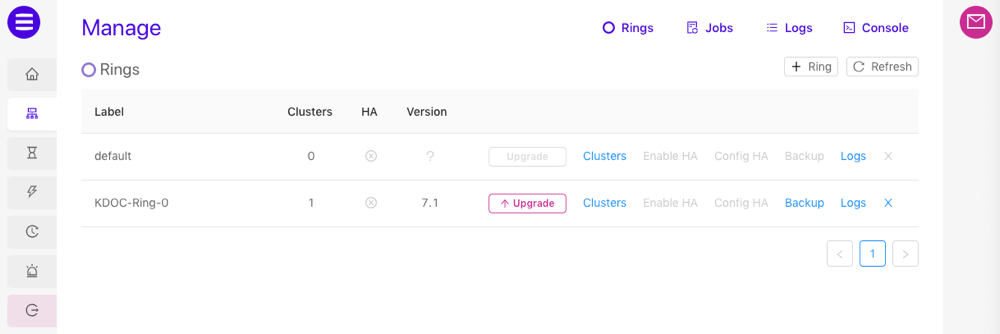
HA is enabled on a *ring* using the *KAgent* UI. To enable *HA* using *KAgent*:

1. Log into the KAgent service with a web browser:

   ```
   http://<kagent-host>:8081
   ```
2. From the left menu, click **Manage**.
3. On the *Rings* page, next to the ring containing your clusters, click
   **Enable HA**.
4. Click **Enable** to confirm setup. The *High Availability* package
   will be installed on each cluster and automatically configured.
5. Click **Close**. HA is now enabled for the ring.

   <img src="https://mintcdn.com/kinetica/1z8mB2CQRb2B9bKF/content/admin/kagent/images/manage_rings.png?fit=max&auto=format&n=1z8mB2CQRb2B9bKF&q=85&s=fd3942a184a442ad638eaf51427f3daa" alt="../../admin/kagent/images/manage_rings.png" width="1000" height="334" data-path="content/admin/kagent/images/manage_rings.png" />

### Config HA

*KAgent* exposes the most important *High Availability* configuration settings
via the *KAgent* UI. Information about the settings can be found in the table
below.

<Tip>
  All *HA* configuration settings can be edited via the *etcd* modify
  configuration window on the *KAgent Rings*
  [dashboard](/content/admin/kagent/dashboard#dashboard-rings). However, the settings can only be
  edited if the database is shutdown.
</Tip>

| Setting                   | Description                                                                                                                                 | Default Value |
| ------------------------- | ------------------------------------------------------------------------------------------------------------------------------------------- | ------------- |
| `qos`                     | Quality of service; limits the number of messages that are prefetched and queued locally on the cluster for better consumption performance. | `1000`        |
| `startup_queue_limit`     | The database appears down until the queue is drained of the set number of requests.                                                         | `100000`      |
| `max_request_failures`    | Determines how many times a cluster can fail to receive a request that was successful on another cluster.                                   | `3`           |
| `request_failure_pause`   | Time to pause in seconds between request send retries.                                                                                      | `3`           |
| `discard_failed_requests` | If true, then requests that exceed the maximum failures (and timeout) will be discarded.                                                    | `true`        |

To update the settings:

1. Log into the KAgent service with a web browser:

   ```
   http://<kagent-host>:8081
   ```
2. From the left menu, click **Manage**.
3. On the *Rings* page, next to the ring containing your clusters, click
   **Config HA**.
4. Adjust the settings as necessary.
5. Click **Update**.

<a id="ring-config-apis" />

### APIs

Any client API connection made to a cluster within an HA ring will automatically
be configured to fail over from one cluster in the ring to another in the event
of an outage.  A client API connection can be configured manually to fail over
from one cluster to another in a set of clusters that are not part of an HA ring
by specifying the cluster URLs at the time of connection.

The enabled failover mode (*active/active* or *active/passive*) is governed by
whether a primary URL is specified or implied as follows:

* *Active/Active* - No primary URL is specified and more than one URL is
  specified
* *Active/Passive* - A primary URL is specified, or a single URL is specified

For more information on the HA failover modes, consult
[Failover Modes](/content/ha/ha_architecture#ha-failover-modes).

If using either failover mode and a cluster is not reachable, the API
will attempt to re-establish the current cluster connection a configurable
number of times.  Failing that, it will attempt to amend the connection by
connecting to one of the other clusters in either the ring or the set of URLs
specified at the initial time of connection.  If no other clusters can be
reached, the connection fails.

#### C++

<Tip>
  For more information on C++ API database object instantiation, review
  the [C++ API Reference](/content/api/cpp).
</Tip>

<p><strong>Active/Active Configuration</strong></p>

To instantiate a Kinetica connection object with failover in C++, pass a
comma-delimited list of *head node* URLs to the constructor:

```c++ theme={null}
gpudb::GPUdb gpudb("http://172.1.2.3:9191,http://172.1.2.4:9191,http://172.1.2.5:9191");
```

In this case, a cluster will be chosen randomly or sequentially (based on
database object configuration) from the given list for the initial connection.
Subsequent requests through the instantiated connection object will go to the
same cluster.

<Note>
  If you provide a single URL to the `GPUdb` constructor, the failover mode
  will instead be *Active/Passive* and the URL will be treated as the primary
  URL.
</Note>

<p><strong>Active/Passive Configuration</strong></p>

To designate a cluster from the list to always attempt to go to first, specify a
primary URL:

```c++ theme={null}
gpudb::GPUdb::Options options = gpudb::GPUdb::Options().setPrimaryUrl("http://172.1.2.4:9191");
gpudb::GPUdb gpudb("http://172.1.2.3:9191,http://172.1.2.4:9191,http://172.1.2.5:9191", options);
```

In either case, if the current cluster has a failure, the connector will
randomly or sequentially (based on database object configuration) choose a
failover cluster from the list to send further requests.  If no operational
clusters are found, an error will be returned.

#### Java

<Tip>
  For more information on Java API database object instantiation, review
  the [Java API Reference](/content/api/java).
</Tip>

<p><strong>Active/Active Configuration</strong></p>

To instantiate a Kinetica connection object with failover in Java, pass a
comma-delimited list of *head node* URLs to the constructor:

```java theme={null}
GPUdb gpudb = new GPUdb("http://172.1.2.3:9191,http://172.1.2.4:9191,http://172.1.2.5:9191");
```

In this case, a cluster will be chosen randomly or sequentially (based on
database object configuration) from the given list for the
initial connection.  Subsequent requests through the instantiated connection
object will go to the same cluster.

<Note>
  If you provide a single URL to the `GPUdb` constructor, the failover mode
  will instead be *Active/Passive* and the URL will be treated as the primary
  URL.
</Note>

<p><strong>Active/Passive Configuration</strong></p>

To designate a cluster from the list to always attempt to go to first, specify a
primary URL:

```java theme={null}
GPUdb.Options options = new GPUdb.Options().setPrimaryUrl("http://172.1.2.4:9191");
GPUdb gpudb = new GPUdb("http://172.1.2.3:9191,http://172.1.2.4:9191,http://172.1.2.5:9191", options);
```

In either case, if the current cluster has a failure, the connector will
randomly or sequentially (based on database object configuration) choose a
failover cluster from the list to send further requests.  If no operational
clusters are found, an error will be returned.

#### Python

<Tip>
  For more information on Python API database object instantiation,
  review the [Python API Reference](/content/api/python).
</Tip>

<p><strong>Active/Active Configuration</strong></p>

To instantiate a Kinetica connection object with failover in Python, pass
a list of *head node* URLs to the constructor:

```python theme={null}
kinetica = gpudb.GPUdb(host=['http://172.1.2.3:9191','http://172.1.2.4:9191','http://172.1.2.5:9191'])
```

In this case, a cluster will be chosen randomly or sequentially (based on
database object configuration) from the given list for the initial connection.
Subsequent requests through the instantiated connection object will go to the
same cluster.

<Note>
  If you provide a single URL to the `GPUdb` constructor, the failover mode
  will instead be *Active/Passive* and the URL will be treated as the primary
  URL.
</Note>

<p><strong>Active/Passive Configuration</strong></p>

To designate a cluster from the list to always attempt to go to first, specify a
primary host:

```python theme={null}
kinetica = gpudb.GPUdb(host=['http://172.1.2.3:9191','http://172.1.2.4:9191','http://172.1.2.5:9191'], primary_host='http://172.1.2.3:9191')
```

In either case, if the current cluster has a failure, the connector will
randomly or sequentially (based on database object configuration) choose a
failover cluster from the list to send further requests.  If no operational
clusters are found, an error will be returned.

### Connectors

Any Kinetica connectors used to interface with an HA cluster ring should also be
configured to fail over from one cluster to another.

#### ODBC

See [Failover Connections](/content/connectors/sql_guide#odbc-connecting-failover) for the ODBC/JDBC failover configuration.

<a id="ring-extdata" />

## External Data

When using an [external table](/content/concepts/external_tables) or when loading
data via [/insert/records/fromfiles](/content/api/rest/insert_records_fromfiles_rest) ([LOAD INTO](/content/sql/load#sql-load-file-server), in
SQL), the source of data needs to be accessible to all clusters within the ring
or it needs to be synced between locations accessible to each cluster
individually.

Similarly, when using a [data source](/content/concepts/data_sources), the source
needs to be accessible to all clusters within the ring.

## Management

Once HA has been configured, several commands are available to aid in the
management of the cluster.

To start HA, run the following as the <Badge color="gray">root</Badge> user on every node
with the *RabbitMQ* service installed:

```
systemctl start gpudb-mq
```

To stop HA, run the following as the <Badge color="gray">root</Badge> user on every node with
the *RabbitMQ* service installed:

```
systemctl stop gpudb-mq
```
