> ## Documentation Index
> Fetch the complete documentation index at: https://docs.kinetica.com/llms.txt
> Use this file to discover all available pages before exploring further.
# Kinetica Installation with KAgent
Kinetica installation and configuration instructions using KAgent for On-Premise
hardware.
Kinetica can be installed on pre-provisioned instances in AWS, Azure,
or GCP via KAgent. For offerings provisioned within cloud environments
directly, see [Cloud-Ready](/content/cloud).
## System Requirements
Operating system, hardware, and network requirements to run Kinetica.
### Certified OS List
| CPU Platform | Linux Distribution | Versions |
| ------------------------------------------------- | ----------------------------- | --------------------------------------------------------- |
| ARM64
Axion
Gravitron | RHEL / AlmaLinux / RockyLinux | 8.2+
9 |
| ARM64
Axion
Gravitron | Ubuntu | 22.04 LTS
24.04 LTS |
| PPC
*(CPU only)* | Ubuntu | 20.04 LTS |
| x86 | RHEL / AlmaLinux / RockyLinux | 8.2+
9 |
| x86 | Ubuntu | 20.04 LTS
22.04 LTS
24.04 LTS |
### Minimum Hardware Requirements
| Component | Specification |
| ---------- | ----------------------------------------------------------------------------------------------------------------------------------------------------------------------------------------------------- |
| CPU | Two socket based server with at least 8 cores of one of these CPU types:
\* *ARM64* / *Axion* / *Gravitron*
\* *Intel (or compatible)* x86-64 with AVX2
\* *Power PC* 8le |
| GPU | See [GPU Driver](/content/install/shared/gpu_driver) below for the list of supported GPUs |
| Memory | Minimum 8GB |
| Hard Drive | SSD or SATA 7200RPM hard drive with 4X memory capacity |
### GPU Driver Matrix
The cards below have been tested in large-scale production environments and
provide the best performance for the database.
| GPU | Driver | Kinetica Package |
| ------------------ | --------------------- | -------------------- |
| `T4` | `525.X` *(or higher)* | `gpudb-cuda-license` |
| `V100` | `525.X` *(or higher)* | `gpudb-cuda-license` |
| `A10`/`A40`/`A100` | `525.X` *(or higher)* | `gpudb-cuda-license` |
| `L4`/`L40` | `525.X` *(or higher)* | `gpudb-cuda-license` |
| `H100` | `525.X` *(or higher)* | `gpudb-cuda-license` |
### Active Directory
If your environment uses *Microsoft Active Directory* for authentication and
there are security processes running on servers that check for and automatically
remove accounts that are not registered in *Active Directory*, the `gpudb`
user must be added to *Active Directory* as a *Linux*-type account prior
to installing Kinetica.
## KAgent Installation
*KAgent* can be deployed as a RHEL, Ubuntu, or SUSE installation package on any
server inside or outside the cluster.
Automatically download & install the latest *KAgent* version using these
commands:
```bash RHEL 8 theme={null}
KAGENT_REPO=https://repo.kinetica.com/yum/7.2/CentOS/8/x86_64
KAGENT_PKG=$(wget -q -O - ${KAGENT_REPO} | sed 's/<[^>]*>//g' | grep -o "kagent.*ga.*rpm " | sort -V | tail -1)
wget ${KAGENT_REPO}/${KAGENT_PKG}
sudo yum install ./${KAGENT_PKG}
```
```bash Ubuntu 20 theme={null}
KAGENT_REPO=https://repo.kinetica.com/debian/7.2/Ubuntu/focal/binary-amd64
KAGENT_PKG=$(wget -q -O - ${KAGENT_REPO} | sed 's/<[^>]*>//g' | grep -o "kagent.*ga.*deb " | sort -V | tail -1)
wget ${KAGENT_REPO}/${KAGENT_PKG}
sudo apt install ./${KAGENT_PKG}
```
```bash Ubuntu 22 theme={null}
KAGENT_REPO=https://repo.kinetica.com/debian/7.2/Ubuntu/jammy/binary-amd64
KAGENT_PKG=$(wget -q -O - ${KAGENT_REPO} | sed 's/<[^>]*>//g' | grep -o "kagent.*ga.*deb " | sort -V | tail -1)
wget ${KAGENT_REPO}/${KAGENT_PKG}
sudo apt install ./${KAGENT_PKG}
```
```bash SUSE 15 theme={null}
KAGENT_REPO=https://repo.kinetica.com/yum/7.2/SUSE/15.3/x86_64
KAGENT_PKG=$(wget -q -O - ${KAGENT_REPO} | sed 's/<[^>]*>//g' | grep -o "kagent.*ga.*rpm " | sort -V | tail -1)
wget ${KAGENT_REPO}/${KAGENT_PKG}
sudo zypper install ./${KAGENT_PKG}
```
Alternatively, visit the `KAGENT_REPO` link below to search for a specific
version of *KAgent*, change `KAGENT_PKG` to that version on **line 2**, and
then run the modified commands to download & install that version:
```bash RHEL 8 theme={null}
KAGENT_REPO=https://repo.kinetica.com/yum/7.2/CentOS/8/x86_64
KAGENT_PKG=kagent-7.2.0.4.20240326024429.ga-0.x86_64.el8.rpm
wget ${KAGENT_REPO}/${KAGENT_PKG}
sudo yum install ./${KAGENT_PKG}
```
```bash Ubuntu 20 theme={null}
KAGENT_REPO=https://repo.kinetica.com/debian/7.2/Ubuntu/focal/binary-amd64
KAGENT_PKG=kagent_7.2.0.4.20240326024429.ga-0_amd64.ubuntu20.04.deb
wget ${KAGENT_REPO}/${KAGENT_PKG}
sudo apt install ./${KAGENT_PKG}
```
```bash Ubuntu 22 theme={null}
KAGENT_REPO=https://repo.kinetica.com/debian/7.2/Ubuntu/jammy/binary-amd64
KAGENT_PKG=kagent_7.2.0.4.20240326024429.ga-0_amd64.ubuntu22.04.deb
wget ${KAGENT_REPO}/${KAGENT_PKG}
sudo apt install ./${KAGENT_PKG}
```
```bash SUSE 15 theme={null}
KAGENT_REPO=https://repo.kinetica.com/yum/7.2/SUSE/15.3/x86_64
KAGENT_PKG=kagent-7.2.0.4.20240326024429.ga-0.x86_64.sles15.3.rpm
wget ${KAGENT_REPO}/${KAGENT_PKG}
sudo zypper install ./${KAGENT_PKG}
```
This installs the package to the directory /opt/gpudb/kagent and
registers and starts the `kagent_ui` service. *KAgent* will open port `8081`
on the local firewall (if enabled).
## Kinetica Installation
Installation of *Kinetica* using *KAgent* involves the automated deployment
of the installation package via either a browser-based UI or console-driven CLI.
A list of the IP addresses for server(s) running Kinetica and additional
KAgent instance(s) must be compiled before the installation process. The
installation process also requires a license key. To receive a license
key, contact support at [support@kinetica.com](mailto:support@kinetica.com).
### KAgent UI
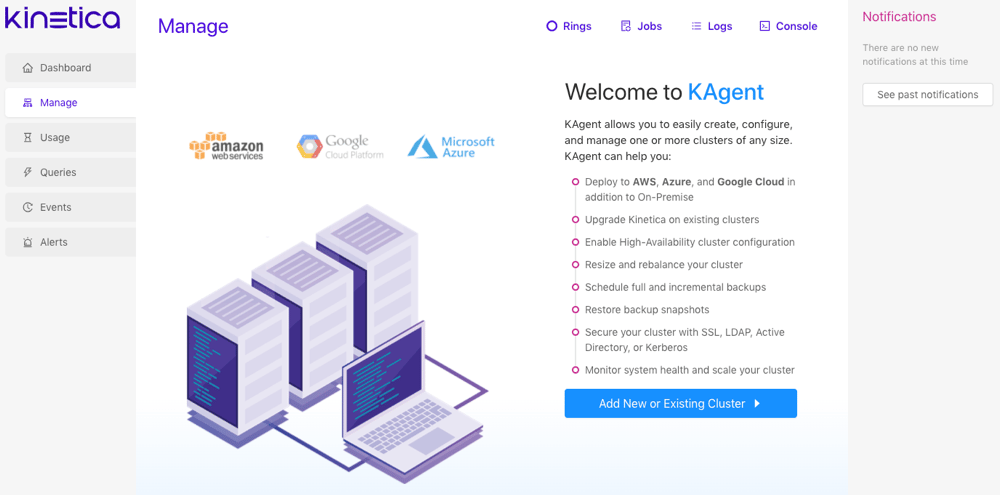 To access the *KAgent* UI and begin setting up a cluster:
Review [KAgent](/content/admin/kagent/kagent) for more information on
*KAgent* and its features.
1. Ensure the *KAgent* service is started:
```
service kagent_ui status
```
2. Browse to the *KAgent* UI using IP or host name:
```
http://:8081/kagent
```
3. Optionally, if using custom rings, i.e. not the `default` ring, click
**Rings** then click **Clusters** next to the desired
ring. See [High Availability Architecture](/content/ha/ha_architecture) for more information about rings and
high availability (HA).
4. Click **Add New or Existing Cluster**.
#### Cluster
To access the *KAgent* UI and begin setting up a cluster:
Review [KAgent](/content/admin/kagent/kagent) for more information on
*KAgent* and its features.
1. Ensure the *KAgent* service is started:
```
service kagent_ui status
```
2. Browse to the *KAgent* UI using IP or host name:
```
http://:8081/kagent
```
3. Optionally, if using custom rings, i.e. not the `default` ring, click
**Rings** then click **Clusters** next to the desired
ring. See [High Availability Architecture](/content/ha/ha_architecture) for more information about rings and
high availability (HA).
4. Click **Add New or Existing Cluster**.
#### Cluster
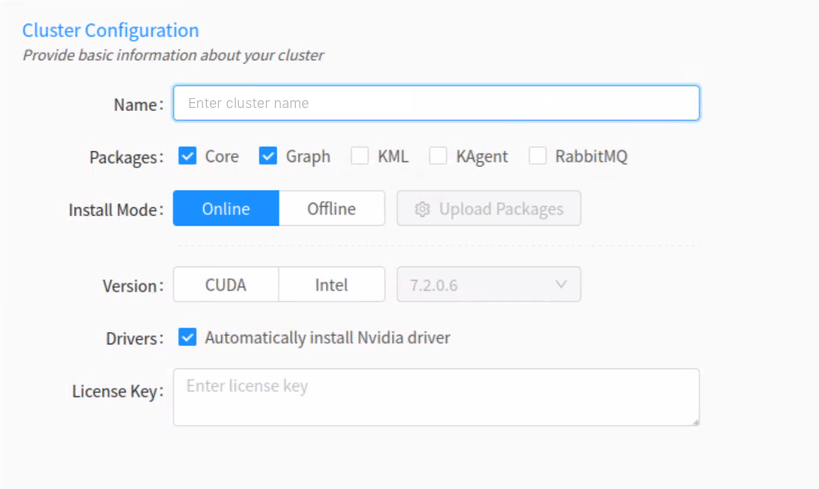 1. Enter a name for the cluster. The name cannot contain spaces or underscores.
2. Optionally, select one or more of the following packages:
* Select **Core** if node(s) in the cluster should have the
core database functionality installed on them.
First-time setups should always have *Core* selected.
* Select **Graph** if a node in the cluster should have the
graph server installed on it. See
[Graphs & Solvers Concepts](/content/graph_solver/network_graph_solver) for more information.
* Optionally, select to install **KML**
(*Kinetica Machine Learning*) if a node should have *KML* installed on it.
An existing Kubernetes cluster is required for *KML* processing. See
[Machine Learning](/content/ml) for more information on *KML* features.
* Optionally, select to install **KAgent** if a node should
also have *KAgent* installed on it. See [KAgent](/content/admin/kagent/kagent)
for more information.
* Optionally, select to install **RabbitMQ** if setting up a
ring for *High Availability*. Review [High Availability Architecture](/content/ha/ha_architecture) and
[High Availability Configuration & Management](/content/ha/ha_configuration) for more information.
3. For the **Install Mode**, select either
**Online** (install directly from the online Kinetica
repository) or **Offline** (install from uploaded packages).
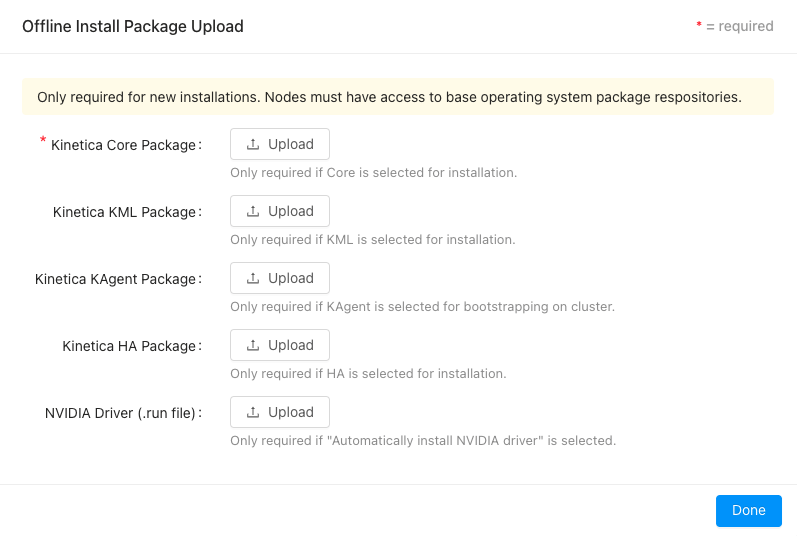
If **Offline** is selected, click
**Upload Packages**, then upload a package file for each
component or driver desired for the installation.
If performing an offline installation, all necessary
dependencies will need to be installed prior to cluster setup.
1. Enter a name for the cluster. The name cannot contain spaces or underscores.
2. Optionally, select one or more of the following packages:
* Select **Core** if node(s) in the cluster should have the
core database functionality installed on them.
First-time setups should always have *Core* selected.
* Select **Graph** if a node in the cluster should have the
graph server installed on it. See
[Graphs & Solvers Concepts](/content/graph_solver/network_graph_solver) for more information.
* Optionally, select to install **KML**
(*Kinetica Machine Learning*) if a node should have *KML* installed on it.
An existing Kubernetes cluster is required for *KML* processing. See
[Machine Learning](/content/ml) for more information on *KML* features.
* Optionally, select to install **KAgent** if a node should
also have *KAgent* installed on it. See [KAgent](/content/admin/kagent/kagent)
for more information.
* Optionally, select to install **RabbitMQ** if setting up a
ring for *High Availability*. Review [High Availability Architecture](/content/ha/ha_architecture) and
[High Availability Configuration & Management](/content/ha/ha_configuration) for more information.
3. For the **Install Mode**, select either
**Online** (install directly from the online Kinetica
repository) or **Offline** (install from uploaded packages).
If **Offline** is selected, click
**Upload Packages**, then upload a package file for each
component or driver desired for the installation.
If performing an offline installation, all necessary
dependencies will need to be installed prior to cluster setup.
 4. For the **Version**, select either **CUDA**
(GPU) or **Intel** (CPU-only) to determine the package variant
to install.
5. If the **Version** is set to *CUDA*, ensure
**Automatically install Nvidia driver** is selected. This will
automatically configure the server(s) for an Nvidia GPU driver and install
the most compatible driver.
6. Enter the license key.
7. If **KML** is selected to install, upload a configuration file
for an already-existing *Kubernetes* installation. Note that *KML* requires
*Kubernetes*; see [Machine Learning](/content/ml) for more information.
8. Click **Next**.
#### Deployment
4. For the **Version**, select either **CUDA**
(GPU) or **Intel** (CPU-only) to determine the package variant
to install.
5. If the **Version** is set to *CUDA*, ensure
**Automatically install Nvidia driver** is selected. This will
automatically configure the server(s) for an Nvidia GPU driver and install
the most compatible driver.
6. Enter the license key.
7. If **KML** is selected to install, upload a configuration file
for an already-existing *Kubernetes* installation. Note that *KML* requires
*Kubernetes*; see [Machine Learning](/content/ml) for more information.
8. Click **Next**.
#### Deployment
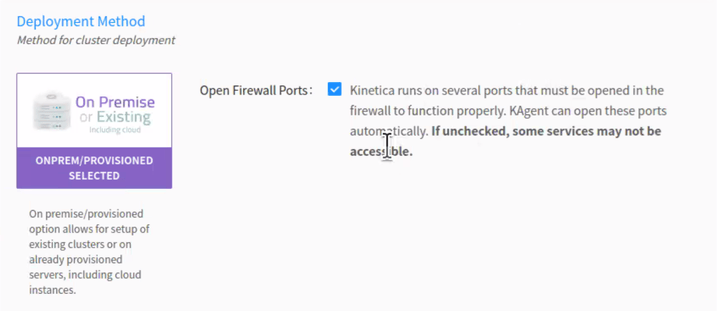 1. Select the **On Premise** deployment method, and click
**Next**.
If clearing the **Open Firewall Ports** checkbox, the firewall
then must be configured manually to allow the *required* ports listed in
the [default ports](/content/install/shared/ports) table. Consult
[Adjust Firewall](/content/install/shared/adjust_firewall) for tips on configuring the firewall.
#### Security
1. Select the **On Premise** deployment method, and click
**Next**.
If clearing the **Open Firewall Ports** checkbox, the firewall
then must be configured manually to allow the *required* ports listed in
the [default ports](/content/install/shared/ports) table. Consult
[Adjust Firewall](/content/install/shared/adjust_firewall) for tips on configuring the firewall.
#### Security
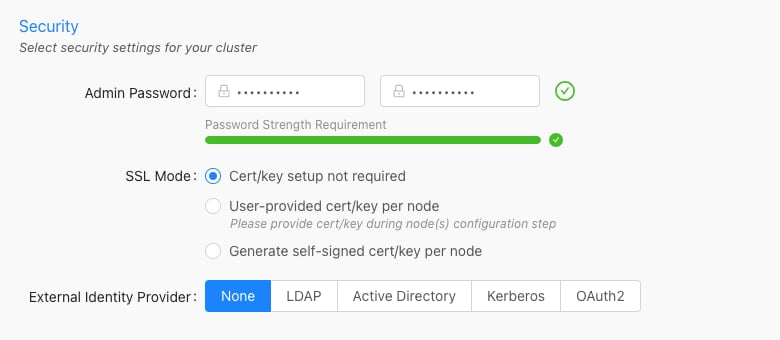 The *Security* configuration section is only required if *Core*
is being installed.
1. Enter and confirm an **Admin Password**. It must meet
the password strength requirements.
This is the password used to access *Reveal*, *Workbench*, *KAgent*, and
*GAdmin* as the default administrative user.
2. Select an **SSL Mode**:
* **Cert/key setup not required** -- *Kinetica* will not require
SSL certificate/key creation/upload and SSL will not be enabled
* **User-provided cert/key per node** -- user must upload an SSL
certificate and key for each node; *Kinetica* copies the cert/key pair
to /opt/gpudb/certs, enables HTTPD, and configures HTTPD to use
HTTPS
* **Generate self-signed cert/key per node** -- *KAgent* generates
a self-signed certificate and key for each node and places it in
/opt/gpudb/certs, enables HTTPD, and configures HTTPD to use HTTPS
3. Select an **Authentication** type and fill the fields as necessary:
* **None** -- no authentication or authorization
* **LDAP** -- configures *Kinetica* to authenticate via *LDAP*;
requires authentication to connect to the database, enables authorization,
enables external authentication, automatically creates users in the
database for *LDAP* users, and automatically grants roles in the database
to *LDAP* users
* **Active Directory** -- configures *Kinetica* to authenticate via
*Microsoft Active Directory*; requires authentication to connect to the
database, enables authorization, enables external authentication,
automatically creates users in the database for *Active Directory* users,
and automatically grants roles in the database to *Active Directory* users
* **Kerberos** -- configures *Kinetica* to authenticate via
*Kerberos*; requires authentication to connect to the database, enables
authorization, enables external authentication, automatically creates users
in the database for *Kerberos* users, and automatically grants roles in the
database to *Kerberos* users
* **OAuth** -- configures *Kinetica* to authenticate via an
*OAuth* service; requires authentication to connect to the database,
enables authorization, enables external authentication, automatically
creates user in the database for *OAuth* users, and automatically grants
roles in the database to *OAuth* users
No SSL or authentication is **not** recommended! For more information on
security configurations and settings as well as how to manually configure
*Kinetica* for a secure setup, see [Security Configuration](/content/security/sec_configuration).
4. Click **Next**.
#### Nodes
The *Security* configuration section is only required if *Core*
is being installed.
1. Enter and confirm an **Admin Password**. It must meet
the password strength requirements.
This is the password used to access *Reveal*, *Workbench*, *KAgent*, and
*GAdmin* as the default administrative user.
2. Select an **SSL Mode**:
* **Cert/key setup not required** -- *Kinetica* will not require
SSL certificate/key creation/upload and SSL will not be enabled
* **User-provided cert/key per node** -- user must upload an SSL
certificate and key for each node; *Kinetica* copies the cert/key pair
to /opt/gpudb/certs, enables HTTPD, and configures HTTPD to use
HTTPS
* **Generate self-signed cert/key per node** -- *KAgent* generates
a self-signed certificate and key for each node and places it in
/opt/gpudb/certs, enables HTTPD, and configures HTTPD to use HTTPS
3. Select an **Authentication** type and fill the fields as necessary:
* **None** -- no authentication or authorization
* **LDAP** -- configures *Kinetica* to authenticate via *LDAP*;
requires authentication to connect to the database, enables authorization,
enables external authentication, automatically creates users in the
database for *LDAP* users, and automatically grants roles in the database
to *LDAP* users
* **Active Directory** -- configures *Kinetica* to authenticate via
*Microsoft Active Directory*; requires authentication to connect to the
database, enables authorization, enables external authentication,
automatically creates users in the database for *Active Directory* users,
and automatically grants roles in the database to *Active Directory* users
* **Kerberos** -- configures *Kinetica* to authenticate via
*Kerberos*; requires authentication to connect to the database, enables
authorization, enables external authentication, automatically creates users
in the database for *Kerberos* users, and automatically grants roles in the
database to *Kerberos* users
* **OAuth** -- configures *Kinetica* to authenticate via an
*OAuth* service; requires authentication to connect to the database,
enables authorization, enables external authentication, automatically
creates user in the database for *OAuth* users, and automatically grants
roles in the database to *OAuth* users
No SSL or authentication is **not** recommended! For more information on
security configurations and settings as well as how to manually configure
*Kinetica* for a secure setup, see [Security Configuration](/content/security/sec_configuration).
4. Click **Next**.
#### Nodes
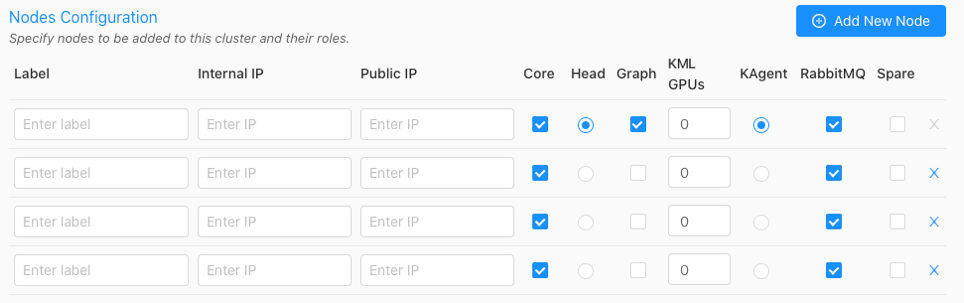 1. Click **Add New Node** until there are the desired number of nodes
that will have *Kinetica* (and potentially other services) installed on them.
2. For each node, input a custom **Label** (*hostname* is suggested),
the **Internal IP**, and the **Public IP**.
3. If the `User-provided cert/key per node` **SSL Mode**
was selected in [Security](#security), an **SSL** column will be added to the
configuration page--click the lock icon in the **SSL** column to open
the **SSL Certificate/Key** window, where the SSL cert and key, along
with an optional public hostname, can be provided. Repeat this for each node.
4. Optionally, select if each node should have the **Core** package
installed. The Core package contains access to the database and its core
components and functionality. Note that if the core package is *not*
installed on a node, that node cannot be designated as the
**Head Node**.
5. Select the desired node for the **Head Node** using the corresponding
radio button. This server will receive user requests and parcel them out to
the other *worker nodes* of the system. The *head node* of the cluster (or
only node in a single-node system) will also be used for the administration
of the cluster, and by default, the hosting of
[Reveal](/content/bi/reveal) and
[GAdmin](/content/admin/gadmin) and as such, will require special handling
during the installation process.
All services and privileges (**Head**, **Graph**,
**KML**, etc.) can exist on a single node if
desired, assuming there are enough resources to handle it.
6. If the *Graph* package was selected for install in
[Cluster](#cluster), select the desired node(s) to host the
[graph](/content/graph_solver/network_graph_solver) service using
the corresponding radio button. The *graph* node does not need to have the
**Core** package enabled. Consult
[Distributed Graph Servers](/content/graph_solver/distributed_graph_server) for more information on
leveraging multiple graph servers.
7. To reserve GPUs for *KML*, *UDFs*, or other external processes that may be
running on the node, set the number under *KML GPUs*.
Some *UDFs* and features of *KML* may require GPUs to work or
have increased performance.
8. If the *KAgent* package was selected for install in [Cluster](/content/install/kagent_install#kagent-ui-cluster),
select the desired node to host the service. The *KAgent* node does not need
to have the **Core** package enabled.
9. If the *RabbitMQ* package was selected for install in
[Cluster](/content/install/kagent_install#kagent-ui-cluster) because a [High Availability](/content/ha)
setup is required, select the desired node(s) to have **RabbitMQ**
installed. Ensure at least one node will have RabbitMQ installed if enabling
[High Availability (HA)](/content/ha/ha_architecture) for the cluster; select
additional nodes to have RabbitMQ installed for redundant queues. A node
does not have to host any other services other than *RabbitMQ* if desired.
In total, an odd number of nodes should be selected for
*RabbitMQ* installation. *Kinetica* recommends installing
*RabbitMQ* machines that will not have the **Core**
package enabled.
10. Click **Next**.
11. Confirm which IP address KAgent should use to connect to the cluster:
**Internal** or **Public**.
#### Credentials
1. Click **Add New Node** until there are the desired number of nodes
that will have *Kinetica* (and potentially other services) installed on them.
2. For each node, input a custom **Label** (*hostname* is suggested),
the **Internal IP**, and the **Public IP**.
3. If the `User-provided cert/key per node` **SSL Mode**
was selected in [Security](#security), an **SSL** column will be added to the
configuration page--click the lock icon in the **SSL** column to open
the **SSL Certificate/Key** window, where the SSL cert and key, along
with an optional public hostname, can be provided. Repeat this for each node.
4. Optionally, select if each node should have the **Core** package
installed. The Core package contains access to the database and its core
components and functionality. Note that if the core package is *not*
installed on a node, that node cannot be designated as the
**Head Node**.
5. Select the desired node for the **Head Node** using the corresponding
radio button. This server will receive user requests and parcel them out to
the other *worker nodes* of the system. The *head node* of the cluster (or
only node in a single-node system) will also be used for the administration
of the cluster, and by default, the hosting of
[Reveal](/content/bi/reveal) and
[GAdmin](/content/admin/gadmin) and as such, will require special handling
during the installation process.
All services and privileges (**Head**, **Graph**,
**KML**, etc.) can exist on a single node if
desired, assuming there are enough resources to handle it.
6. If the *Graph* package was selected for install in
[Cluster](#cluster), select the desired node(s) to host the
[graph](/content/graph_solver/network_graph_solver) service using
the corresponding radio button. The *graph* node does not need to have the
**Core** package enabled. Consult
[Distributed Graph Servers](/content/graph_solver/distributed_graph_server) for more information on
leveraging multiple graph servers.
7. To reserve GPUs for *KML*, *UDFs*, or other external processes that may be
running on the node, set the number under *KML GPUs*.
Some *UDFs* and features of *KML* may require GPUs to work or
have increased performance.
8. If the *KAgent* package was selected for install in [Cluster](/content/install/kagent_install#kagent-ui-cluster),
select the desired node to host the service. The *KAgent* node does not need
to have the **Core** package enabled.
9. If the *RabbitMQ* package was selected for install in
[Cluster](/content/install/kagent_install#kagent-ui-cluster) because a [High Availability](/content/ha)
setup is required, select the desired node(s) to have **RabbitMQ**
installed. Ensure at least one node will have RabbitMQ installed if enabling
[High Availability (HA)](/content/ha/ha_architecture) for the cluster; select
additional nodes to have RabbitMQ installed for redundant queues. A node
does not have to host any other services other than *RabbitMQ* if desired.
In total, an odd number of nodes should be selected for
*RabbitMQ* installation. *Kinetica* recommends installing
*RabbitMQ* machines that will not have the **Core**
package enabled.
10. Click **Next**.
11. Confirm which IP address KAgent should use to connect to the cluster:
**Internal** or **Public**.
#### Credentials
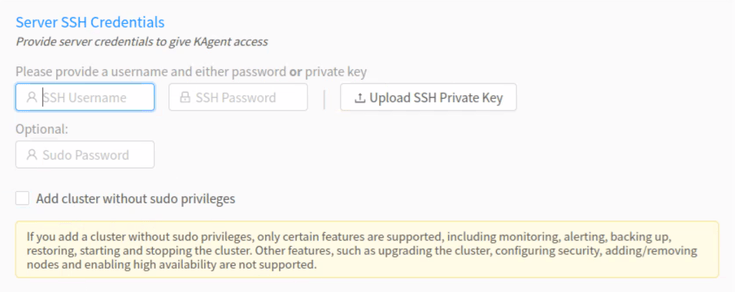 1. For the **Server SSH Credentials**, enter the SSH username and
password or upload the SSH private key that will be used to access the
node(s).
2. Optionally, enter the `sudo` password.
3. Click **Verify**.
The [console](/content/admin/kagent/manage#kagent-ui-console) will appear showing the log of *KAgent*
interactions as *KAgent* attempts to access the cluster with the provided
credentials and also retrieve information on the hosts, including Kinetica
version and configuration (if installed), hostname and IP addresses, OS type,
and Nvidia information.
#### Installation
1. For the **Server SSH Credentials**, enter the SSH username and
password or upload the SSH private key that will be used to access the
node(s).
2. Optionally, enter the `sudo` password.
3. Click **Verify**.
The [console](/content/admin/kagent/manage#kagent-ui-console) will appear showing the log of *KAgent*
interactions as *KAgent* attempts to access the cluster with the provided
credentials and also retrieve information on the hosts, including Kinetica
version and configuration (if installed), hostname and IP addresses, OS type,
and Nvidia information.
#### Installation
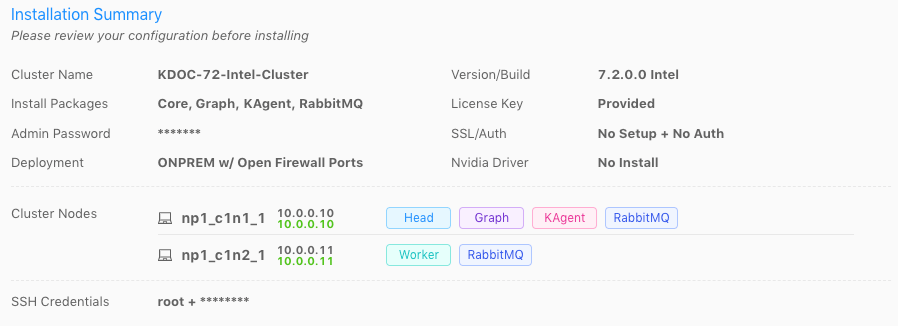 1. Review the **Installation Summary** to ensure there are no validation
errors in the information. The highlighted IP address will be the one KAgent
uses to connect to the cluster.
Click **CLI Commands** to view and/or copy the KAgent
command line interface commands that will be run in the background
(order is from top to bottom).
1. Review the **Installation Summary** to ensure there are no validation
errors in the information. The highlighted IP address will be the one KAgent
uses to connect to the cluster.
Click **CLI Commands** to view and/or copy the KAgent
command line interface commands that will be run in the background
(order is from top to bottom).
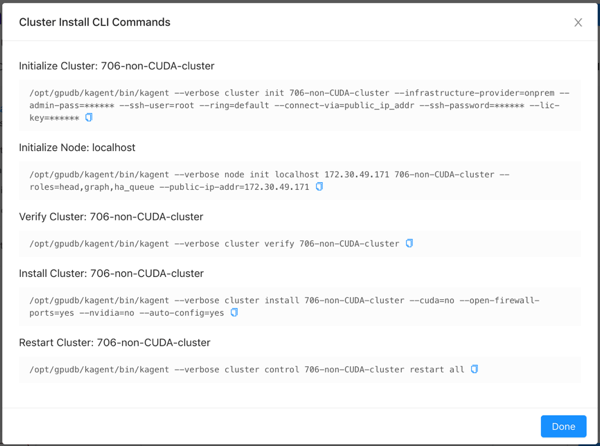 2. Click **Install**. *KAgent* will open a window displaying the
progress of the installation.
2. Click **Install**. *KAgent* will open a window displaying the
progress of the installation.
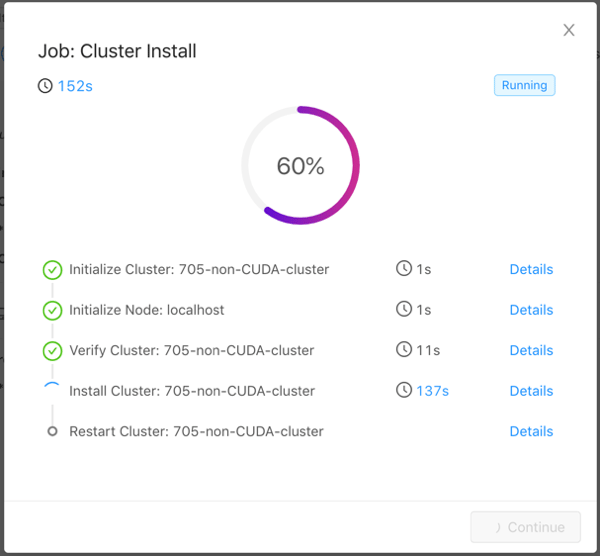 Click **Details** next to a step to see stdout and stderr
for that step. Click
Click **Details** next to a step to see stdout and stderr
for that step. Click  to copy the displayed text.
The installation may take a while as *KAgent* initializes each node in the
cluster, verifies the cluster, adds a repository, downloads the package, installs
the package to the directory /opt/gpudb, creates a group named
`gpudb`, and creates two users (`gpudb` & `gpudb_proc`) whose home
directories are located in /home/gpudb. This will also register two
services: `gpudb` & `gpudb_host_manager`.
After a successful installation, if [KAgent](/content/admin/kagent/kagent) was also
installed on a separate node, one can be redirected to the *KAgent* on that
cluster node. If *KAgent* was not installed on a separate node, one can be
redirected to [Kinetica Administration Application (GAdmin)](/content/admin/gadmin).
After the installation, the cluster will be added to *KAgent*
and you'll be logged into *KAgent* as the `admin` user for
the cluster. After this session is over (via either logging out
or session timeout), you'll be required to log into *KAgent*
every time you want to access *KAgent* features. See
[Logging In / Out](/content/admin/kagent/kagent#kagent-ui-logout) for more information.
## Validation
To validate that *Kinetica* has been installed and started properly, you can
perform the following tests.
### Curl Test
To ensure that *Kinetica* has started (you may have to wait a moment while the
system initializes), you can run `curl` on the *head node* to check if
the server is responding and port is available with respect to any running
firewalls:
```
$ curl localhost:9191
Kinetica is running!
```
### API Test
You can also run a test to ensure that the API is responding properly. There is
an *admin simulator* project in *Python* provided with the *Python* API, which
pulls statistics from the *Kinetica* instance. Running this on the *head node*,
passing in the appropriate `` & ``, you should see:
```
$ /opt/gpudb/bin/gpudb_python /opt/gpudb/kitools/gadmin_sim.py -u -p --table --summary
+-----------------+--------------------------------+----------------------+----------------------+-------+
| Schema | Table/View | Records | Type ID | TTL |
+=================+================================+======================+======================+=======+
| SYSTEM | | 1 | | |
| SYSTEM | ITER | 1 | UNSET_TYPE_ID | -1 |
+-----------------+--------------------------------+----------------------+----------------------+-------+
+---------------------------+----------------------+
| Object Type | Count |
+===========================+======================+
| Schemas | 1 |
| Tables & Views | 1 |
| Records | 1 |
| Records + Track Elements | 1 |
+---------------------------+----------------------+
```
### GAdmin Status Test
The administrative interface itself can be used to validate that the system is
functioning properly. Simply log into [GAdmin](/content/admin/gadmin).
Browse to **Dashboard** to view the status of the overall system and
**Ranks** to view the status breakdown by *rank*.
### Ingest/Read Test
After verifying *Kinetica* has started and its components work, you should
confirm ingesting and reading data works as expected.
1. Navigate to the **Demo** tab on the **Cluster** page.
2. Click **Load Sample Data** under the **NYC Taxi** section,
then click **Load** to confirm.
3. Once the data is finished loading, click **View Loaded Data**. The
data should be available in the `nyctaxi` [table](/content/concepts/tables)
located in the `demo` [schema](/content/concepts/schemas).
If [Reveal](/content/bi/reveal) is enabled:
1. Navigate to:
```
http://:8088/
```
2. Log into *Reveal* and [change the administration account's default password](/content/security/reveal#change-password-reveal).
3. Click **NYC Taxi** under **Dashboards**. The default NYC Taxi
dashboard should load.
## Core Utilities
*Kinetica* comes packaged with many helpful server and support executables that
can be found in `/opt/gpudb/core/bin/` and `/opt/gpudb/bin`. Note that any
of the `gpudb_hosts_*.sh` scripts will operate on the hosts specified in
`gpudb.conf`. Run any of the following with the `-h` option for usage
information.
For most of the utilities that use passwordless SSH, an AWS PEM
file can be specified instead using the `-i` option (with the exception
being the `gpudb_hosts_persist_*` scripts). If passwordless SSH is not
setup and no PEM file is specified, you will be prompted for a password
on each host.
### Environment Configuration and Tools
Some of the most commonly used and important utilities are also available in the
`/opt/gpudb/bin` directory.
This directory also contains the [KI Tools suite](/content/tools)
| Utility / Script | Uses Passwordless SSH | Description |
| --------------------------------- | --------------------- | ------------------------------------------------------------------------------------------------------------------------------------------------------------------------------------------------------------------------------------------------------------------------------------------------------------------------------------------------------------------------------------------------------------- |
| `gpudb_alter_password` | No | Script to change a given user's password |
| `gpudb_env` | No | Utility to run a program and its given arguments after setting the `PATH`, `LD_LIBRARY_PATH`, `PYTHON_PATH`, and others to the appropriate `/opt/gpudb/` directories. Use this script or `/opt/gpudb/bin/gpudb_python` to correctly setup the environment to run *Kinetica's* packaged *Python* version. You can also run `source /opt/gpudb/core/bin/gpudb_env.sh` to have the current environment updated. |
| `gpudb_pip` | Yes | Script to run *Kinetica's* packaged `pip` version. Runs on all hosts. This can be used in place of `pip`, e.g., `/opt/gpudb/bin/gpudb_pip install gpudb` |
| `gpudb_python` | No | Script to correctly setup the environment to run *Kinetica's* packaged *Python* version. This can be used in place of the `python` command, e.g., `/opt/gpubd/bin/gpudb_python my_python_file.py` |
| `gpudb_udf_distribute_thirdparty` | No | Utility to mirror the local `/opt/gpudb/udf/thirdparty` to remote hosts. Creates a dated backup on the remote host before copying |
### Helper Scripts
Additional helper scripts and utilities are available in
`/opt/gpudb/core/bin`.
| Utility / Script | Uses Passwordless SSH | Description |
| --------------------------------------- | --------------------- | -------------------------------------------------------------------------------------------------------------------------------------------------------------------------------------------------------------------------------------------------------------------------------------------------------------------------------------------------------------------------------------------------------------------------------------------------------------------------------------------------------------------------------------- |
| `gpudb` | No | Run as `gpudb` user or root. The *Kinetica* system start/restart/stop/status script |
| `gpudb_alter_password.py` | No | Script to change a given user's password |
| `gpudb_cluster_cuda` | No | Server executable for CUDA clusters. Displays version and configuration information. This should only be run by the `gpudb` executable (see above). |
| `gpudb_cluster_intel` | No | Server executable for *Intel* clusters. Displays version and configuration information. This should only be run by the `gpudb` executable (see above). |
| `gpudb_conf_parser.py` | No | Run using `/opt/gpudb/bin/gpudb_python`. Utility for parsing the `/opt/gpudb/core/etc/gpudb.conf` file and printing the settings and values. |
| `gpudb_config_compare.py` | No | Script to compare two configuration files: a "modified" configuration file and a "baseline" configuration file. The script can also merge the files after outputting the diff. The merged file will use the "modified" file's settings values if the "modified" configuration settings match the "baseline" configuration settings; if a setting value is present in the "modified" file but **not** in the "baseline" file, the "baseline" setting value will be used. Supports `.ini`, `.conf`, `.config`, `.py`, and `.json` files. |
| `gpudb_decrypt.sh` | No | Utility for decrypting text encrypted by `gpudb_encrypt.sh`. See [Obfuscating Plain-Text Passwords](/content/security/sec_hardening) for details. |
| `gpudb_disk_mount_azure.sh` | No | Utility used for attaching and detaching data volumes for Kinetica clusters running in Microsoft Azure. |
| `gpudb_encrypt.sh` | No | Utility for encrypting text. See [Obfuscating Plain-Text Passwords](/content/security/sec_hardening) for details. |
| `gpudb_env.sh` | No | Utility to run a program and its given arguments after setting the `PATH`, `LD_LIBRARY_PATH`, `PYTHON_PATH`, and others to the appropriate `/opt/gpudb/` directories. Use this script or `/opt/gpudb/bin/gpudb_python` to correctly setup the environment to setup the environment to run *Kinetica's* packaged *Python* version. You can also run `source /opt/gpudb/core/bin/gpudb_env.sh` to have the current environment updated. |
| `gpudb_file_integrity_check.py` | No | Utility to test the consistency of the `/opt/gpudb/persist` directory |
| `gpudb_generate_key.sh` | No | Utility for generating an encryption key. See [Obfuscating Plain-Text Passwords](/content/security/sec_hardening) for details. |
| `gpudb_host_manager` | No | The host daemon process that starts and manages any *Kinetica* processes. |
| `gpudb_hosts_addresses.sh` | Yes | Prints all the unique hostnames (or IPs) specified in `gpudb.conf` |
| `gpudb_hosts_diff_file.sh` | Yes | Run as `gpudb` user or root. Utility to diff a given file from the current machine to the specified destination file on one or more hosts |
| `gpudb_hosts_logfile_cleanup.sh` | Yes | Run as `gpudb` user or root. Script to delete old log files and optionally keep the last *n* logs |
| `gpudb_hosts_persist_clear.sh` | Yes | Run as `gpudb` user or root. Script to clear the database persist files (location specified in `gpudb.conf`)
to copy the displayed text.
The installation may take a while as *KAgent* initializes each node in the
cluster, verifies the cluster, adds a repository, downloads the package, installs
the package to the directory /opt/gpudb, creates a group named
`gpudb`, and creates two users (`gpudb` & `gpudb_proc`) whose home
directories are located in /home/gpudb. This will also register two
services: `gpudb` & `gpudb_host_manager`.
After a successful installation, if [KAgent](/content/admin/kagent/kagent) was also
installed on a separate node, one can be redirected to the *KAgent* on that
cluster node. If *KAgent* was not installed on a separate node, one can be
redirected to [Kinetica Administration Application (GAdmin)](/content/admin/gadmin).
After the installation, the cluster will be added to *KAgent*
and you'll be logged into *KAgent* as the `admin` user for
the cluster. After this session is over (via either logging out
or session timeout), you'll be required to log into *KAgent*
every time you want to access *KAgent* features. See
[Logging In / Out](/content/admin/kagent/kagent#kagent-ui-logout) for more information.
## Validation
To validate that *Kinetica* has been installed and started properly, you can
perform the following tests.
### Curl Test
To ensure that *Kinetica* has started (you may have to wait a moment while the
system initializes), you can run `curl` on the *head node* to check if
the server is responding and port is available with respect to any running
firewalls:
```
$ curl localhost:9191
Kinetica is running!
```
### API Test
You can also run a test to ensure that the API is responding properly. There is
an *admin simulator* project in *Python* provided with the *Python* API, which
pulls statistics from the *Kinetica* instance. Running this on the *head node*,
passing in the appropriate `` & ``, you should see:
```
$ /opt/gpudb/bin/gpudb_python /opt/gpudb/kitools/gadmin_sim.py -u -p --table --summary
+-----------------+--------------------------------+----------------------+----------------------+-------+
| Schema | Table/View | Records | Type ID | TTL |
+=================+================================+======================+======================+=======+
| SYSTEM | | 1 | | |
| SYSTEM | ITER | 1 | UNSET_TYPE_ID | -1 |
+-----------------+--------------------------------+----------------------+----------------------+-------+
+---------------------------+----------------------+
| Object Type | Count |
+===========================+======================+
| Schemas | 1 |
| Tables & Views | 1 |
| Records | 1 |
| Records + Track Elements | 1 |
+---------------------------+----------------------+
```
### GAdmin Status Test
The administrative interface itself can be used to validate that the system is
functioning properly. Simply log into [GAdmin](/content/admin/gadmin).
Browse to **Dashboard** to view the status of the overall system and
**Ranks** to view the status breakdown by *rank*.
### Ingest/Read Test
After verifying *Kinetica* has started and its components work, you should
confirm ingesting and reading data works as expected.
1. Navigate to the **Demo** tab on the **Cluster** page.
2. Click **Load Sample Data** under the **NYC Taxi** section,
then click **Load** to confirm.
3. Once the data is finished loading, click **View Loaded Data**. The
data should be available in the `nyctaxi` [table](/content/concepts/tables)
located in the `demo` [schema](/content/concepts/schemas).
If [Reveal](/content/bi/reveal) is enabled:
1. Navigate to:
```
http://:8088/
```
2. Log into *Reveal* and [change the administration account's default password](/content/security/reveal#change-password-reveal).
3. Click **NYC Taxi** under **Dashboards**. The default NYC Taxi
dashboard should load.
## Core Utilities
*Kinetica* comes packaged with many helpful server and support executables that
can be found in `/opt/gpudb/core/bin/` and `/opt/gpudb/bin`. Note that any
of the `gpudb_hosts_*.sh` scripts will operate on the hosts specified in
`gpudb.conf`. Run any of the following with the `-h` option for usage
information.
For most of the utilities that use passwordless SSH, an AWS PEM
file can be specified instead using the `-i` option (with the exception
being the `gpudb_hosts_persist_*` scripts). If passwordless SSH is not
setup and no PEM file is specified, you will be prompted for a password
on each host.
### Environment Configuration and Tools
Some of the most commonly used and important utilities are also available in the
`/opt/gpudb/bin` directory.
This directory also contains the [KI Tools suite](/content/tools)
| Utility / Script | Uses Passwordless SSH | Description |
| --------------------------------- | --------------------- | ------------------------------------------------------------------------------------------------------------------------------------------------------------------------------------------------------------------------------------------------------------------------------------------------------------------------------------------------------------------------------------------------------------- |
| `gpudb_alter_password` | No | Script to change a given user's password |
| `gpudb_env` | No | Utility to run a program and its given arguments after setting the `PATH`, `LD_LIBRARY_PATH`, `PYTHON_PATH`, and others to the appropriate `/opt/gpudb/` directories. Use this script or `/opt/gpudb/bin/gpudb_python` to correctly setup the environment to run *Kinetica's* packaged *Python* version. You can also run `source /opt/gpudb/core/bin/gpudb_env.sh` to have the current environment updated. |
| `gpudb_pip` | Yes | Script to run *Kinetica's* packaged `pip` version. Runs on all hosts. This can be used in place of `pip`, e.g., `/opt/gpudb/bin/gpudb_pip install gpudb` |
| `gpudb_python` | No | Script to correctly setup the environment to run *Kinetica's* packaged *Python* version. This can be used in place of the `python` command, e.g., `/opt/gpubd/bin/gpudb_python my_python_file.py` |
| `gpudb_udf_distribute_thirdparty` | No | Utility to mirror the local `/opt/gpudb/udf/thirdparty` to remote hosts. Creates a dated backup on the remote host before copying |
### Helper Scripts
Additional helper scripts and utilities are available in
`/opt/gpudb/core/bin`.
| Utility / Script | Uses Passwordless SSH | Description |
| --------------------------------------- | --------------------- | -------------------------------------------------------------------------------------------------------------------------------------------------------------------------------------------------------------------------------------------------------------------------------------------------------------------------------------------------------------------------------------------------------------------------------------------------------------------------------------------------------------------------------------- |
| `gpudb` | No | Run as `gpudb` user or root. The *Kinetica* system start/restart/stop/status script |
| `gpudb_alter_password.py` | No | Script to change a given user's password |
| `gpudb_cluster_cuda` | No | Server executable for CUDA clusters. Displays version and configuration information. This should only be run by the `gpudb` executable (see above). |
| `gpudb_cluster_intel` | No | Server executable for *Intel* clusters. Displays version and configuration information. This should only be run by the `gpudb` executable (see above). |
| `gpudb_conf_parser.py` | No | Run using `/opt/gpudb/bin/gpudb_python`. Utility for parsing the `/opt/gpudb/core/etc/gpudb.conf` file and printing the settings and values. |
| `gpudb_config_compare.py` | No | Script to compare two configuration files: a "modified" configuration file and a "baseline" configuration file. The script can also merge the files after outputting the diff. The merged file will use the "modified" file's settings values if the "modified" configuration settings match the "baseline" configuration settings; if a setting value is present in the "modified" file but **not** in the "baseline" file, the "baseline" setting value will be used. Supports `.ini`, `.conf`, `.config`, `.py`, and `.json` files. |
| `gpudb_decrypt.sh` | No | Utility for decrypting text encrypted by `gpudb_encrypt.sh`. See [Obfuscating Plain-Text Passwords](/content/security/sec_hardening) for details. |
| `gpudb_disk_mount_azure.sh` | No | Utility used for attaching and detaching data volumes for Kinetica clusters running in Microsoft Azure. |
| `gpudb_encrypt.sh` | No | Utility for encrypting text. See [Obfuscating Plain-Text Passwords](/content/security/sec_hardening) for details. |
| `gpudb_env.sh` | No | Utility to run a program and its given arguments after setting the `PATH`, `LD_LIBRARY_PATH`, `PYTHON_PATH`, and others to the appropriate `/opt/gpudb/` directories. Use this script or `/opt/gpudb/bin/gpudb_python` to correctly setup the environment to setup the environment to run *Kinetica's* packaged *Python* version. You can also run `source /opt/gpudb/core/bin/gpudb_env.sh` to have the current environment updated. |
| `gpudb_file_integrity_check.py` | No | Utility to test the consistency of the `/opt/gpudb/persist` directory |
| `gpudb_generate_key.sh` | No | Utility for generating an encryption key. See [Obfuscating Plain-Text Passwords](/content/security/sec_hardening) for details. |
| `gpudb_host_manager` | No | The host daemon process that starts and manages any *Kinetica* processes. |
| `gpudb_hosts_addresses.sh` | Yes | Prints all the unique hostnames (or IPs) specified in `gpudb.conf` |
| `gpudb_hosts_diff_file.sh` | Yes | Run as `gpudb` user or root. Utility to diff a given file from the current machine to the specified destination file on one or more hosts |
| `gpudb_hosts_logfile_cleanup.sh` | Yes | Run as `gpudb` user or root. Script to delete old log files and optionally keep the last *n* logs |
| `gpudb_hosts_persist_clear.sh` | Yes | Run as `gpudb` user or root. Script to clear the database persist files (location specified in `gpudb.conf`)
**Important**: Only run this while the database is stopped. |
| `gpudb_hosts_rsync_to.sh` | Yes | Run as `gpudb` user. Script to copy files from this server to the remove servers using `rsync` |
| `gpudb_hosts_ssh_copy_id.sh` | Yes | Run as `gpudb` user or root. Script to distribute the `gpudb` user's public SSH keys to the other hosts defined in `gpudb.conf` to allow password-less SSH. This script should only be run from the head node.
**Important**: This script should be re-run after changing the host configuration to redistribute the keys |
| `gpudb_hosts_ssh_execute.sh` | Yes | Run as `gpudb` user or root. Script to execute a program with arguments on all hosts specified in `gpudb.conf`, e.g., `./gpudb_hosts_ssh_execute.sh "ps aux"` or `./gpudb_hosts_ssh_execute.sh "hostname"` |
| `gpudb_hosts_ssh_setup_passwordless.sh` | Yes | Script to add an authorized SSH key for a given user across a set of hosts. |
| `gpudb_keygen` | No | Executable to generate and print a machine key. You can use the key to obtain a license from [support@kinetica.com](mailto:support@kinetica.com) |
| `gpudb_log_plot_job_completed_time.sh` | No | Plots job completion time statistics using `gnuplot` |
| `gpudb_machine_info.sh` | No | Script to print OS config information that affects performance as well as suggestions to improve performance |
| `gpudb_migrate_persistence.py` | No | Utility to migrate data from a local persist directory into the database |
| `gpudb_nvidia_setup.sh` | No | Utility to configure the Nvidia GPU devices for best performance or restore defaults. Root permission is required to change values. Utility reports informational settings and permission errors when run as user |
| `gpudb_open_files.sh` | No | Script to print the files currently open by the database |
| `gpudb_process_monitor.py` | No | Script to check a process list against a matching regular expression and print a log to stdout when the process is started or stopped. The script can also run a program, send emails, and/or SNMP alerts when the process starts or stops. The script can be configured using a configuration file, but note that some settings can be overridden from the command line. |
| `gpudb_sysinfo.sh` | No | More information when run as root. Script to print a variety of information about the system and hardware for debugging. You can also make a `.tgz` file of the output. Rerun this program as needed to keep records of the system. Use a visual diff program to compare two or more system catalogs |
| `gpudb_udf_distribute_thirdparty.sh` | Yes | Utility to mirror the local `/opt/gpudb/udf/thirdparty` to remote hosts. Creates a dated backup on the remote host before copying |
| `gpudb_useradd.sh` | No | Script to create the `gpudb:gpudb` and `gpudb_proc:gpudb_proc` user:groups and SSH id. This script can be rerun as needed to restore the user:groups and ssh config. Be sure to rerun (on the head node only) `gpudb_hosts_ssh_copy_id.sh` to redistribute the SSH keys if desired whenever the SSH keys are changed |
## Logging
The best way to troubleshoot any issues is by searching through the available
logs. For more information on changing the format of the logs, see
[Custom Logging](/content/admin/logging). Each component in Kinetica has its own log, the
location of which is detailed below:
| Component | Log Location |
| --------------------------------------------------------------------- | ------------------------------------------------------------- |
| [Kinetica Machine Learning (KML)](/content/ml) | /opt/gpudb/kml/logs/ |
| [GAdmin (Tomcat)](/content/admin/gadmin#gadmin) | /opt/gpudb/tomcat/logs/ |
| [Graph Server](/content/graph_solver/network_graph_solver#solvers) | /opt/gpudb/graph/logs/ |
| [KAgent](/content/admin/kagent/kagent#kagent-concept) (Service) | /opt/gpudb/kagent/logs/ |
| [KAgent](/content/admin/kagent/kagent#kagent-concept) (UI) | /opt/gpudb/kagent/ui/logs/ |
| [Kinetica system logs](/content/admin/gadmin/cluster#cluster-logging) | /opt/gpudb/core/logs/ |
| [Reveal](/content/bi/reveal#reveal-label) | /opt/gpudb/connector/reveal/logs/ |
| [SQL Engine](/content/connectors/sql_guide#sql-logging) | /opt/gpudb/sql/logs/ |
| Stats Server | /opt/gpudb/kagent/stats/logs/ |
| Text Server | /opt/gpudb/text/logs/ |
## Additional Configuration
If additional edits to the database's configuration file are desired, e.g.,
*UDFs* (*procs*), auditing, etc., the database will need to be stopped and the
file will need to be updated. System configuration is done primarily through the
configuration file /opt/gpudb/core/etc/gpudb.conf, and while all nodes
in a cluster have this file, only the copy on the *head node* needs to be
modified. The configuration file can be edited via *GAdmin* or via a text editor
on the command line.
Only edit the /opt/gpudb/core/etc/gpudb.conf on the
*head node*. Editing the file on *worker nodes* is not supported and may
lead to unexpected results.
Some common configuration options to consider updating:
* Enabling [auditing](/content/security/auditing)
* Changing the persist directory
The directory should meet the following criteria:
* Available disk space that is at least 4x memory
* Writable by the `gpudb` user
* Consist of raided SSDs
* Not be part of a network share or NFS mount
* Enabling [UDFs](/content/udf) (*procs*)
* Adjusting [storage tiers and resource groups](/content/rm)
To edit the configuration file via *GAdmin*:
1. Log into *GAdmin*
1. Enter `admin` for the **Username**
2. Enter the **Admin Password** provided to *KAgent* for the
**Password** (refer to [KAgent UI](/content/install/kagent_install#using-kagent-ui) for more
information)
3. Click **Log In**
2. [Stop the system](/content/admin/services#stop-db).
3. Navigate to **Cluster --> Config**
4. Edit the file in the text window.
5. Click **Update**, then click **Start Service**.
To edit the configuration file via command line:
1. [Stop the system](/content/admin/services#stop-db).
2. Open /opt/gpudb/core/etc/gpudb.conf in the desired text editor.
3. Edit and save the file.
4. [Start the system](/content/admin/services#start-db).
## Uninstallation
Should you need to uninstall Kinetica, you'll need to shut down the system,
remove the package, and remove related files, directories, & user accounts.
1. [Stop the system](/content/admin/services#stop-sys)
2. Remove the KAgent and Kinetica packages from your
machine:
```bash RHEL theme={null}
sudo yum remove kagent
sudo yum remove gpudb--
```
```bash Ubuntu theme={null}
sudo apt remove kagent
sudo apt remove gpudb--
```
```bash SUSE theme={null}
sudo zypper remove kagent
sudo zypper remove gpudb--
```
3. Optionally, remove the *Kinetica Machine Learning (KML)* package from your
machine:
```bash RHEL theme={null}
sudo yum remove kinetica-ml
```
```bash Ubuntu theme={null}
sudo apt remove kinetica-ml
```
```bash SUSE theme={null}
sudo zypper remove kinetica-ml
```
4. Remove any user-defined **persist** directories (these directories are set
in /opt/gpudb/core/etc/gpudb.conf)
5. Clean-up all Kinetica
artifacts:
```bash theme={null}
sudo rm -rf /opt/gpudb
```
6. Remove the gpudb & gpudb\_proc users from the
machine:
```bash RHEL theme={null}
sudo userdel -r gpudb
sudo userdel -r gpudb_proc
```
```bash Ubuntu theme={null}
sudo deluser --remove-home gpudb
sudo deluser --remove-home gpudb_proc
```
```bash SUSE theme={null}
sudo userdel -r gpudb
sudo userdel -r gpudb_proc
```
7. Remove the gpudb group from the
machine:
```bash theme={null}
groupdel gpudb
```