> ## Documentation Index
> Fetch the complete documentation index at: https://docs.kinetica.com/llms.txt
> Use this file to discover all available pages before exploring further.
# Manual Kinetica Installation
Kinetica manual installation and configuration instructions.
Kinetica can be installed manually on pre-provisioned instances in
AWS, Azure, or GCP. For offerings provisioned within cloud environments
directly, see [Cloud-Ready](/content/cloud).
## System Requirements
Operating system, hardware, and network requirements to run Kinetica.
### Certified OS List
| CPU Platform | Linux Distribution | Versions |
| ------------------------------------------------- | ----------------------------- | --------------------------------------------------------- |
| ARM64
Axion
Gravitron | RHEL / AlmaLinux / RockyLinux | 8.2+
9 |
| ARM64
Axion
Gravitron | Ubuntu | 22.04 LTS
24.04 LTS |
| PPC
*(CPU only)* | Ubuntu | 20.04 LTS |
| x86 | RHEL / AlmaLinux / RockyLinux | 8.2+
9 |
| x86 | Ubuntu | 20.04 LTS
22.04 LTS
24.04 LTS |
### Minimum Hardware Requirements
| Component | Specification |
| ---------- | ----------------------------------------------------------------------------------------------------------------------------------------------------------------------------------------------------- |
| CPU | Two socket based server with at least 8 cores of one of these CPU types:
\* *ARM64* / *Axion* / *Gravitron*
\* *Intel (or compatible)* x86-64 with AVX2
\* *Power PC* 8le |
| GPU | See [GPU Driver](/content/install/shared/gpu_driver) below for the list of supported GPUs |
| Memory | Minimum 8GB |
| Hard Drive | SSD or SATA 7200RPM hard drive with 4X memory capacity |
### GPU Driver Matrix
The cards below have been tested in large-scale production environments and
provide the best performance for the database.
| GPU | Driver | Kinetica Package |
| ------------------ | --------------------- | -------------------- |
| `T4` | `525.X` *(or higher)* | `gpudb-cuda-license` |
| `V100` | `525.X` *(or higher)* | `gpudb-cuda-license` |
| `A10`/`A40`/`A100` | `525.X` *(or higher)* | `gpudb-cuda-license` |
| `L4`/`L40` | `525.X` *(or higher)* | `gpudb-cuda-license` |
| `H100` | `525.X` *(or higher)* | `gpudb-cuda-license` |
## Cluster Preparation
There are some steps that should be followed to set up your network and server
configuration before installing *Kinetica*.
The first step is to collect the IP addresses of the server or servers that will
be running *Kinetica*. If deploying to a cluster, one server must be designated
as the *head node*. This server receives user requests and parcels them out to
the other *worker nodes* of the system. The *head node* of the cluster (or only
node in a single-node system) will also be used for administration of the
system, host all services & applications, and as such, will require special
handling during the installation process.
### Networking Configuration
The *Kinetica head node* will require a number of ports to be open in order to
communicate with its applications & services.
Any *worker nodes* will need ports opened to communicate with the *head node*
and each other, though this set of ports will be smaller than that of the
*head node*.
#### Default Ports
The default ports used for communication with *KAgent*, *Kinetica* (and between
servers, if operating in a cluster), and various important services follow. The
**Nodes** column will list either **Head**--that the
corresponding port only needs to be opened on the *head node*, or
**All**--that the corresponding port needs to be opened on the
*head node* & *worker nodes*.
While the table below lists *KAgent* and the graph server as being on the
*head node*, these features could be kept on machines entirely separate from
*Kinetica* if desired.
| Port | Function | Nodes | Usage |
| ------ | ------------------------------------------------------------------------------------------------------------------------------------------------------------------------------------------------------------------------------------------------------------------------------------------------------------------------------------------------------------------------------------------------------------------------------------------------------------------------------------------------------------------------------------------------------- | ----- | ---------------------------------------- |
| 22 | This port is used by *KAgent* to manage cluster servers. For clusters not managed by *KAgent*, this will be needed to manage servers directly. | All | Required Internally |
| 2003 | This port must be open to collect the runtime system statistics. | All | Required Internally |
| 2004 | This port must be open to collect the runtime system statistics. | All | Required Internally |
| 4000+N | For installations which have the external text search server enabled and communicating over TCP (`rankN.text_index_address = tcp://…`), there will be one instance of the text search server listening for each *rank* on every server in the cluster. Each of these daemons will be listening on a port starting at `4000` on each server and incrementing by one for each additional *rank*. | All | Optional Internally |
| 5432 | The listener for *PostgreSQL Wire Protocol* connections | Head | Optional Externally |
| 5552 | *Host Manager* status notification channel | All | Required Internally |
| 5553 | *Host Manager* message publishing channel | All | Required Internally |
| 6555+N | Provides distributed processing of communications between the network and different *ranks* used in *Kinetica*. There is one port for each *rank* running on each server, starting on each server at port `6555` and incrementing by one for each additional *rank*. | All | Required Internally |
| 7002 | This port must be open to collect the runtime system statistics. | All | Required Internally |
| 8000 | The *Tomcat* listener for the *Workbench* user interface. | Head | Optional Externally |
| 8005 | The *Tomcat* shutdown port for the *Kinetica* *Administration Application* (*GAdmin*) user interface. This port should **not** be exposed publicly. | Head | Required Internally |
| 8006 | The *Tomcat* shutdown port for the *KAgent* user interface. This port should **not** be exposed publicly. | Head | Required Internally |
| 8009 | The *Tomcat* AJP connector port for the *GAdmin* user interface. | Head | Required Internally |
| 8010 | The *Tomcat* AJP connector port for the *KAgent* user interface. | Head | Required Internally |
| 8080 | The *Tomcat* listener for the *GAdmin* user interface. | All | Optional Externally |
| 8081 | The *Tomcat* listener for the *KAgent* user interface. | Head | Optional Externally |
| 8082 | In installations where users need to be authenticated to access the database, a preconfigured HTTPd instance listens on this port, which will authenticate incoming HTTP requests before passing them along to *Kinetica*. When authorization is required, all requests to *Kinetica* should be sent here, rather than the standard `9191+` ports. | All | Optional Externally |
| 8088 | This is the port on which *Kinetica Reveal* is exposed. For installations that have this feature enabled, it should be exposed to users. | Head | Optional Externally |
| 8099 | This is the port used for pushing data to the graph server (if enabled) | Head | Required Internally |
| 8100 | This is the port used for pulling data from the graph server (if enabled) | Head | Required Internally |
| 8181 | This is the port used to host the system and process stats server | Head | Required Internally |
| 8443 | The *Tomcat* listener for the *GAdmin* user interface using SSL. | All | Optional Externally |
| 8444 | This is the port on which *Kinetica Reveal* is exposed using SSL. For installations that have this feature enabled, it should be exposed to users. | Head | Optional Externally |
| 8445 | This is the port on which *Kinetica Workbench* is exposed using SSL. For installations that have this feature enabled, it should be exposed to users. | Head | Optional Externally |
| 9001 | Database trigger ZMQ publishing server port. Users of database triggers will need the ability to connect to this port to receive data generated via the trigger. | Head | Optional Externally |
| 9002 | *Table monitor* publishing server port. Users of database *table monitors* will need the ability to connect to this port to receive data generated via the *table monitor*. | Head | Optional Externally |
| 9003 | *Table monitor* internal publishing server port. Users of database *table monitors* on tables that are the targets of *multi-head ingest* will need to allow worker nodes the ability to connect to this port to receive data generated via the *table monitor*. | Head | Optional Internally |
| 9010 | Host collector metrics port. CPU, disk, processes, and other metrics are collected from the `/proc` filesystem and posted here. | All | Required Internally |
| 9080 | Port used to host *Grafana Loki*, a log aggregation system. | All | Required Internally |
| 9089 | Port used to host the Alert Manager, which manages alerts from *Grafana* *Prometheus* and events from *Grafana Loki*. | All | Required Internally |
| 9090 | Port used to host *Grafana Prometheus*, a metric aggregation system. | All | Required Internally |
| 9091 | Port used to host the *Grafana* user interface and embeddable metric dashboards in *GAdmin*. | All | Required Internally, Optional Externally |
| 9187 | The primary port used for communications with *KML*. This port should be exposed for any system using the *KML* API without authorization. | All | Required Internally |
| 9191+N | The primary port(s) used for public and internal *Kinetica* communications. There is one port for each *rank* running on each server, starting on each server at port `9191` and incrementing by one for each additional *rank*. These should be exposed for any system using the *Kinetica* APIs without authorization and must be exposed between all servers in the cluster. For installations where users should be authenticated, these ports should **NOT** be exposed publicly, but still should be exposed between servers within the cluster. | All | Required Internally, Optional Externally |
| 9300 | Port used to query *Host Manager* for status | All | Required Internally |
#### Port Usage Scenarios
*Kinetica* highly encourages that proper firewalls be maintained and used to
protect the database and the network at large. A full tutorial on how to
properly set up a firewall is beyond the scope of this document, but the
following are some best practices and starting points for more research.
All machines connected to the Internet at large should be protected from
intrusion. As shown in the list above, there are no ports which are necessarily
required to be accessible from outside of a trusted network, so we recommend
only opening ports to the Internet and/or untrusted network(s) which are truly
needed based on requirements.
There are some common scenarios which can act as guidelines on which ports
should be available.
Connection to the Internet
If *Kinetica* is running on a server where it will be accessible to the Internet
at large, it is our strong suggestion that security and authentication be used
and ports `9191+N` and `8080` are **NOT** exposed to the public, if
possible. Those ports can potentially allow users to run commands anonymously
and unless security is configured to prevent it, any users connecting to them
will have full control of the database.
Dependence on Kinetica via the API
For applications in which requests are being made to *Kinetica* via client APIs
that do not use authentication, the `9191+N` ports should be made available to
the relevant set of servers. For applications using authentication via the
bundled version of *httpd*, port `8082` should be opened. It is possible to
have both ports open at the same time in cases where anonymous access is
permitted, however the security settings should be carefully set in this case to
ensure that anonymous users have the appropriate access limitations.
Additionally, if the API client is using *table monitors* or *triggers*, ports
`9001`, `9002`, and/or `9003` should also be opened, as needed.
Reveal
In cases where the GUI interface to *Reveal* is required, the `8088`
port should be made available.
Administration
System administrators may wish to have access to the administrative web
interface, in which case port `8080` should be opened, but carefully
controlled.
#### Firewall Settings
RHEL
*RHEL* uses the firewall-cmd command or
firewall-config GUI for configuring the firewall. For example,
the following commands will open up port `8082` publicly:
```
firewall-cmd --zone=public --add-port=8082/tcp --permanent
firewall-cmd --reload
```
SUSE
*SUSE* uses the firewall-cmd command or
firewall-config GUI for configuring the firewall. For example,
the following commands will open up port `8082` publicly:
```
firewall-cmd --zone=public --add-port=8082/tcp --permanent
firewall-cmd --reload
```
Ubuntu
*Ubuntu* comes with a ufw *(Uncomplicated FireWall)* command, which
controls the firewall, for example:
```
sudo ufw allow 8181
```
### System Settings
Each server in the *Kinetica* cluster should be properly prepared before
installing *Kinetica*. While every system is unique, there are several system
parameters which are generally recommended to be set for all nodes in every
installation.
#### Transparent Huge Pages
*Transparent Huge Pages* are the kernel’s attempt to reduce the overhead of
*Translation Lookaside Buffer* (TLB) lookups by increasing the size of memory
pages. This setting is enabled by default, but can lead to sparse memory usage
and decreased performance.
```
sudo sh -c 'echo "never" > /sys/kernel/mm/transparent_hugepage/enabled'
```
#### Active Directory
If your environment uses *Microsoft Active Directory* for authentication and
there are security processes running on servers that check for and automatically
remove accounts that are not registered in *Active Directory*, the `gpudb`
user must be added to *Active Directory* as a *Linux*-type account prior
to installing Kinetica.
#### Nvidia Drivers
If *Nvidia* GPUs are present in the target servers, but the drivers have not
been installed yet, they should be installed now. See either [Install Nvidia Drivers on RHEL](/content/install/nvidia_rhel)
or [Install Nvidia Drivers on Debian/Ubuntu](/content/install/nvidia_deb) for details.
## Installation
Installation of *Kinetica* involves the deployment of the installation package,
and either a browser-based or console-driven initialization step. Afterwards,
passwordless SSH should be configured for ease of management of the system.
The installation process also requires a license key. To receive a license key,
contact support at [support@kinetica.com](mailto:support@kinetica.com).
The *Kinetica* application needs to be deployed to all servers in the target
cluster. Deploy the package using the standard procedures for a local package.
Automatically download & install the latest GPU-based *Kinetica* version using
these commands:
```bash RHEL 8 theme={null}
KIN_REPO=https://repo.kinetica.com/yum/7.2/CentOS/8/x86_64
KIN_PKG=$(wget -q -O - ${KIN_REPO} | sed 's/<[^>]*>//g' | grep -o "gpudb-cuda.*ga.*rpm " | sort -V | tail -1)
wget ${KIN_REPO}/${KIN_PKG}
sudo yum install ./${KIN_PKG}
```
```bash RHEL 9 theme={null}
KIN_REPO=https://repo.kinetica.com/yum/7.2/CentOS/9/x86_64
KIN_PKG=$(wget -q -O - ${KIN_REPO} | sed 's/<[^>]*>//g' | grep -o "gpudb-cuda.*ga.*rpm " | sort -V | tail -1)
wget ${KIN_REPO}/${KIN_PKG}
sudo yum install ./${KIN_PKG}
```
```bash Ubuntu 20 theme={null}
KIN_REPO=https://repo.kinetica.com/debian/7.2/Ubuntu/focal/binary-amd64
KIN_PKG=$(wget -q -O - ${KIN_REPO} | sed 's/<[^>]*>//g' | grep -o "gpudb-cuda.*ga.*deb " | sort -V | tail -1)
wget ${KIN_REPO}/${KIN_PKG}
sudo apt install ./${KIN_PKG}
```
```bash Ubuntu 22 theme={null}
KIN_REPO=https://repo.kinetica.com/debian/7.2/Ubuntu/jammy/binary-amd64
KIN_PKG=$(wget -q -O - ${KIN_REPO} | sed 's/<[^>]*>//g' | grep -o "gpudb-cuda.*ga.*deb " | sort -V | tail -1)
wget ${KIN_REPO}/${KIN_PKG}
sudo apt install ./${KIN_PKG}
```
```bash SUSE 15 theme={null}
KIN_REPO=https://repo.kinetica.com/yum/7.2/SUSE/15.3/x86_64
KIN_PKG=$(wget -q -O - ${KIN_REPO} | sed 's/<[^>]*>//g' | grep -o "gpudb-cuda.*ga.*rpm " | sort -V | tail -1)
wget ${KIN_REPO}/${KIN_PKG}
sudo zypper install ./${KIN_PKG}
```
Alternatively, visit the `KIN_REPO` link below to search for a specific Intel
or CUDA version of *Kinetica*, change `KIN_PKG` to that file on **line 2**,
and then run the modified commands to download & install that version:
```bash RHEL 8 theme={null}
KIN_REPO=https://repo.kinetica.com/yum/7.2/CentOS/8/x86_64
KIN_PKG=gpudb-cuda-license-7.2.0.7.20240510143203.ga-0.el8.x86_64.rpm
wget ${KIN_REPO}/${KIN_PKG}
sudo yum install ./${KIN_PKG}
```
```bash RHEL 9 theme={null}
KIN_REPO=https://repo.kinetica.com/yum/7.2/CentOS/9/x86_64
KIN_PKG=gpudb-cuda-license-7.2.0.7.20240510143203.ga-0.el9.x86_64.rpm
wget ${KIN_REPO}/${KIN_PKG}
sudo yum install ./${KIN_PKG}
```
```bash Ubuntu 20 theme={null}
KIN_REPO=https://repo.kinetica.com/debian/7.2/Ubuntu/focal/binary-amd64
KIN_PKG=gpudb-cuda-license-7.2.0.7.20240510143203.ga-0.ubuntu20.04.amd64.deb
wget ${KIN_REPO}/${KIN_PKG}
sudo apt install ./${KIN_PKG}
```
```bash Ubuntu 22 theme={null}
KIN_REPO=https://repo.kinetica.com/debian/7.2/Ubuntu/jammy/binary-amd64
KIN_PKG=gpudb-cuda-license-7.2.0.7.20240510143203.ga-0.ubuntu22.04.amd64.deb
wget ${KIN_REPO}/${KIN_PKG}
sudo apt install ./${KIN_PKG}
```
```bash SUSE 15 theme={null}
KIN_REPO=https://repo.kinetica.com/yum/7.2/SUSE/15.3/x86_64
KIN_PKG=gpudb-cuda-license-7.2.0.7.20240510143203.ga-0.sles15.3.x86_64.rpm
wget ${KIN_REPO}/${KIN_PKG}
sudo zypper install ./${KIN_PKG}
```
This installs the package to the directory /opt/gpudb, creates a group
named `gpudb`, and two users (`gpudb` & `gpudb_proc`) whose home directory
is located at /home/gpudb. SSH keys are also created to allow
password-less *SSH* access between servers for the `gpudb` user when
configured as a cluster. This will also register two services: `gpudb` &
`gpudb_host_manager`.
## Configuration
### Initialization
Once the application has been deployed, choose the configuration method:
* [Visual Initialization](#visual-initialization) - for installations where the *head node* has web
browser access
* [Console Initialization](#console-initialization) - for installations without web browser access on
the *head node*
#### Visual Initialization
The *Visual Installer* is run through the *Kinetica Administration Application*
(*GAdmin*) and simplifies the installation of *Kinetica*.
Browse to the *head node*, using IP or host name:
```
http://localhost:8080/
```
Once you've arrived at the login page, you'll need to change your password and
initialize the system using the following steps:
1. Log into the admin application
1. Enter **Username**: `admin`
2. Enter **Password**: `admin`
3. Click **Login**
2. If a license key has not already been configured, a
**Product Activation** page will be displayed, where the license key
is to be entered:
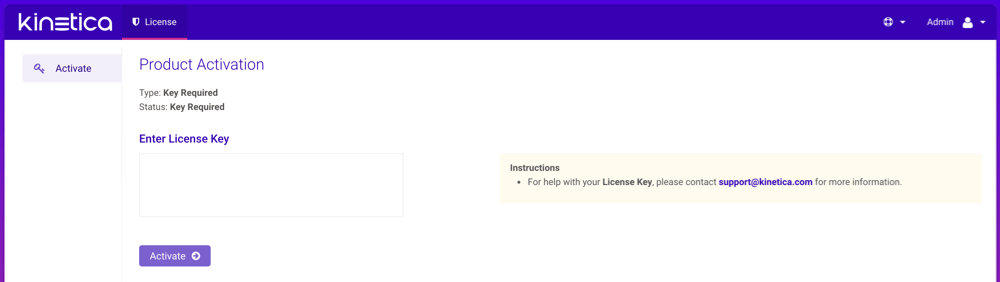 1. Enter the license key under **Enter License Key**
2. When complete, click **Activate**, then confirm the activation
3. At the **Setup Wizard** page, configure the system basics:
1. Enter the **IP Address** and number of **GPUs** (if any)
for each server in the cluster
2. Optionally, select the **Public Head IP Address** checkbox and
update the address as necessary
3. The license key under **Configure License Key** should already be
populated
4. When complete, click **Save**
For additional configuration options, see the [Configuration Reference](/content/config#cr-label).
4. Start the system. This will start all *Kinetica* processes on the
*head node*, and if in a clustered environment, the corresponding processes
on the *worker nodes*.
1. Click **Admin** on the left menu
2. Click **Start**.
5. See [Changing the Administrator Password](/content/admin/changing_password) for instructions on updating the
administration account's password.
Skip ahead to [Passwordless SSH](/content/install/package#passwordless-ssh).
#### Console Initialization
System configuration is done primarily through the configuration file
/opt/gpudb/core/etc/gpudb.conf, and while all nodes in a cluster have
this file, only the copy on the *head node* needs to be modified.
For details on the parameters used in this section, see [Configuration Reference](/content/config).
Only edit the /opt/gpudb/core/etc/gpudb.conf on the
*head node*. Editing the file on *worker nodes* is not supported and may
lead to unexpected results.
1. Log in to the *head node* and open /opt/gpudb/core/etc/gpudb.conf
in an editor.
2. Specify the configuration for each host in the cluster. In this example,
there are two servers with three *ranks* on the first and two *ranks* on the
second:
```
host0.address = 172.123.45.67
host0.public_address = 172.123.45.67
host0.host_manager_public_url = http://172.123.45.67:9300
host0.ram_limit = 6769400000
host0.gpus =
host0.accepts_failover = true
host1.address = 172.123.45.68
host1.public_address = 172.123.45.68
host1.host_manager_public_url = http://172.123.45.68:9300
host1.ram_limit = 6769400000
host1.gpus =
host1.accepts_failover = true
rank0.host = host0
rank1.host = host0
rank2.host = host0
rank3.host = host1
rank4.host = host1
```
3. For *CUDA* builds, the GPUs need to be assigned to *ranks*. To display the
installed GPUs and their status run:
```
nvidia-smi
```
If the program is not installed or doesn't run, see [Nvidia Drivers](/content/install/package#install-nvidia-drivers).
Once the number of GPUs on each server has been established, enter them into the
configuration file by associated *rank*. In this example, there are two
servers with a GPU assigned to each of two *ranks* per host (none for *rank0*):
```
rank0.gpu = 0 # This GPU can be shared with a worker rank, typically rank 1.
rank1.taskcalc_gpu = 0
rank2.taskcalc_gpu = 1
rank3.taskcalc_gpu = 0 # On new host, restart at 0
rank4.taskcalc_gpu = 1
```
4. For non-*CUDA* builds, the Numa CPUs need to be assigned to *ranks*. To display
the Numa nodes, run:
```
numactl -H
```
Once the number of Numa nodes on each server has been established, enter them
into the configuration file by associated *rank*. In this example, there are
two servers with a Numa node assigned to each of two *ranks* per host (none for
*rank0*):
```
rank0.numa_node = # Preferring a node for the head node HTTP server is often not necessary.
rank1.base_numa_node = 0
rank2.base_numa_node = 1
rank3.base_numa_node = 0 # On new host, restart at 0
rank4.base_numa_node = 1
rank1.data_numa_node = 0
rank2.data_numa_node = 1
rank3.data_numa_node = 0 # On new host, restart at 0
rank4.data_numa_node = 1
```
5. Set the license key:
```
license_key = ...
```
6. Optionally, enable the text search capability:
```
enable_text_search = true
```
Text search is required if [KML](/content/ml/concepts)
usage is desired.
7. Determine the directory in which database files will be stored. It should
meet the following criteria:
* Available disk space that is 4x memory
* Writable by the `gpudb` user
* Consist of raided SSDs
* Not be part of a network share or NFS mount
8. Enter the database file directory path into the configuration:
```
persist_directory = /opt/gpudb/persist
```
For additional configuration options, see the [Configuration Reference](/content/config#cr-label).
9. Save the file.
10. Start the `gpudb` service. This will start all *Kinetica* processes on the
*head node*, and if in a clustered environment, processes on the
*worker nodes*:
```
service gpudb start
```
11. Log into the admin application and
[change the administration account's default password](/content/admin/changing_password).
### Passwordless SSH
If *Kinetica* is installed in a clustered environment, configuring passwordless
SSH will make management considerably easier. Run the following command on the
*head node* to set up passwordless *SSH* between the *head node* and the
*worker nodes* for the `gpudb` users created during deployment:
```
sudo /opt/gpudb/core/bin/gpudb_hosts_ssh_copy_id.sh
```
If necessary, you can copy SSH public keys for non-`gpudb` users to all the
hosts in a cluster (made available with `gpudb_hosts_addresses.sh`) using the
`ssh-copy-id` tool that is part of OpenSSH:
```
ssh-copy-id -i ~/.ssh/ @
```
### Starting Kinetica
See [Managing All Services](/content/admin/services#manage-all) for the command-line reference for starting and
stopping Kinetica services.
## Validation
To validate that *Kinetica* has been installed and started properly, you can
perform the following tests.
### Curl Test
To ensure that *Kinetica* has started (you may have to wait a moment while the
system initializes), you can run `curl` on the *head node* to check if
the server is responding and port is available with respect to any running
firewalls:
```
$ curl localhost:9191
Kinetica is running!
```
### API Test
You can also run a test to ensure that the API is responding properly. There is
an *admin simulator* project in *Python* provided with the *Python* API, which
pulls statistics from the *Kinetica* instance. Running this on the *head node*,
passing in the appropriate `` & ``, you should see:
```
$ /opt/gpudb/bin/gpudb_python /opt/gpudb/kitools/gadmin_sim.py -u -p --table --summary
+-----------------+--------------------------------+----------------------+----------------------+-------+
| Schema | Table/View | Records | Type ID | TTL |
+=================+================================+======================+======================+=======+
| SYSTEM | | 1 | | |
| SYSTEM | ITER | 1 | UNSET_TYPE_ID | -1 |
+-----------------+--------------------------------+----------------------+----------------------+-------+
+---------------------------+----------------------+
| Object Type | Count |
+===========================+======================+
| Schemas | 1 |
| Tables & Views | 1 |
| Records | 1 |
| Records + Track Elements | 1 |
+---------------------------+----------------------+
```
### GAdmin Status Test
The administrative interface itself can be used to validate that the system is
functioning properly. Simply log into [GAdmin](/content/admin/gadmin).
Browse to **Dashboard** to view the status of the overall system and
**Ranks** to view the status breakdown by *rank*.
### Ingest/Read Test
After verifying *Kinetica* has started and its components work, you should
confirm ingesting and reading data works as expected.
1. Navigate to the **Demo** tab on the **Cluster** page.
2. Click **Load Sample Data** under the **NYC Taxi** section,
then click **Load** to confirm.
3. Once the data is finished loading, click **View Loaded Data**. The
data should be available in the `nyctaxi` [table](/content/concepts/tables)
located in the `demo` [schema](/content/concepts/schemas).
If [Reveal](/content/bi/reveal) is enabled:
1. Navigate to:
```
http://:8088/
```
2. Log into *Reveal* and [change the administration account's default password](/content/security/reveal#change-password-reveal).
3. Click **NYC Taxi** under **Dashboards**. The default NYC Taxi
dashboard should load.
## Core Utilities
*Kinetica* comes packaged with many helpful server and support executables that
can be found in `/opt/gpudb/core/bin/` and `/opt/gpudb/bin`. Note that any
of the `gpudb_hosts_*.sh` scripts will operate on the hosts specified in
`gpudb.conf`. Run any of the following with the `-h` option for usage
information.
For most of the utilities that use passwordless SSH, an AWS PEM
file can be specified instead using the `-i` option (with the exception
being the `gpudb_hosts_persist_*` scripts). If passwordless SSH is not
setup and no PEM file is specified, you will be prompted for a password
on each host.
### Environment Configuration and Tools
Some of the most commonly used and important utilities are also available in the
`/opt/gpudb/bin` directory.
This directory also contains the [KI Tools suite](/content/tools)
| Utility / Script | Uses Passwordless SSH | Description |
| --------------------------------- | --------------------- | ------------------------------------------------------------------------------------------------------------------------------------------------------------------------------------------------------------------------------------------------------------------------------------------------------------------------------------------------------------------------------------------------------------- |
| `gpudb_alter_password` | No | Script to change a given user's password |
| `gpudb_env` | No | Utility to run a program and its given arguments after setting the `PATH`, `LD_LIBRARY_PATH`, `PYTHON_PATH`, and others to the appropriate `/opt/gpudb/` directories. Use this script or `/opt/gpudb/bin/gpudb_python` to correctly setup the environment to run *Kinetica's* packaged *Python* version. You can also run `source /opt/gpudb/core/bin/gpudb_env.sh` to have the current environment updated. |
| `gpudb_pip` | Yes | Script to run *Kinetica's* packaged `pip` version. Runs on all hosts. This can be used in place of `pip`, e.g., `/opt/gpudb/bin/gpudb_pip install gpudb` |
| `gpudb_python` | No | Script to correctly setup the environment to run *Kinetica's* packaged *Python* version. This can be used in place of the `python` command, e.g., `/opt/gpubd/bin/gpudb_python my_python_file.py` |
| `gpudb_udf_distribute_thirdparty` | No | Utility to mirror the local `/opt/gpudb/udf/thirdparty` to remote hosts. Creates a dated backup on the remote host before copying |
### Helper Scripts
Additional helper scripts and utilities are available in
`/opt/gpudb/core/bin`.
| Utility / Script | Uses Passwordless SSH | Description |
| --------------------------------------- | --------------------- | -------------------------------------------------------------------------------------------------------------------------------------------------------------------------------------------------------------------------------------------------------------------------------------------------------------------------------------------------------------------------------------------------------------------------------------------------------------------------------------------------------------------------------------- |
| `gpudb` | No | Run as `gpudb` user or root. The *Kinetica* system start/restart/stop/status script |
| `gpudb_alter_password.py` | No | Script to change a given user's password |
| `gpudb_cluster_cuda` | No | Server executable for CUDA clusters. Displays version and configuration information. This should only be run by the `gpudb` executable (see above). |
| `gpudb_cluster_intel` | No | Server executable for *Intel* clusters. Displays version and configuration information. This should only be run by the `gpudb` executable (see above). |
| `gpudb_conf_parser.py` | No | Run using `/opt/gpudb/bin/gpudb_python`. Utility for parsing the `/opt/gpudb/core/etc/gpudb.conf` file and printing the settings and values. |
| `gpudb_config_compare.py` | No | Script to compare two configuration files: a "modified" configuration file and a "baseline" configuration file. The script can also merge the files after outputting the diff. The merged file will use the "modified" file's settings values if the "modified" configuration settings match the "baseline" configuration settings; if a setting value is present in the "modified" file but **not** in the "baseline" file, the "baseline" setting value will be used. Supports `.ini`, `.conf`, `.config`, `.py`, and `.json` files. |
| `gpudb_decrypt.sh` | No | Utility for decrypting text encrypted by `gpudb_encrypt.sh`. See [Obfuscating Plain-Text Passwords](/content/security/sec_hardening) for details. |
| `gpudb_disk_mount_azure.sh` | No | Utility used for attaching and detaching data volumes for Kinetica clusters running in Microsoft Azure. |
| `gpudb_encrypt.sh` | No | Utility for encrypting text. See [Obfuscating Plain-Text Passwords](/content/security/sec_hardening) for details. |
| `gpudb_env.sh` | No | Utility to run a program and its given arguments after setting the `PATH`, `LD_LIBRARY_PATH`, `PYTHON_PATH`, and others to the appropriate `/opt/gpudb/` directories. Use this script or `/opt/gpudb/bin/gpudb_python` to correctly setup the environment to setup the environment to run *Kinetica's* packaged *Python* version. You can also run `source /opt/gpudb/core/bin/gpudb_env.sh` to have the current environment updated. |
| `gpudb_file_integrity_check.py` | No | Utility to test the consistency of the `/opt/gpudb/persist` directory |
| `gpudb_generate_key.sh` | No | Utility for generating an encryption key. See [Obfuscating Plain-Text Passwords](/content/security/sec_hardening) for details. |
| `gpudb_host_manager` | No | The host daemon process that starts and manages any *Kinetica* processes. |
| `gpudb_hosts_addresses.sh` | Yes | Prints all the unique hostnames (or IPs) specified in `gpudb.conf` |
| `gpudb_hosts_diff_file.sh` | Yes | Run as `gpudb` user or root. Utility to diff a given file from the current machine to the specified destination file on one or more hosts |
| `gpudb_hosts_logfile_cleanup.sh` | Yes | Run as `gpudb` user or root. Script to delete old log files and optionally keep the last *n* logs |
| `gpudb_hosts_persist_clear.sh` | Yes | Run as `gpudb` user or root. Script to clear the database persist files (location specified in `gpudb.conf`)
1. Enter the license key under **Enter License Key**
2. When complete, click **Activate**, then confirm the activation
3. At the **Setup Wizard** page, configure the system basics:
1. Enter the **IP Address** and number of **GPUs** (if any)
for each server in the cluster
2. Optionally, select the **Public Head IP Address** checkbox and
update the address as necessary
3. The license key under **Configure License Key** should already be
populated
4. When complete, click **Save**
For additional configuration options, see the [Configuration Reference](/content/config#cr-label).
4. Start the system. This will start all *Kinetica* processes on the
*head node*, and if in a clustered environment, the corresponding processes
on the *worker nodes*.
1. Click **Admin** on the left menu
2. Click **Start**.
5. See [Changing the Administrator Password](/content/admin/changing_password) for instructions on updating the
administration account's password.
Skip ahead to [Passwordless SSH](/content/install/package#passwordless-ssh).
#### Console Initialization
System configuration is done primarily through the configuration file
/opt/gpudb/core/etc/gpudb.conf, and while all nodes in a cluster have
this file, only the copy on the *head node* needs to be modified.
For details on the parameters used in this section, see [Configuration Reference](/content/config).
Only edit the /opt/gpudb/core/etc/gpudb.conf on the
*head node*. Editing the file on *worker nodes* is not supported and may
lead to unexpected results.
1. Log in to the *head node* and open /opt/gpudb/core/etc/gpudb.conf
in an editor.
2. Specify the configuration for each host in the cluster. In this example,
there are two servers with three *ranks* on the first and two *ranks* on the
second:
```
host0.address = 172.123.45.67
host0.public_address = 172.123.45.67
host0.host_manager_public_url = http://172.123.45.67:9300
host0.ram_limit = 6769400000
host0.gpus =
host0.accepts_failover = true
host1.address = 172.123.45.68
host1.public_address = 172.123.45.68
host1.host_manager_public_url = http://172.123.45.68:9300
host1.ram_limit = 6769400000
host1.gpus =
host1.accepts_failover = true
rank0.host = host0
rank1.host = host0
rank2.host = host0
rank3.host = host1
rank4.host = host1
```
3. For *CUDA* builds, the GPUs need to be assigned to *ranks*. To display the
installed GPUs and their status run:
```
nvidia-smi
```
If the program is not installed or doesn't run, see [Nvidia Drivers](/content/install/package#install-nvidia-drivers).
Once the number of GPUs on each server has been established, enter them into the
configuration file by associated *rank*. In this example, there are two
servers with a GPU assigned to each of two *ranks* per host (none for *rank0*):
```
rank0.gpu = 0 # This GPU can be shared with a worker rank, typically rank 1.
rank1.taskcalc_gpu = 0
rank2.taskcalc_gpu = 1
rank3.taskcalc_gpu = 0 # On new host, restart at 0
rank4.taskcalc_gpu = 1
```
4. For non-*CUDA* builds, the Numa CPUs need to be assigned to *ranks*. To display
the Numa nodes, run:
```
numactl -H
```
Once the number of Numa nodes on each server has been established, enter them
into the configuration file by associated *rank*. In this example, there are
two servers with a Numa node assigned to each of two *ranks* per host (none for
*rank0*):
```
rank0.numa_node = # Preferring a node for the head node HTTP server is often not necessary.
rank1.base_numa_node = 0
rank2.base_numa_node = 1
rank3.base_numa_node = 0 # On new host, restart at 0
rank4.base_numa_node = 1
rank1.data_numa_node = 0
rank2.data_numa_node = 1
rank3.data_numa_node = 0 # On new host, restart at 0
rank4.data_numa_node = 1
```
5. Set the license key:
```
license_key = ...
```
6. Optionally, enable the text search capability:
```
enable_text_search = true
```
Text search is required if [KML](/content/ml/concepts)
usage is desired.
7. Determine the directory in which database files will be stored. It should
meet the following criteria:
* Available disk space that is 4x memory
* Writable by the `gpudb` user
* Consist of raided SSDs
* Not be part of a network share or NFS mount
8. Enter the database file directory path into the configuration:
```
persist_directory = /opt/gpudb/persist
```
For additional configuration options, see the [Configuration Reference](/content/config#cr-label).
9. Save the file.
10. Start the `gpudb` service. This will start all *Kinetica* processes on the
*head node*, and if in a clustered environment, processes on the
*worker nodes*:
```
service gpudb start
```
11. Log into the admin application and
[change the administration account's default password](/content/admin/changing_password).
### Passwordless SSH
If *Kinetica* is installed in a clustered environment, configuring passwordless
SSH will make management considerably easier. Run the following command on the
*head node* to set up passwordless *SSH* between the *head node* and the
*worker nodes* for the `gpudb` users created during deployment:
```
sudo /opt/gpudb/core/bin/gpudb_hosts_ssh_copy_id.sh
```
If necessary, you can copy SSH public keys for non-`gpudb` users to all the
hosts in a cluster (made available with `gpudb_hosts_addresses.sh`) using the
`ssh-copy-id` tool that is part of OpenSSH:
```
ssh-copy-id -i ~/.ssh/ @
```
### Starting Kinetica
See [Managing All Services](/content/admin/services#manage-all) for the command-line reference for starting and
stopping Kinetica services.
## Validation
To validate that *Kinetica* has been installed and started properly, you can
perform the following tests.
### Curl Test
To ensure that *Kinetica* has started (you may have to wait a moment while the
system initializes), you can run `curl` on the *head node* to check if
the server is responding and port is available with respect to any running
firewalls:
```
$ curl localhost:9191
Kinetica is running!
```
### API Test
You can also run a test to ensure that the API is responding properly. There is
an *admin simulator* project in *Python* provided with the *Python* API, which
pulls statistics from the *Kinetica* instance. Running this on the *head node*,
passing in the appropriate `` & ``, you should see:
```
$ /opt/gpudb/bin/gpudb_python /opt/gpudb/kitools/gadmin_sim.py -u -p --table --summary
+-----------------+--------------------------------+----------------------+----------------------+-------+
| Schema | Table/View | Records | Type ID | TTL |
+=================+================================+======================+======================+=======+
| SYSTEM | | 1 | | |
| SYSTEM | ITER | 1 | UNSET_TYPE_ID | -1 |
+-----------------+--------------------------------+----------------------+----------------------+-------+
+---------------------------+----------------------+
| Object Type | Count |
+===========================+======================+
| Schemas | 1 |
| Tables & Views | 1 |
| Records | 1 |
| Records + Track Elements | 1 |
+---------------------------+----------------------+
```
### GAdmin Status Test
The administrative interface itself can be used to validate that the system is
functioning properly. Simply log into [GAdmin](/content/admin/gadmin).
Browse to **Dashboard** to view the status of the overall system and
**Ranks** to view the status breakdown by *rank*.
### Ingest/Read Test
After verifying *Kinetica* has started and its components work, you should
confirm ingesting and reading data works as expected.
1. Navigate to the **Demo** tab on the **Cluster** page.
2. Click **Load Sample Data** under the **NYC Taxi** section,
then click **Load** to confirm.
3. Once the data is finished loading, click **View Loaded Data**. The
data should be available in the `nyctaxi` [table](/content/concepts/tables)
located in the `demo` [schema](/content/concepts/schemas).
If [Reveal](/content/bi/reveal) is enabled:
1. Navigate to:
```
http://:8088/
```
2. Log into *Reveal* and [change the administration account's default password](/content/security/reveal#change-password-reveal).
3. Click **NYC Taxi** under **Dashboards**. The default NYC Taxi
dashboard should load.
## Core Utilities
*Kinetica* comes packaged with many helpful server and support executables that
can be found in `/opt/gpudb/core/bin/` and `/opt/gpudb/bin`. Note that any
of the `gpudb_hosts_*.sh` scripts will operate on the hosts specified in
`gpudb.conf`. Run any of the following with the `-h` option for usage
information.
For most of the utilities that use passwordless SSH, an AWS PEM
file can be specified instead using the `-i` option (with the exception
being the `gpudb_hosts_persist_*` scripts). If passwordless SSH is not
setup and no PEM file is specified, you will be prompted for a password
on each host.
### Environment Configuration and Tools
Some of the most commonly used and important utilities are also available in the
`/opt/gpudb/bin` directory.
This directory also contains the [KI Tools suite](/content/tools)
| Utility / Script | Uses Passwordless SSH | Description |
| --------------------------------- | --------------------- | ------------------------------------------------------------------------------------------------------------------------------------------------------------------------------------------------------------------------------------------------------------------------------------------------------------------------------------------------------------------------------------------------------------- |
| `gpudb_alter_password` | No | Script to change a given user's password |
| `gpudb_env` | No | Utility to run a program and its given arguments after setting the `PATH`, `LD_LIBRARY_PATH`, `PYTHON_PATH`, and others to the appropriate `/opt/gpudb/` directories. Use this script or `/opt/gpudb/bin/gpudb_python` to correctly setup the environment to run *Kinetica's* packaged *Python* version. You can also run `source /opt/gpudb/core/bin/gpudb_env.sh` to have the current environment updated. |
| `gpudb_pip` | Yes | Script to run *Kinetica's* packaged `pip` version. Runs on all hosts. This can be used in place of `pip`, e.g., `/opt/gpudb/bin/gpudb_pip install gpudb` |
| `gpudb_python` | No | Script to correctly setup the environment to run *Kinetica's* packaged *Python* version. This can be used in place of the `python` command, e.g., `/opt/gpubd/bin/gpudb_python my_python_file.py` |
| `gpudb_udf_distribute_thirdparty` | No | Utility to mirror the local `/opt/gpudb/udf/thirdparty` to remote hosts. Creates a dated backup on the remote host before copying |
### Helper Scripts
Additional helper scripts and utilities are available in
`/opt/gpudb/core/bin`.
| Utility / Script | Uses Passwordless SSH | Description |
| --------------------------------------- | --------------------- | -------------------------------------------------------------------------------------------------------------------------------------------------------------------------------------------------------------------------------------------------------------------------------------------------------------------------------------------------------------------------------------------------------------------------------------------------------------------------------------------------------------------------------------- |
| `gpudb` | No | Run as `gpudb` user or root. The *Kinetica* system start/restart/stop/status script |
| `gpudb_alter_password.py` | No | Script to change a given user's password |
| `gpudb_cluster_cuda` | No | Server executable for CUDA clusters. Displays version and configuration information. This should only be run by the `gpudb` executable (see above). |
| `gpudb_cluster_intel` | No | Server executable for *Intel* clusters. Displays version and configuration information. This should only be run by the `gpudb` executable (see above). |
| `gpudb_conf_parser.py` | No | Run using `/opt/gpudb/bin/gpudb_python`. Utility for parsing the `/opt/gpudb/core/etc/gpudb.conf` file and printing the settings and values. |
| `gpudb_config_compare.py` | No | Script to compare two configuration files: a "modified" configuration file and a "baseline" configuration file. The script can also merge the files after outputting the diff. The merged file will use the "modified" file's settings values if the "modified" configuration settings match the "baseline" configuration settings; if a setting value is present in the "modified" file but **not** in the "baseline" file, the "baseline" setting value will be used. Supports `.ini`, `.conf`, `.config`, `.py`, and `.json` files. |
| `gpudb_decrypt.sh` | No | Utility for decrypting text encrypted by `gpudb_encrypt.sh`. See [Obfuscating Plain-Text Passwords](/content/security/sec_hardening) for details. |
| `gpudb_disk_mount_azure.sh` | No | Utility used for attaching and detaching data volumes for Kinetica clusters running in Microsoft Azure. |
| `gpudb_encrypt.sh` | No | Utility for encrypting text. See [Obfuscating Plain-Text Passwords](/content/security/sec_hardening) for details. |
| `gpudb_env.sh` | No | Utility to run a program and its given arguments after setting the `PATH`, `LD_LIBRARY_PATH`, `PYTHON_PATH`, and others to the appropriate `/opt/gpudb/` directories. Use this script or `/opt/gpudb/bin/gpudb_python` to correctly setup the environment to setup the environment to run *Kinetica's* packaged *Python* version. You can also run `source /opt/gpudb/core/bin/gpudb_env.sh` to have the current environment updated. |
| `gpudb_file_integrity_check.py` | No | Utility to test the consistency of the `/opt/gpudb/persist` directory |
| `gpudb_generate_key.sh` | No | Utility for generating an encryption key. See [Obfuscating Plain-Text Passwords](/content/security/sec_hardening) for details. |
| `gpudb_host_manager` | No | The host daemon process that starts and manages any *Kinetica* processes. |
| `gpudb_hosts_addresses.sh` | Yes | Prints all the unique hostnames (or IPs) specified in `gpudb.conf` |
| `gpudb_hosts_diff_file.sh` | Yes | Run as `gpudb` user or root. Utility to diff a given file from the current machine to the specified destination file on one or more hosts |
| `gpudb_hosts_logfile_cleanup.sh` | Yes | Run as `gpudb` user or root. Script to delete old log files and optionally keep the last *n* logs |
| `gpudb_hosts_persist_clear.sh` | Yes | Run as `gpudb` user or root. Script to clear the database persist files (location specified in `gpudb.conf`)
**Important**: Only run this while the database is stopped. |
| `gpudb_hosts_rsync_to.sh` | Yes | Run as `gpudb` user. Script to copy files from this server to the remove servers using `rsync` |
| `gpudb_hosts_ssh_copy_id.sh` | Yes | Run as `gpudb` user or root. Script to distribute the `gpudb` user's public SSH keys to the other hosts defined in `gpudb.conf` to allow password-less SSH. This script should only be run from the head node.
**Important**: This script should be re-run after changing the host configuration to redistribute the keys |
| `gpudb_hosts_ssh_execute.sh` | Yes | Run as `gpudb` user or root. Script to execute a program with arguments on all hosts specified in `gpudb.conf`, e.g., `./gpudb_hosts_ssh_execute.sh "ps aux"` or `./gpudb_hosts_ssh_execute.sh "hostname"` |
| `gpudb_hosts_ssh_setup_passwordless.sh` | Yes | Script to add an authorized SSH key for a given user across a set of hosts. |
| `gpudb_keygen` | No | Executable to generate and print a machine key. You can use the key to obtain a license from [support@kinetica.com](mailto:support@kinetica.com) |
| `gpudb_log_plot_job_completed_time.sh` | No | Plots job completion time statistics using `gnuplot` |
| `gpudb_machine_info.sh` | No | Script to print OS config information that affects performance as well as suggestions to improve performance |
| `gpudb_migrate_persistence.py` | No | Utility to migrate data from a local persist directory into the database |
| `gpudb_nvidia_setup.sh` | No | Utility to configure the Nvidia GPU devices for best performance or restore defaults. Root permission is required to change values. Utility reports informational settings and permission errors when run as user |
| `gpudb_open_files.sh` | No | Script to print the files currently open by the database |
| `gpudb_process_monitor.py` | No | Script to check a process list against a matching regular expression and print a log to stdout when the process is started or stopped. The script can also run a program, send emails, and/or SNMP alerts when the process starts or stops. The script can be configured using a configuration file, but note that some settings can be overridden from the command line. |
| `gpudb_sysinfo.sh` | No | More information when run as root. Script to print a variety of information about the system and hardware for debugging. You can also make a `.tgz` file of the output. Rerun this program as needed to keep records of the system. Use a visual diff program to compare two or more system catalogs |
| `gpudb_udf_distribute_thirdparty.sh` | Yes | Utility to mirror the local `/opt/gpudb/udf/thirdparty` to remote hosts. Creates a dated backup on the remote host before copying |
| `gpudb_useradd.sh` | No | Script to create the `gpudb:gpudb` and `gpudb_proc:gpudb_proc` user:groups and SSH id. This script can be rerun as needed to restore the user:groups and ssh config. Be sure to rerun (on the head node only) `gpudb_hosts_ssh_copy_id.sh` to redistribute the SSH keys if desired whenever the SSH keys are changed |
## Logging
The best way to troubleshoot any issues is by searching through the available
logs. For more information on changing the format of the logs, see
[Custom Logging](/content/admin/logging). Each component in Kinetica has its own log, the
location of which is detailed below:
| Component | Log Location |
| --------------------------------------------------------------------- | ------------------------------------------------------------- |
| [Kinetica Machine Learning (KML)](/content/ml) | /opt/gpudb/kml/logs/ |
| [GAdmin (Tomcat)](/content/admin/gadmin#gadmin) | /opt/gpudb/tomcat/logs/ |
| [Graph Server](/content/graph_solver/network_graph_solver#solvers) | /opt/gpudb/graph/logs/ |
| [KAgent](/content/admin/kagent/kagent#kagent-concept) (Service) | /opt/gpudb/kagent/logs/ |
| [KAgent](/content/admin/kagent/kagent#kagent-concept) (UI) | /opt/gpudb/kagent/ui/logs/ |
| [Kinetica system logs](/content/admin/gadmin/cluster#cluster-logging) | /opt/gpudb/core/logs/ |
| [Reveal](/content/bi/reveal#reveal-label) | /opt/gpudb/connector/reveal/logs/ |
| [SQL Engine](/content/connectors/sql_guide#sql-logging) | /opt/gpudb/sql/logs/ |
| Stats Server | /opt/gpudb/kagent/stats/logs/ |
| Text Server | /opt/gpudb/text/logs/ |
## Uninstallation
Should you need to uninstall Kinetica, you'll need to shut down the system,
remove the package, and remove related files, directories, & user accounts.
1. [Stop the system](/content/admin/services#stop-sys)
2. Remove the Kinetica package from your
machine:
```bash RHEL theme={null}
sudo yum remove gpudb--
```
```bash Ubuntu theme={null}
sudo apt remove gpudb--
```
```bash SUSE theme={null}
sudo zypper remove gpudb--
```
3. Optionally, remove the *Kinetica Machine Learning (KML)* package from your
machine:
```bash RHEL theme={null}
sudo yum remove kinetica-ml
```
```bash Ubuntu theme={null}
sudo apt remove kinetica-ml
```
```bash SUSE theme={null}
sudo zypper remove kinetica-ml
```
4. Remove any user-defined **persist** directories (these directories are set
in /opt/gpudb/core/etc/gpudb.conf)
5. Clean-up all Kinetica
artifacts:
```bash theme={null}
sudo rm -rf /opt/gpudb
```
6. Remove the gpudb & gpudb\_proc users from the
machine:
```bash RHEL theme={null}
sudo userdel -r gpudb
sudo userdel -r gpudb_proc
```
```bash Ubuntu theme={null}
sudo deluser --remove-home gpudb
sudo deluser --remove-home gpudb_proc
```
```bash SUSE theme={null}
sudo userdel -r gpudb
sudo userdel -r gpudb_proc
```
7. Remove the gpudb group from the
machine:
```bash theme={null}
groupdel gpudb
```