Overview
Resource management is a feature within Kinetica designed to meet three
goals:
- Expand the operating capacity of a cluster by backing the in-memory database
with several layers of disk-based storage
- Allow the prioritization of data within those layers
- Allow the prioritization of user requests
Three components are involved in managing resources:
- Storage Tiers: Data containment layers within the database
- Tier Strategies: Data object eviction priorities within each
storage tier
- Resource Groups: Resource fencing—process scheduling priorities and other
limits imposed on a specific group of users
Within these components, there are two mechanisms for managing resources:
- Eviction: Moving data from one tier to a lower tier in order to make
room for other data to be processed
- Scheduling: Ordering work to be processed
For resource management configuration that can be performed while the database
is online, see Resource Management Usage. For configuration that must be performed while
the database is offline, see Resource Management Configuration.
Storage Tiers
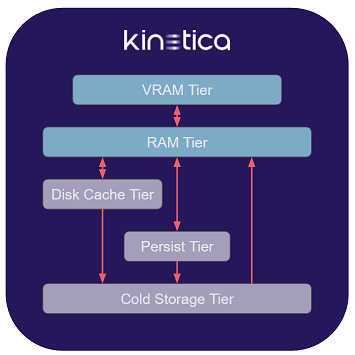
A tier is a container in which data can be stored, either on a temporary or
permanent basis. There are five basic types of tier:
Each tier is defined by an overall capacity and an expected level of
performance that is generally inversely proportional to that capacity. For
example, the VRAM Tier will usually have the smallest total memory, but be
the most performant for processing data, while the Cold Storage Tier would be
the largest tier, but the least performant.
VRAM
The VRAM Tier is composed of GPU RAM on each host. It is generally the
smallest & fastest tier. Any operations that make use of the GPU require the
data on which they are operating to be located in the VRAM Tier.
There is always one VRAM Tier in CUDA-enabled installations. It may
comprise the VRAM in multiple GPUs per host, and due to restrictions on
cross-GPU VRAM access, data stored in the tier may be temporarily duplicated
across GPUs as necessary for processing by GPU-based kernels.
For non-CUDA installations, there is no VRAM Tier, and any configuration
related to the VRAM Tier is ignored.
RAM
The RAM Tier is composed of the system memory on each host. It is generally
larger & slower than the VRAM Tier. Any operation not serviced by the GPUs
will be processed by the CPUs, and the corresponding data must be loaded in the
RAM Tier.
There is always one RAM Tier. It comprises all of the RAM on each
host that has been made available for data storage. The RAM Tier is not used
for small, non-data objects or variables that are allocated and deallocated for
program flow control or used to store metadata or other similar information.
These objects continue to use either the stack or the regular runtime memory
allocator. The RAM Tier should be sized on each host such that there is
sufficient RAM left over to handle these objects, as well as the needs of other
processes running on the same host.
RAM on a given host may be divided between NUMA nodes; in general, Kinetica
will attempt to access data stored in the RAM Tier from threads that prefer
execution on the same NUMA node, but there is no hard restriction on cross-node
access as there is with cross-GPU access to VRAM, so data stored in the
RAM Tier will not be duplicated between NUMA nodes.
Disk Cache
The Disk Cache Tier is useful as a temporary swap space for data that doesn’t
fit in RAM or VRAM.
It is also useful as the only disk-based tier that can hold
filtered views,
join views,
memory-only tables, & the backing
tables for materialized views.
These objects are often created by the system in servicing user requests for
data, but can also be created by users directly. With a supporting
Disk Cache Tier, these tables can be cached to disk when RAM is at capacity
and reloaded into RAM when needed in a subsequent operation.
It is recommended that the disk be faster than the one backing the
Persist Tier, since this tier is used as an
intermediary cache between the RAM Tier and
Persist Tier. However, given that the Disk Cache Tier, unlike the
Persist Tier, can hold non-persistable data objects, it is recommended to
make use of one irrespective of relative performance.
If the disk backing the Disk Cache Tier is not faster than the disk backing
the Persist Tier, the caching of persistent objects can be disabled to improve
performance. Since an object loaded from the Persist Tier into the RAM Tier
will already exist in the Persist Tier in its original form, it will not need
to be written to the Disk Cache Tier or re-written to the Persist Tier when
evicted from the RAM Tier. Given disks of equivalent performance backing
these two tiers, there would be no benefit in reading/writing persistent
objects from/to the Disk Cache; thus, the performance benefit in disabling the
caching of these objects.
Multiple Disk Cache Tier instances can be defined on different disks with
different capacities and performance parameters, though no instances are
required.
Persist
The Persist Tier is a single tier that contains data that survives between
database restarts. Although, like the
Disk Cache Tier, it is disk-based, its behavior
is different: data for persistent objects is always present in the
Persist Tier (or off-loaded to the
Cold Storage Tier, if configured), and will be
synchronized periodically with copies of persisted objects in the RAM Tier as
updates are made to the data.
The Persist Tier is the primary permanent storage tier, and should be sized
appropriately to contain all operational data being processed by the database.
In general, the size limit on the Persist Tier should only be
set if one or more Cold Storage Tiers are configured. Without a supporting
Cold Storage Tier to evict objects in the Persist Tier to, operations
requiring space in the Persist Tier will fail when the limit is reached.
Cold Storage
Cold Storage Tiers can be used to extend the storage capacity of the
Persist Tier for infrequently
accessed data and for spill-over when the Disk Cache Tier or Persist Tier is
at capacity.
The Cold Storage Tier is typically a much larger capacity physical disk or a
cloud-based storage system which may not be as performant as the Persist Tier
storage.
Eviction
Eviction is the forced movement of data from a higher tier to a lower tier
in order to make room for other data to be moved into that higher tier.
Evictability
Each object in the system has a level of evictability that is dependent on the
type of object it is and the available tiers below it into which it could be
evicted.
Tables can be evicted from any tier to the
tier below.
Filtered views,
join views, &
memory-only tables can be evicted
to the Disk Cache Tier, and to the
Cold Storage Tier from there, bypassing
the Persist Tier.
Any object that exists at its lowest possible tier will be considered
unevictable by the system, regardless of
eviction priority.
Tier strategy is also considered when
determining the lowest possible tier. For example, a memory-only table with
a tier strategy that contains no Disk Cache Tier or Cold Storage Tier will
have the RAM Tier as its lowest possible
tier and be unevictable from it.
Request-Based Eviction
For each user request, some amount of memory, potentially in multiple tiers,
will be required to fulfill it. The system may need to load source data into
memory, allocate memory for processing the request, and allot memory for holding
the response data. During the life of the request, the system will continually
assess memory/disk needs at each tier level to complete processing
successfully.
If, at some point, the system determines that not enough space within a given
tier exists to meet the needs of the request being processed,
request-based eviction will commence. The system will make an assessment of
all the evictable objects in that tier, based on their
eviction priority. If enough
objects can be evicted to provide the capacity for the current operation to
succeed, they will be removed. If not, the request will fail.
Since a request is handled in smaller chunks and may have many associated
operations that need to be performed, the request-based eviction process may
be invoked several times for a request received when the system is near capacity
usage in one or more tiers.
As request-based eviction can result in a great deal of data movement and
processing overhead for a user request,
watermark-based eviction can be
employed to make room for new user requests before they arrive and improve the
overall response time for users.
Watermark-Based Eviction
Watermark-based eviction is a feature designed to preemptively make space for
new requests when a system is near capacity in a given tier. The goal is to
keep enough space in each tier to avoid having a request wait for space to be
cleared via request-based eviction.
Watermark-based eviction occurs in the background, independent of user
requests.
High & low watermarks are used to govern when watermark-based evictions take
place. When the high watermark usage percentage is crossed within a tier,
the system will begin evicting objects from that tier based on their
eviction priority. The system will
continue to evict objects until the low watermark usage percentage is crossed.
Watermark-based eviction can be disabled for any tier or for any of the
configured Disk Cache Tier instances.
To configure watermark-based eviction for each tier, see
Tier-Specific Parameters under Resource Management Configuration.
Eviction Priority
As storage tiers become saturated with data objects, some objects will need to
be evicted from the tier in which they currently reside to a lower-level
tier capable of holding them, to allow other data objects take their place.
An eviction priority is the priority level of a data object within a given
tier that determines the likelihood of that object’s eviction relative to
other data objects in the same tier. Objects with the same
eviction priority will be considered in least recently used fashion for
eviction; e.g., given two objects of eviction priority 5, the one that
was used more recently will remain, while the one that was used less recently
will be evicted.
The priority levels range from 1 to 10, where:
1: the object will be among the first to be evicted9: the object will be among the last to be evicted10: the object will not be able to be evicted
An eviction priority of 1 within the VRAM Tier will cause
a data object to be evicted immediately from VRAM after use. This can have a
performance benefit, as most objects processed on the GPU will not be
immediately reprocessed and make use of the cached object. It is often more
performant to keep the VRAM Tier free for new data to process than to keep
already-processed data in the tier to be evicted subsequently, when needed.
Examples
The eviction policy between
request-based eviction &
watermark-based eviction differs in that the
former will only evict if the target capacity can be reached, while the latter
will continuously evict until the target capacity is reached.
Consider a tier with a capacity of 100GB containing four objects having the
following priorities & sizes and a remaining capacity of 10GB:
| Name | Priority | Size |
|---|
| A | 1 | 30GB |
| B | 4 | 10GB |
| C | 4 | 20GB |
| D | 10 | 30GB |
Request-Based Eviction Processing
If a request for 50GB of capacity is received, the system would determine that
the remaining capacity of 10% would be insufficient to fulfill the request and
request-based eviction would be triggered.
The object with eviction priority 1 (A) will be considered first for
eviction. If removed, a total capacity of 40GB would be free. Since that
doesn’t meet the required 50GB, the least recently used object of
eviction priority 4 would be evicted. In this case, the removal of either
B or C would result in enough capacity for the request, but whichever was
used less recently would be added to the eviction set. At that point, the
system would have an eviction set of the necessary size, so all objects in the
set would be evicted and the request would proceed.
If, instead, a request for 80GB of capacity is received, the accumulation of
evictable objects into an eviction set would take place in the same way.
However, once A, B, & C were added to the eviction set, there would only
be 70GB free. At that point, since the only remaining object, D, has an
eviction priority of 10 (and is therefore unevictable), the system would
be unable to find enough space to handle the request. The request would be
rejected immediately, and no evictions would take place.
Watermark-Based Eviction Processing
Consider the same scenario with objects A, B, C, & D totaling 90GB of
the 100GB available, and with configured high & low watermarks of 95% and 50%,
respectively.
If a request for 7GB of capacity is received with an eviction priority of
9, it would be processed successfully and leave the total usage at 97% of
capacity:
| Name | Priority | Size |
|---|
| A | 1 | 30GB |
| B | 4 | 10GB |
| C | 4 | 20GB |
| D | 10 | 30GB |
| E | 9 | 7GB |
1 (A) will be considered first.
However, in this scheme, it would be evicted immediately, lowering the total
usage to 67%. Next, the less recently used object of the two with
eviction priority 4 would be considered.
If object B were less recently used than C, it would be evicted and lower
usage to 57%. Since the low watermark would still not have been crossed, object
C would also be evicted and lower total usage to 37%. At this point,
watermark-based eviction would cease.
If object C were less recently used of the two, it would be evicted and lower
usage to 47%. The low watermark would have been crossed, and
watermark-based eviction would cease.
Data Movement
Upward
Data is loaded from each tier below the RAM Tier directly into the
RAM Tier as the need arises in servicing user requests. For operations
requiring GPU processing, data is moved from the RAM Tier into the
VRAM Tier.
Downward
Regardless of tier, eviction will always
cause an evictable object to be
removed from its present tier or to be moved to a lower tier. However,
whether the object is moved to a lower tier or simply removed from the
existing one is dependent on the tier configuration as well as some additional
circumstances outlined below:
-
VRAM Tier: objects with
eviction priority 1 are
removed from the tier immediately after use; objects with
eviction priorities greater than 1 are removed as they are evicted
-
RAM Tier: by default, only
persistable objects are evictable from the RAM Tier and are removed when
evicted, since they will already exist in the Persist Tier; if a
Disk Cache Tier is configured and is part of an object’s
tier strategy, the movement rules
are amended as follows, based on the object’s ability to be persisted:
- Persistable objects (tables, result tables marked as persistent, etc.) are
moved to the Disk Cache Tier, if caching of persistable objects in the
Disk Cache Tier is enabled.
See Disk Cache Tier
for configuration details.
- Non-persistable objects (joins, projections, memory-only tables, etc.) are
moved to the Disk Cache Tier.
-
Disk Cache Tier: persistable objects
are removed from the Disk Cache Tier when evicted; if a
Cold Storage Tier is configured and is part of an object’s tier strategy,
non-persistable objects are moved to the Cold Storage Tier when evicted
-
Persist Tier: if a
Cold Storage Tier is configured, objects will be moved to it
-
Cold Storage Tier: data objects are
not evictable from the Cold Storage Tier
Expiration
Any time an object expires (see TTL) or is deleted, all
associated data objects in all tiers will be deleted.
On Startup
When the database is started, table data are loaded from the Persist Tier into
the RAM Tier. Table data with higher eviction priorities in the RAM Tier
are loaded before those with lower eviction priorities.
Loading continues until the midpoint (average) of the
high & low watermarks of the RAM Tier is
reached. Any high & low watermarks defined for individual ranks within the
RAM Tier will be used for data contained within those ranks. If
watermark-based eviction is disabled, loading will continue until the
capacity of the RAM Tier is reached.
Tier Strategies
A tier strategy is the association of data object priorities to a set of
tiers of distinct types. Any data object assigned to a given tier strategy
will take on the priority level defined by the tier strategy for the tier in
which it resides.
The strategy is formed by chaining together the tier types and their
respective eviction priorities. Any given
tier may appear no more than once in the chain. This means that for a system
with multiple Disk Cache Tier instances and/or Cold Storage Tier instances,
only one of each may appear in a given tier strategy.
For instance, a table can be assigned the following tier strategy, given an
installation with a Disk Cache Tier instance DISK2 and a
Cold Storage Tier instance COLD5:
((VRAM 1, RAM 5, DISK2 3, PERSIST 9, COLD5))
| Tier | Priority | Implication |
|---|
| VRAM | 1 | Lowest priority within VRAM; automatically evicted after use |
| RAM | 5 | Average priority within RAM; evicted when RAM size limit is exceeded and no objects with priority 1 - 4 exist to be evicted first |
| DISK2 | 3 | Below-average priority within Disk Cache Tier DISK2; no effect in relation to other Disk Cache Tier instances |
| PERSIST | 9 | Highest evictable priority within persistent storage; among the last to be evicted to Cold Storage Tier COLD5 |
| COLD5 | | Uses COLD5 as final backing tier; no priority needs to be set, as no eviction from this tier can take place |
Tier Strategy Predicates
A tier strategy predicate offers conditional tiering for a table and for its
columns, individually, if needed. It is an expression, associated with a
tier strategy, that when evaluated to true for a given set of data, will
apply the associated tier strategy to the matching data set.
Several tier strategy predicates and their associated tier strategies can be
chained together to form a tier strategy clause, which will be evaluated in
sequence to determine the appropriate tier strategy to apply. The last
tier strategy in the clause can have the tier strategy predicate omitted in
order to make it the default if no other expressions are matched. If no default
or tier strategy clause is specified for a column, the table’s tier strategy
is used. If no default is specified for a table, the
default tier strategy
is used.
For instance, consider the following tier strategy, applied to a table with a
timestamp column named last_seen, a positive integer column named id,
and a string column named name:
(
    (VRAM 1, RAM 9) WHERE last_seen > TIMESTAMPADD(DAY, -3, NOW()),
    (VRAM 1, RAM 8, DISK2 7)
),
(
    COLUMNS id, name
        (VRAM 2, RAM 10) WHERE last_seen > TIMESTAMPADD(MINUTE, -1, NOW())
)
id & name column data for records with updates in
the last minute will have their eviction priorities elevated to allow caching
in the VRAM Tier and to prevent eviction entirely from the RAM Tier.
Specifically, the following tier strategies would be applied:
| Last Seen | Column | Tier Strategy |
|---|
| < 1 minute ago | id | VRAM 2, RAM 10 |
| name | VRAM 2, RAM 10 |
| <other columns> | VRAM 1, RAM 9 |
| > 1 minute ago but < 3 days ago | id | VRAM 1, RAM 9 |
| name | VRAM 1, RAM 9 |
| <other columns> | VRAM 1, RAM 9 |
| > 3 days ago | id | VRAM 1, RAM 8, DISK2 7 |
| name | VRAM 1, RAM 8, DISK2 7 |
| <other columns> | VRAM 1, RAM 8, DISK2 7 |
Resource Groups
Resource groups are used to enforce simultaneous memory, thread, & priority
limits for one or more users. A user can have a resource group assigned
directly, or can be assigned a role that has been assigned a resource group.
The configurable limits for users within each resource group are:
- VRAM Tier maximum memory consumption
- RAM Tier maximum memory consumption
- Maximum CPU concurrency that can be requested for the execution of jobs
- Maximum scheduling priority
that can be requested for the execution of jobs
- Maximum eviction priority that
can be assigned to objects
Ranking and Effective Resource Groups
Since a user may have multiple roles and each role may have an associated
resource group, a user may ultimately be assigned multiple resource groups.
In this case, an effective resource group is determined by the system,
depending on whether the group is assigned directly or via role, and by the
relative ranking of the indirectly-assigned resource groups.
The ranking of a resource group is assigned during its creation and can be
altered at any time. The ranking applies system-wide; i.e., there is no
per-user ranking of resource groups. The resource group with the highest
ranking will have a rank of 1.
The following method is used to determine a user’s effective resource group:
- If a user has a direct resource group assignment, this will be the
effective resource group.
- If a user has no direct resource group assignment, but does have one or more
roles with associated resource groups, the relative rankings of these
resource groups will be assessed, and the one with the highest ranking will
be the effective resource group.
- If a user has no direct or indirect (via role) resource groups assigned,
the default resource group
will be the effective resource group.
A user with more than one resource group assigned cannot choose
which resource group to use, nor will the user be given a composite of the
assigned resource groups; e.g., the maximum value of all resource limits
across the user’s assigned groups.
Scheduling
Each user request is broken down into one or more component tasks, which the
database must complete to return an appropriate response. These tasks are
scheduled by the system for execution in the order they were received, but may
be executed out-of-order, depending on resource availability and each task’s
scheduling priority.
Scheduling Priority
A scheduling priority is assigned to each user request and is used by the
system to determine the order in which it services those requests. The higher
the priority, the sooner the request will be serviced, relative to other
requests.
The scheduling priority of a request is dictated by the requesting user’s
resource group. Once a request is
made, the scheduling priority of the user’s resource group is assigned to
it. As the request is broken down into tasks over the course of its processing,
scheduling priorities will be assigned to those tasks, as they are created.
Because of this delayed assignment of priority, any change to the
scheduling priority of a user’s resource group may impact the effective
scheduling priority of the user’s currently running requests as well as those
of that user’s future requests.
There is no guarantee of ordering of requests being serviced for requests of the
same scheduling priority.