AlterDatasinkRequest Class Reference
A set of parameters for Kinetica.alterDatasink. More...
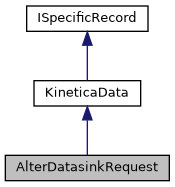
 Inheritance diagram for AlterDatasinkRequest:
 Collaboration diagram for AlterDatasinkRequest: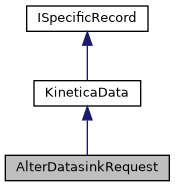
Classes | |
| struct | DatasinkUpdatesMap |
| A set of string constants for the parameter datasink_updates_map. More... | |
Public Member Functions | |
| AlterDatasinkRequest () | |
| Constructs an AlterDatasinkRequest object with default parameters. More... | |
| AlterDatasinkRequest (string name, IDictionary< string, string > datasink_updates_map, IDictionary< string, string > options) | |
| Constructs an AlterDatasinkRequest object with the specified parameters. More... | |
| Public Member Functions inherited from KineticaData | |
| KineticaData (KineticaType type) | |
| Constructor from Kinetica Type More... | |
| KineticaData (System.Type type=null) | |
| Default constructor, with optional System.Type More... | |
| object | Get (int fieldPos) |
| Retrieve a specific property from this object More... | |
| void | Put (int fieldPos, object fieldValue) |
| Write a specific property to this object More... | |
Properties | |
| string | name [get, set] |
| Name of the data sink to be altered. More... | |
| IDictionary< string, string > | datasink_updates_map = new Dictionary<string, string>() [get, set] |
| Map containing the properties of the data sink to be updated. More... | |
| IDictionary< string, string > | options = new Dictionary<string, string>() [get, set] |
| Optional parameters. More... | |
| Properties inherited from KineticaData | |
| Schema | Schema [get] |
| Avro Schema for this class More... | |
| Properties inherited from Avro.Specific.ISpecificRecord | |
| Schema | Schema [get] |
Additional Inherited Members | |
| Static Public Member Functions inherited from KineticaData | |
| static ? RecordSchema | SchemaFromType (System.Type t, KineticaType? ktype=null) |
| Create an Avro Schema from a System.Type and a KineticaType. More... | |
Detailed Description
A set of parameters for Kinetica.alterDatasink.
Alters the properties of an existing data sink.
Definition at line 17 of file AlterDatasink.cs.
Constructor & Destructor Documentation
◆ AlterDatasinkRequest() [1/2]
|
inline |
Constructs an AlterDatasinkRequest object with default parameters.
Definition at line 723 of file AlterDatasink.cs.
◆ AlterDatasinkRequest() [2/2]
|
inline |
Constructs an AlterDatasinkRequest object with the specified parameters.
- Parameters
-
name Name of the data sink to be altered. Must be an existing data sink. datasink_updates_map Map containing the properties of the data sink to be updated. Error if empty. - DESTINATION: Destination for the output data in format 'destination_type://path[:port]'. Supported destination types are 'azure', 'gcs', 'hdfs', 'http', 'https', 'jdbc', 'kafka', and 's3'.
- CONNECTION_TIMEOUT: Timeout in seconds for connecting to this sink.
- WAIT_TIMEOUT: Timeout in seconds for waiting for a response from this sink.
- CREDENTIAL: Name of the credential object to be used in this data sink.
- S3_BUCKET_NAME: Name of the Amazon S3 bucket to use as the data sink.
- S3_REGION: Name of the Amazon S3 region where the given bucket is located.
-
S3_VERIFY_SSL: Whether to verify SSL connections. Supported values:
- TRUE: Connect with SSL verification.
- FALSE: Connect without verifying the SSL connection; for testing purposes, bypassing TLS errors, self-signed certificates, etc.
-
S3_USE_VIRTUAL_ADDRESSING: Whether to use virtual addressing when referencing the Amazon S3 sink. Supported values:
- TRUE: The requests URI should be specified in virtual-hosted-style format where the bucket name is part of the domain name in the URL.
- FALSE: Use path-style URI for requests.
- S3_AWS_ROLE_ARN: Amazon IAM Role ARN which has required S3 permissions that can be assumed for the given S3 IAM user.
- S3_ENCRYPTION_CUSTOMER_ALGORITHM: Customer encryption algorithm used encrypting data.
- S3_ENCRYPTION_CUSTOMER_KEY: Customer encryption key to encrypt or decrypt data.
- S3_ENCRYPTION_TYPE: Server side encryption type.
- S3_KMS_KEY_ID: KMS key.
- HDFS_KERBEROS_KEYTAB: Kerberos keytab file location for the given HDFS user. This may be a KIFS file.
- HDFS_DELEGATION_TOKEN: Delegation token for the given HDFS user.
- HDFS_USE_KERBEROS: Use kerberos authentication for the given HDFS cluster. Supported values: The default value is FALSE.
- AZURE_STORAGE_ACCOUNT_NAME: Name of the Azure storage account to use as the data sink, this is valid only if tenant_id is specified.
- AZURE_CONTAINER_NAME: Name of the Azure storage container to use as the data sink.
- AZURE_TENANT_ID: Active Directory tenant ID (or directory ID).
- AZURE_SAS_TOKEN: Shared access signature token for Azure storage account to use as the data sink.
- AZURE_OAUTH_TOKEN: OAuth token to access given storage container.
-
AZURE_USE_VIRTUAL_ADDRESSING: Whether to use virtual addressing when referencing the Azure source. Supported values:
- TRUE: The requests URI should be specified in virtual-hosted-style format where the bucket name is part of the domain name in the URL.
- FALSE: Use path-style URI for requests.
- GCS_BUCKET_NAME: Name of the Google Cloud Storage bucket to use as the data sink.
- GCS_PROJECT_ID: Name of the Google Cloud project to use as the data sink.
- GCS_SERVICE_ACCOUNT_KEYS: Google Cloud service account keys to use for authenticating the data sink.
- JDBC_DRIVER_JAR_PATH: JDBC driver jar file location. This may be a KIFS file.
- JDBC_DRIVER_CLASS_NAME: Name of the JDBC driver class.
- KAFKA_URL: The publicly-accessible full path URL to the kafka broker, e.g., 'http://172.123.45.67:9300'.
- KAFKA_TOPIC_NAME: Name of the Kafka topic to use for this data sink, if it references a Kafka broker.
- ANONYMOUS: Create an anonymous connection to the storage provider–DEPRECATED: this is now the default. Specify use_managed_credentials for non-anonymous connection. Supported values: The default value is TRUE.
- USE_MANAGED_CREDENTIALS: When no credentials are supplied, we use anonymous access by default. If this is set, we will use cloud provider user settings. Supported values: The default value is FALSE.
- USE_HTTPS: Use HTTPS to connect to datasink if true, otherwise use HTTP. Supported values: The default value is TRUE.
- MAX_BATCH_SIZE: Maximum number of records per notification message. The default value is '1'.
- MAX_MESSAGE_SIZE: Maximum size in bytes of each notification message. The default value is '1000000'.
-
JSON_FORMAT: The desired format of JSON encoded notifications message. Supported values:
- FLAT: A single record is returned per message.
- NESTED: Records are returned as an array per message.
- SKIP_VALIDATION: Bypass validation of connection to this data sink. Supported values: The default value is FALSE.
- SCHEMA_NAME: Updates the schema name. If SCHEMA_NAME doesn't exist, an error will be thrown. If SCHEMA_NAME is empty, then the user's default schema will be used.
options Optional parameters.
Definition at line 1129 of file AlterDatasink.cs.
Property Documentation
◆ datasink_updates_map
|
getset |
Map containing the properties of the data sink to be updated.
- DESTINATION: Destination for the output data in format 'destination_type://path[:port]'. Supported destination types are 'azure', 'gcs', 'hdfs', 'http', 'https', 'jdbc', 'kafka', and 's3'.
- CONNECTION_TIMEOUT: Timeout in seconds for connecting to this sink.
- WAIT_TIMEOUT: Timeout in seconds for waiting for a response from this sink.
- CREDENTIAL: Name of the credential object to be used in this data sink.
- S3_BUCKET_NAME: Name of the Amazon S3 bucket to use as the data sink.
- S3_REGION: Name of the Amazon S3 region where the given bucket is located.
-
S3_VERIFY_SSL: Whether to verify SSL connections. Supported values:
- TRUE: Connect with SSL verification.
- FALSE: Connect without verifying the SSL connection; for testing purposes, bypassing TLS errors, self-signed certificates, etc.
-
S3_USE_VIRTUAL_ADDRESSING: Whether to use virtual addressing when referencing the Amazon S3 sink. Supported values:
- TRUE: The requests URI should be specified in virtual-hosted-style format where the bucket name is part of the domain name in the URL.
- FALSE: Use path-style URI for requests.
- S3_AWS_ROLE_ARN: Amazon IAM Role ARN which has required S3 permissions that can be assumed for the given S3 IAM user.
- S3_ENCRYPTION_CUSTOMER_ALGORITHM: Customer encryption algorithm used encrypting data.
- S3_ENCRYPTION_CUSTOMER_KEY: Customer encryption key to encrypt or decrypt data.
- S3_ENCRYPTION_TYPE: Server side encryption type.
- S3_KMS_KEY_ID: KMS key.
- HDFS_KERBEROS_KEYTAB: Kerberos keytab file location for the given HDFS user. This may be a KIFS file.
- HDFS_DELEGATION_TOKEN: Delegation token for the given HDFS user.
- HDFS_USE_KERBEROS: Use kerberos authentication for the given HDFS cluster. Supported values: The default value is FALSE.
- AZURE_STORAGE_ACCOUNT_NAME: Name of the Azure storage account to use as the data sink, this is valid only if tenant_id is specified.
- AZURE_CONTAINER_NAME: Name of the Azure storage container to use as the data sink.
- AZURE_TENANT_ID: Active Directory tenant ID (or directory ID).
- AZURE_SAS_TOKEN: Shared access signature token for Azure storage account to use as the data sink.
- AZURE_OAUTH_TOKEN: OAuth token to access given storage container.
-
AZURE_USE_VIRTUAL_ADDRESSING: Whether to use virtual addressing when referencing the Azure source. Supported values:
- TRUE: The requests URI should be specified in virtual-hosted-style format where the bucket name is part of the domain name in the URL.
- FALSE: Use path-style URI for requests.
- GCS_BUCKET_NAME: Name of the Google Cloud Storage bucket to use as the data sink.
- GCS_PROJECT_ID: Name of the Google Cloud project to use as the data sink.
- GCS_SERVICE_ACCOUNT_KEYS: Google Cloud service account keys to use for authenticating the data sink.
- JDBC_DRIVER_JAR_PATH: JDBC driver jar file location. This may be a KIFS file.
- JDBC_DRIVER_CLASS_NAME: Name of the JDBC driver class.
- KAFKA_URL: The publicly-accessible full path URL to the kafka broker, e.g., 'http://172.123.45.67:9300'.
- KAFKA_TOPIC_NAME: Name of the Kafka topic to use for this data sink, if it references a Kafka broker.
- ANONYMOUS: Create an anonymous connection to the storage provider–DEPRECATED: this is now the default. Specify use_managed_credentials for non-anonymous connection. Supported values: The default value is TRUE.
- USE_MANAGED_CREDENTIALS: When no credentials are supplied, we use anonymous access by default. If this is set, we will use cloud provider user settings. Supported values: The default value is FALSE.
- USE_HTTPS: Use HTTPS to connect to datasink if true, otherwise use HTTP. Supported values: The default value is TRUE.
- MAX_BATCH_SIZE: Maximum number of records per notification message. The default value is '1'.
- MAX_MESSAGE_SIZE: Maximum size in bytes of each notification message. The default value is '1000000'.
-
JSON_FORMAT: The desired format of JSON encoded notifications message. Supported values:
- FLAT: A single record is returned per message.
- NESTED: Records are returned as an array per message.
- SKIP_VALIDATION: Bypass validation of connection to this data sink. Supported values: The default value is FALSE.
- SCHEMA_NAME: Updates the schema name. If SCHEMA_NAME doesn't exist, an error will be thrown. If SCHEMA_NAME is empty, then the user's default schema will be used.
Definition at line 716 of file AlterDatasink.cs.
◆ name
|
getset |
Name of the data sink to be altered.
Must be an existing data sink.
Definition at line 316 of file AlterDatasink.cs.
◆ options
|
getset |
Optional parameters.
Definition at line 719 of file AlterDatasink.cs.
The documentation for this class was generated from the following file:
- Kinetica/Protocol/AlterDatasink.cs