A set of parameters for Kinetica.filterByList. More...
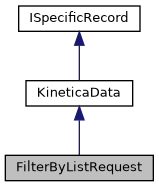
 Inheritance diagram for FilterByListRequest:
 Collaboration diagram for FilterByListRequest: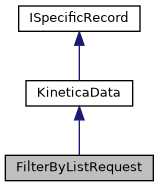
Classes | |
| struct | Options |
| A set of string constants for the parameter options. More... | |
Public Member Functions | |
| FilterByListRequest () | |
| Constructs a FilterByListRequest object with default parameters. More... | |
| FilterByListRequest (string table_name, string view_name, IDictionary< string, IList< string >> column_values_map, IDictionary< string, string > options=null) | |
| Constructs a FilterByListRequest object with the specified parameters. More... | |
| Public Member Functions inherited from KineticaData | |
| KineticaData (KineticaType type) | |
| Constructor from Kinetica Type More... | |
| KineticaData (System.Type type=null) | |
| Default constructor, with optional System.Type More... | |
| object | Get (int fieldPos) |
| Retrieve a specific property from this object More... | |
| void | Put (int fieldPos, object fieldValue) |
| Write a specific property to this object More... | |
Properties | |
| string | table_name [get, set] |
| Name of the table to filter, in [schema_name. More... | |
| string | view_name = "" [get, set] |
| If provided, then this will be the name of the view containing the results, in [schema_name. More... | |
| IDictionary< string, IList< string > > | column_values_map = new Dictionary<string, IList<string>>() [get, set] |
| List of values for the corresponding column in the table. More... | |
| IDictionary< string, string > | options = new Dictionary<string, string>() [get, set] |
| Optional parameters. More... | |
| Properties inherited from KineticaData | |
| Schema | Schema [get] |
| Avro Schema for this class More... | |
| Properties inherited from Avro.Specific.ISpecificRecord | |
| Schema | Schema [get] |
Additional Inherited Members | |
| Static Public Member Functions inherited from KineticaData | |
| static ? RecordSchema | SchemaFromType (System.Type t, KineticaType? ktype=null) |
| Create an Avro Schema from a System.Type and a KineticaType. More... | |
Detailed Description
A set of parameters for Kinetica.filterByList.
Calculates which records from a table have values in the given list for the corresponding column. The operation is synchronous, meaning that a response will not be returned until all the objects are fully available. The response payload provides the count of the resulting set. A new resultant set (view) which satisfies the input filter specification is also created if a view_name is passed in as part of the request.
For example, if a type definition has the columns 'x' and 'y', then a filter by list query with the column map {"x":["10.1", "2.3"], "y":["0.0", "-31.5", "42.0"]} will return the count of all data points whose x and y values match both in the respective x- and y-lists, e.g., "x = 10.1 and y = 0.0", "x = 2.3 and y = -31.5", etc. However, a record with "x = 10.1 and y = -31.5" or "x = 2.3 and y = 0.0" would not be returned because the values in the given lists do not correspond.
Definition at line 28 of file FilterByList.cs.
Constructor & Destructor Documentation
◆ FilterByListRequest() [1/2]
|
inline |
Constructs a FilterByListRequest object with default parameters.
Definition at line 175 of file FilterByList.cs.
◆ FilterByListRequest() [2/2]
|
inline |
Constructs a FilterByListRequest object with the specified parameters.
- Parameters
-
table_name Name of the table to filter, in [schema_name.]table_name format, using standard name resolution rules. This may be the name of a table or a view (when chaining queries). view_name If provided, then this will be the name of the view containing the results, in [schema_name.]view_name format, using standard name resolution rules and meeting table naming criteria. Must not be an already existing table or view. The default value is ''. column_values_map List of values for the corresponding column in the table. options Optional parameters. - CREATE_TEMP_TABLE: If TRUE, a unique temporary table name will be generated in the sys_temp schema and used in place of view_name . This is always allowed even if the caller does not have permission to create tables. The generated name is returned in QUALIFIED_VIEW_NAME. Supported values: The default value is FALSE.
- COLLECTION_NAME: [DEPRECATED–please specify the containing schema for the view as part of view_name and use Kinetica.createSchema to create the schema if non-existent] Name of a schema for the newly created view. If the schema provided is non-existent, it will be automatically created.
-
FILTER_MODE: String indicating the filter mode, either 'in_list' or 'not_in_list'. Supported values:
- IN_LIST: The filter will match all items that are in the provided list(s).
- NOT_IN_LIST: The filter will match all items that are not in the provided list(s).
Definition at line 252 of file FilterByList.cs.
Property Documentation
◆ column_values_map
|
getset |
List of values for the corresponding column in the table.
Definition at line 112 of file FilterByList.cs.
◆ options
|
getset |
Optional parameters.
- CREATE_TEMP_TABLE: If TRUE, a unique temporary table name will be generated in the sys_temp schema and used in place of view_name. This is always allowed even if the caller does not have permission to create tables. The generated name is returned in QUALIFIED_VIEW_NAME. Supported values: The default value is FALSE.
- COLLECTION_NAME: [DEPRECATED–please specify the containing schema for the view as part of view_name and use Kinetica.createSchema to create the schema if non-existent] Name of a schema for the newly created view. If the schema provided is non-existent, it will be automatically created.
-
FILTER_MODE: String indicating the filter mode, either 'in_list' or 'not_in_list'. Supported values:
- IN_LIST: The filter will match all items that are in the provided list(s).
- NOT_IN_LIST: The filter will match all items that are not in the provided list(s).
The default value is an empty Dictionary.
Definition at line 171 of file FilterByList.cs.
◆ table_name
|
getset |
Name of the table to filter, in [schema_name.
]table_name format, using standard name resolution rules.
This may be the name of a table or a view (when chaining queries).
Definition at line 98 of file FilterByList.cs.
◆ view_name
|
getset |
If provided, then this will be the name of the view containing the results, in [schema_name.
]view_name format, using standard name resolution rules and meeting table naming criteria.
Must not be an already existing table or view. The default value is ''.
Definition at line 108 of file FilterByList.cs.
The documentation for this class was generated from the following file:
- Kinetica/Protocol/FilterByList.cs