

Introduction
Reveal is a web-based visual data exploration and insight discovery tool. It allows users who may or may not have extensive experience with big data or data analytics to quickly build charts, graphs, and maps in a meaningful way to explore their dataset. Reveal was designed to be interactive and easy to use. While Reveal comes included with many common charts and map slices (collectively, what we call widgets in Reveal), the Reveal SDK allows developers to create their own custom slice types. From these, slices can be created, which can interact with existing dashboards and slices. The Reveal architecture allows for complete control and customization of what is rendered in the slice, as well as what interactions are available to users.Software Stack
Reveal is a web application with a Python (currently requires version3.10) backend server and mostly JavaScript/React frontend client. It uses
Flask AppBuilder as its server-side web framework. The client-side code is
primarily a single page app design which leverages bundled JavaScript built
using webpack from a Node (requires version 6.9.0+) project structure.
For database connections, Reveal uses PyODBC to query Kinetica via a
custom SQLAlchemy connector. Some slices also interact
with Kinetica via API endpoints. It is recommended that, in addition to
basic knowledge of the endpoint API, a custom slice type developer have some
familiarity with the following technologies:
React
This popular JavaScript library is the recommended way to build custom slice frontends, for its component design pattern.ECMAScript 2015 (or ES6)
A lot of the existing code and slice types are written in this specification and the included webpack build process is already configured to transpile using Babel.webpack
While all the necessary build steps are already configured for the developer, it might help to have some understanding of how it works in case the build needs to be customized.D3/NVD3
D3 is a JavaScript library that makes it easy to manipulate the DOM based on data, but it is commonly known as one of the most popular charting/visualization libraries. NVD3 builds on top of D3 and abstracts away some of the complexity of D3 and makes it even easier to use.OpenLayers
This map visualization library is what we currently use for our Map slices. It is very powerful and supports a lot of industry standard features and customization.Architecture
The following diagram represents the general data architecture and flow of a typical Reveal dashboard. We find that many use cases integrate both Map and Filter slices. While these particular slices are not required to build a dashboard, the Filter slice is required to enable global/cross filtering in the dashboard. This means any filtering interaction such as drawing an area selection on a map or clicking on a bar in a Histogram slice will trigger a filtering of all data represented in the dashboard by those parameters and a re-rendering of other slices in the dashboard.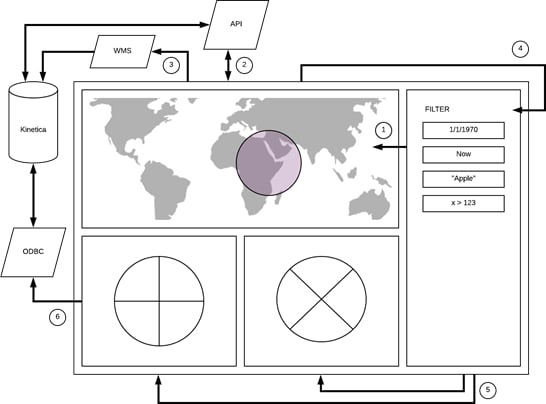
Data Flow Summary
- The Filter slice sends current filter parameters to the map widget and merges with any applied geospatial filters to form a new global data filter.
- The Map slice calls various JavaScript API endpoints as needed depending on the type of filter parameters and query chains them to reduce them to a new dataset with all filters applied. The result returned is a GUID (a view name) that represents this dataset.
- The Map slice uses the new GUID to make a WMS request to generate a new data overlay image which is then applied to the map.
- The Map slice also sends the new GUID to the Filter slice for global broadcast. Think of the Filter slice as a central data/filter dispatch. It manages most of the pub/sub service channels used for dashboard data flow.
- The Filter slice broadcasts the GUID to all other slices in the dashboard.
- All other slices uses the new GUID to load data from the database either via SQL/ODBC or additional JavaScript API endpoint calls and then renders their respective visualization.
If there is no Map slice included in the dashboard and only the
Filter slice is used, the Filter slice alone will manage all the
filtering and broadcast of the GUIDs.
API/WMS Requests
While it is possible in a slice to call any Kinetica API or WMS endpoint directly, it is a recommended best practice to use the proxies provided by the Reveal web application framework. This allows and supports authenticated request mode if authentication is enabled on the database. The server will handle passing the current logged in user’s credentials with each request.- API Endpoint Proxy URL: http://<KINETICA_HOST>:8088/caravel/proxy
- WMS Endpoint Proxy URL: http://<KINETICA_HOST>:8088/caravel/wms
SDK Concepts
The Reveal SDK is a set of command line tools which allows and assists developers in creating new custom slice types for Reveal. These tools will help with:- Creating a new boilerplate template for new custom slice types for a quick start
- Watching a custom slice type development codebase so any new changes will be reflected in the local development Reveal app immediately
- Extracting a custom slice type into a portable package for migration to another Kinetica installation; useful for deploying to production
- Installing a custom slice type package from another Kinetica environment into a local development Reveal app
The default Reveal SDK home directory is
/opt/gpudb/connectors/reveal/sdk, and will be referenced throughout
the remainder of this guide.
- Node Project File - package.json: defines some attributes of the slice type and any required dependencies
- Python Slice Class - init.py: defines the server-side data request and response handlers that will read data from the database
- JavaScript Slice Renderer - <slice_name>.jsx: contains a plain function that must return an object with a render function
- Thumbnail Icon - <slice_name>.png: image that represents the icon for the slice type
-
/slices
-
/kinetica_big_number
- init.py
- kinetica_big_number.css
- kinetica_big_number.jsx
- kinetica_big_number.png
- package.json
-
/kinetica_big_number
Node Project File
The package.json Node project file will define some required attributes which will allow Reveal to detect and build the slice type. In this file you can also define any additional required NPM dependencies used by the slice type. For example:Python Slice Class
The init.py Python class must extend theBaseViz class, which
implements all the required methods to handle database queries and return the
data back to the client. There are several other methods involved, but we’ll
cover just two primary ones that are most often extended:
-
query_obj()- responsible for defining the structure of the data query request such as specifying group-bys, columns, and metrics -
get_data()- responsible for transforming the results from the database query request into a consumable JSON format for the client slice component to consume
Fieldsets
Another important Python class configuration is thefieldsets parameter.
It defines which field(s) will be exposed for slice customization in the
slice editor screen in Reveal. All currently provided
fields are defined in the FormFactory class in a file named forms.py
in the Reveal SDK home directory.
Some commonly-used fields include:
metrics- a multi-select field with a list of all available metrics for a given tablemetric- a select field with a list of all available metrics for a given tablegroupby- a multi-select field with a list of all groupable columns for a given tableall_columns- a multi-select field with a list of all available columns for a given tablelimit- a free-form select field with a list of suggestions of0,5,10,25,50,100, and500
The
Time fieldset is always included for every slice by default.Custom Fields
Several form field types are available to use from the wtforms library. However, custom slice type development will likely require developers to define their own form field controls in order to configure their slice type. New controls can be defined in the init.py file. Simply provide a configuration map parameter calledform_custom in the Python class, which
will contain the definition of any custom fields.
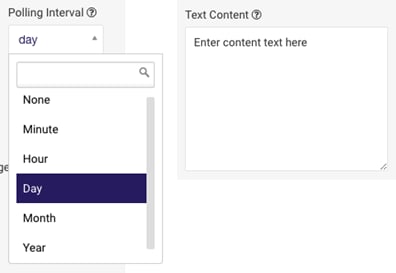
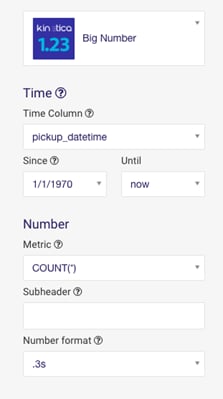
The following example defines two custom fields called
Polling Interval & Text Content. Using these, two
fieldsets will be created. The first fieldset will contain the default
metric field and the Polling Interval custom field. The second
fieldset will contain the Text Content field.
JavaScript Slice Renderer
The *.js/*.jsx JavaScript module must export a function that returns an object with arender and a resize function as properties. These
functions are called by the dashboard or slice editor screens to render the
slice when needed. The render function is responsible for managing
everything required for the slice including, but not exclusive to,
resetting/clearing the slice, fetching data from ODBC/API, manipulating the
DOM to draw the desired visualization, and also handling user events for
interactive slices.
Libraries and Modules
Bundled utilities and other functions can be imported using the kReveal/ prefix. These include utilities for publishing and subscribing to message channels, as well as color-picking helpers. The kReveal prefix is actually an alias for /opt/gpudb/connectors/reveal/lib/python2.7/site-packages/caravel-0.11.0-py2.7.egg/caravel/static/assets/, so any JavaScript files in that directory would be available. An example import would be:The code below has been simplified for demonstration. The full source
is available in the slices folder in the SDK Home directory.
Thumbnail Icon
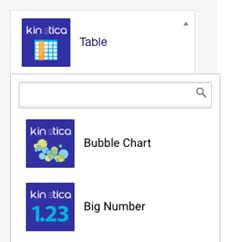
The thumbnail icon is required to display the slice type as a dropdown option in the slice editor where users can select the slice type. It is recommended that the PNG image be600 x 600 pixels, square, and have the same name
as the slice type: <slice_name>.png.
Image

Image Within Dropdown
Cascading Style Sheets
The *.css file(s) can include any style definitions required by the slice. It is recommended to use the slice type class name in the CSS selector to limit the scope of the style so it does not conflict with any other slices.The code below has been simplified for demonstration. The full source
is available in the slices folder in the SDK Home directory.
Setup/Installation
The setup sequence must be run on both development and deployment environments, so that the tools for managing custom Reveal components are available for use.Running any npm or SDK command requires
root or
gpudb user permissions.Reveal SDK development requires an internet connection. If there
are firewall rules enabled for
git (native git transport uses TCP
port 9418), run the following before attempting to install any NPM packages:- Install Kinetica database and make sure the service is up and running. Refer to Kinetica Installation.
- Install git. See Git Downloads for details.
-
Reveal is packaged with Node & npm, located in
/opt/gpudb/connectors/reveal/bin. This directory should be added to
the system path for development:
-
Install the Reveal SDK:
Development Workflow
-
For development, it is recommended to have a dedicated directory for all
working custom slice types. This directory should be version-controlled as
it will contain the slice type configuration & script files. The structure
should mirror this:
-
/<target_development_directory>
- /<slice_type_1_name>
- /<slice_type_2_name>
- /<slice_type_3_name>
-
/<target_development_directory>
-
Use the reveal-sdk script from the SDK to run the
slice-create command:
This will perform the following actions:
-
Prompt the user for basic slice type-specific information to create the
package.json file
-
What is the slice name?
Name must begin with alphabetic/underscore character and be followed by zero or more alphanumeric/underscore characters
- Who is the author?
-
What is the display name?
This is the name/label that will be displayed in the slice type dropdown in the GUI
- What is the slice description?
-
What is the slice name?
- Use the included SDK slice type template files to generate a new custom slice type directory based on the information provided in the previous step
- Put the new slice type directory/files into the target development directory
-
Prompt the user for basic slice type-specific information to create the
package.json file
-
Use the reveal-sdk script from the SDK to run the
slice-watch command in a separate shell session:
This will perform the following actions:
- Run a full rebuild of all the slice types including the newly created slice type
- Restart Reveal to activate the new slice type
- Start watching for changes to the specified slice type in the target development directory and rebuild/restart when necessary
This is a continuous process so it should be run in a separate shell. The command takes some time to run, as it installs node modules and bundles all the JavaScript code. -
Develop the custom slice type by modifying its files in the target
development directory. The slice type watch process will continually update
the Reveal application instance to reflect your changes. Test and repeat
process.
During iterative development, it may be necessary to do a hard reload (clear asset cache) in your browser to make sure it downloads the latest updated assets from the server.When installing and using custom npm packages in custom slice types, the import path must reference the slice type project’s node_modules directory directly:
Deployment Workflow
-
In the development environment, where the slice type was created, use
the reveal-slice-extract script in the SDK Home directory to
extract the desired slice type code for migration to a production
environment. This command will compress the contents of the specified custom
slice type into a tarball.
By default, this will create a <slice_name>.tar.gz file with the packaged slice type in the current directory. Optionally, a name for the tarball can be specified in the command.
- Transfer the newly-created slice type package to the production server or hosted repository.
- Ensure that the Reveal SDK is installed on the target production server. See Reveal Setup/Installation for details.
-
In the production environment, where the slice type is to be deployed,
use the reveal-slice-install script in the SDK Home directory to
install the slice type package. This will extract the package into the
Reveal installation source slices folder and re-run the production
build. This will also restart Reveal to activate the new slice type.
If Kinetica is installed in a non-standard location, set the
KINETICA_INSTALLED_PATHto the top-level Kinetica directory before running either reveal-slice-install or reveal-slice-extract. To deploy the slice type package, run:This process may take several minutes, due to node modules being installed and webpack needing to bundle all the JavaScript files.
White Labeling
It is possible to white label Reveal by customizing the logo and stylesheets.Brand Logo
-
Create logo image PNG file.
Any image used as a logo will be scaled proportionally to fit into a height
of
25pixels. The top navigation menu will be left-aligned to the end of the scaled image, so the wider an image is, the further right the top menu will begin. The default image is133x25, which can be used as a guide when creating a custom logo. -
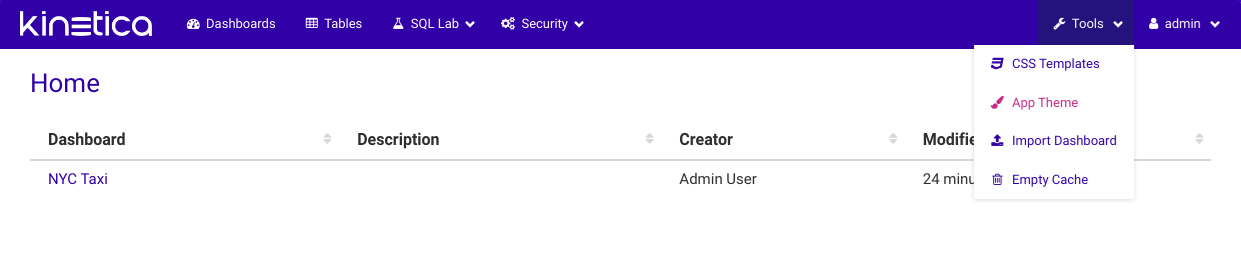
Navigate to Reveal’s Theme Editor page:
- Log into Reveal
- Click Tools
- Click Theme
-
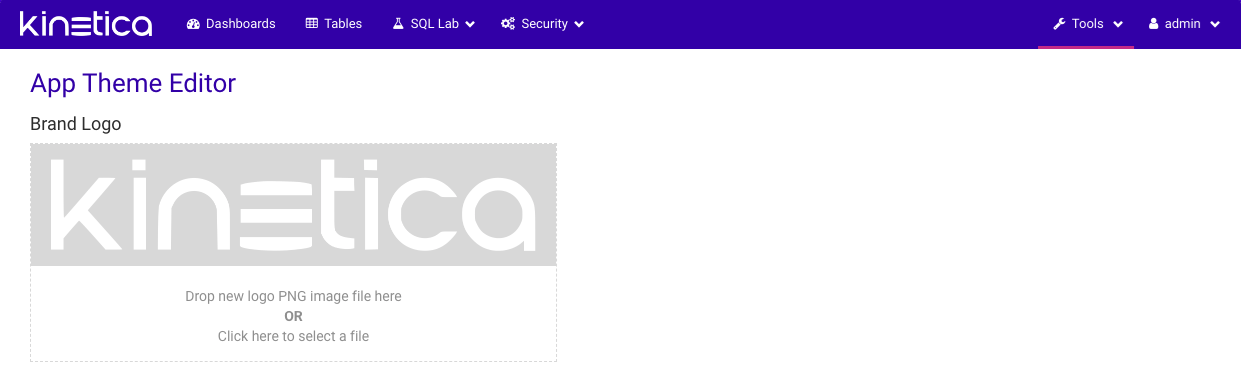
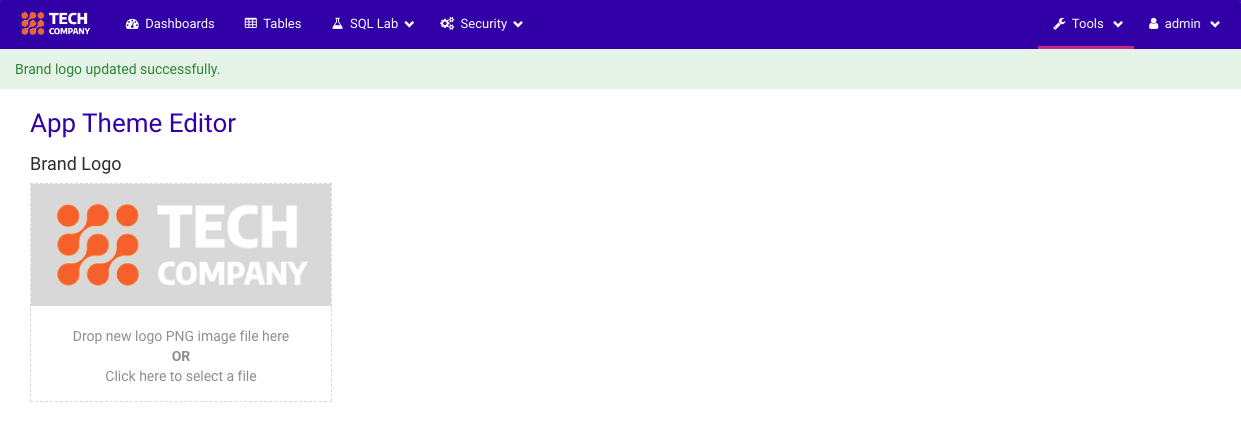
Install logo image.
Either drag and drop the new logo PNG file into the drop area OR click on the
drop area to select a file manually.
Brand Style
-
Navigate to Reveal’s Theme Editor page:
- Log into Reveal
- Click Tools
- Click Theme
-
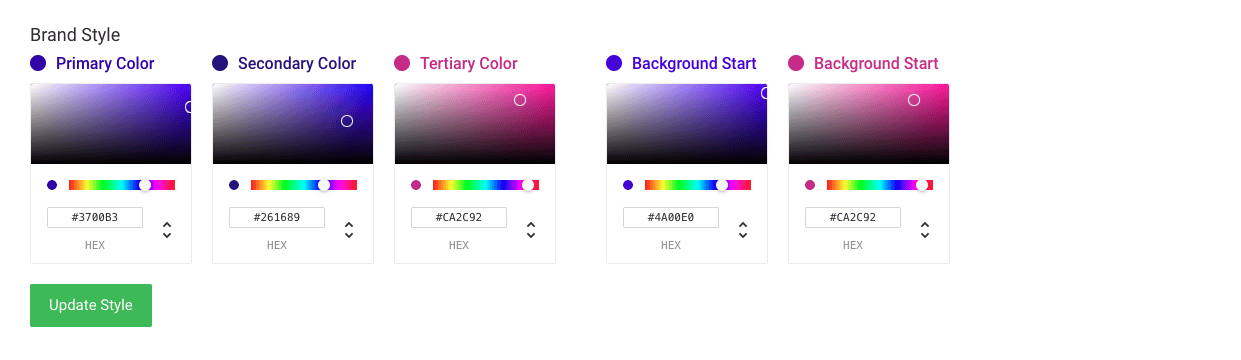
Modify brand colors:
-
Under the Brand Style section, select the desired colors
-
Click the Update Style button.
The changes will be active immediately.
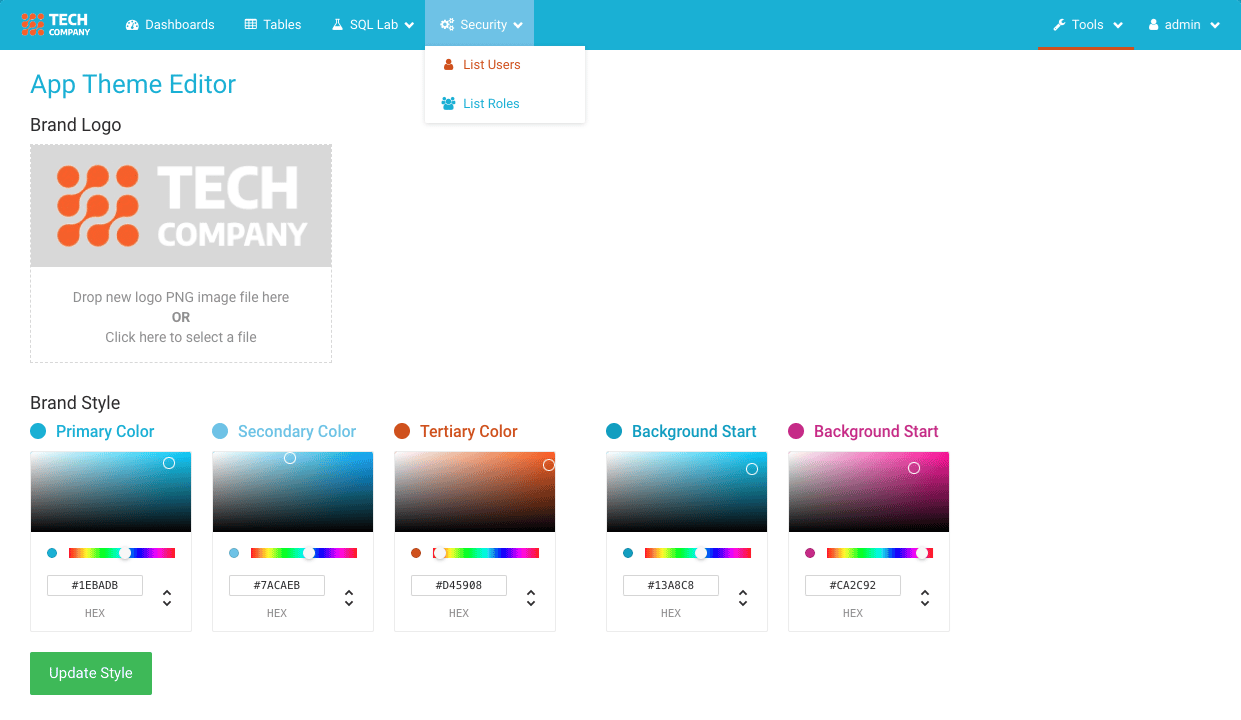
-
Under the Brand Style section, select the desired colors
Login Screen Title/Subtitle
The login screen title and subtitle can be customized by editing the Reveal configuration file located at /opt/gpudb/connectors/reveal/etc/config.py. This will require a Reveal restart.Theme Backup
Create a compressed archive of your current theme, which includes both the color scheme and brand logo.This will create a TAR/GZIP file with the name and location given
in <backup_tarball_file>.
Theme Restore
Restore the theme from the backup compressed archive.Upgrades
Currently, when performing an upgrade of Kinetica, the existing instance of Reveal will be replaced by a newer version. While the Reveal settings and database where dashboards and slices are stored will be preserved, custom slice types are not. To remedy this, the SDK provides a tool that will ensure that custom slice types are backed up and can be reapplied after the upgrade.If this is the first time using the SDK on the target deployment
environment, please follow the steps outlined in
Reveal Setup/Installation.
Extras
Connect Reveal to External Kinetica Instance
While working on customizing Reveal in a local development environment, it is possible to point Reveal to other Kinetica database instances for testing. The following configuration files need to be updated:-
/opt/gpudb/connectors/reveal/etc/config.py
-
/opt/gpudb/connectors/odbcserver/bin/gpudbodbc.ini
Pub/Sub Data Communication
Reveal leverages a pub/sub system to allow slices within a dashboard to send data back and forth to one another. To hook into this communication system, import theKineticaPubSub JavaScript utility library and call from within
the main slice function. There are two primary methods:
-
publish() -
subscribe()