

Prerequisites
The prerequisites for running the query graph example are listed below:- Graph server enabled
- Python API
- Query graph script
Python API Installation
Depending on the target operating system, a Python virtual environment may need to be installed first: The native Kinetica Python API is accessible through the following means:Python Virtual Environment
A Python virtual environment is necessary to install in an operating environment where Python is externally managed.-
Install a Python virtual environment:
-
Activate the Python virtual environment:
PyPI
-
Install the API:
-
Test the installation:
If Import Successful is displayed, the API has been installed as is ready for use.
Git
-
In the desired directory, run the following, but be sure to replace
<kinetica-version>with the name of the installed Kinetica version, e.g.,v7.2: -
Change directory into the newly downloaded repository:
-
In the root directory of the unzipped repository, install the Kinetica API:
-
Test the installation (Python3 is necessary for running the API example):
Script Detail
This example is going to demonstrate querying a social network of relationships between friends and family for:- people directly or indirectly known to a given person who are interested in chess but not known through family
- people directly known to a given gender
- people who are of a given gender or interested in chess
- people directly or indirectly known to a given gender who are interested in chess
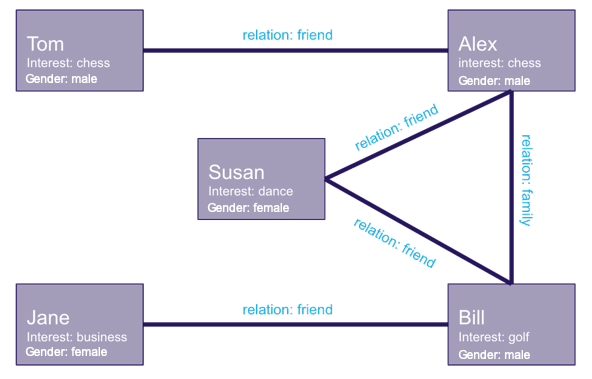
Constants
Several constants are defined at the beginning of the script:-
DEFAULT_SCHEMA— the name of the schema in which the tables supporting the graph creation and match operations will be created, if one is not specified on the command lineThe schema is created during the table setup portion of the script (if it doesn’t already exist) because the schema must exist prior to creating the tables that will later support the graph creation and match operations. -
people_table/knows_table— the names for the tables into which the datasets generated in this file are loaded. These datasets will serve as the basis for the social relationships graph.people_tableis a record of a person’s name, age, and interest;knows_tabledefines the relationships between the people -
social_graph— the social relationships graph -
TABLE_Q1/TABLE_Q2/TABLE_Q3/TABLE_Q4— the resulting adjacency (edge) tables from the four query examples performed in the script -
TABLE_Q1_TARGETS/TABLE_Q2_TARGETS/TABLE_Q3_TARGETS/TABLE_Q4_TARGETS— the target (node) tables from the four examples
Constant Definitions
Table Setup
As mentioned previously, there are two tables used in the graph creation step. The first of these tables is the people table. It is created using the GPUdbTable interface:Create People Table
Populate People Table
Create Relation Table
Populate Relation Table
Graph Creation
One graph is used for the query graph example:social_relationships, a graph
based on the people and knows datasets.
The social_relationships graph is created with the following
characteristics:
- It is not directed because relationships between people are inherently bi-directional
-
The people in this graph are represented using
nodesdetailed in the people table: the person’s (NAME), their main interest (LABEL), and gender (LABEL). -
The relationships in this graph are represented using
edgesdetailed in the knows table: two names to define the relationship (NODE1_NAME/NODE2_NAME) and the relationship definition (LABEL). -
It has no
weightsbecause this example doesn’t favor some relationships over others -
It has no inherent
restrictionsfor any of the nodes or edges in the graphRestrictions will be introduced on a per-query basis later. -
It will be replaced with this instance of the graph if a graph of the same
name exists (
recreate) -
It will have a corresponding table,
social_relationships_table, created for it containing the edges and corresponding node endpoints
Create Social Graph
Querying the Graph
Example 1
To find people interested in chess who are connected to a given person, in this case Jane, in some way (but not through family), we define the graph query in the following way:-
Pass two query identifiers to
queries:- One using
Janeas the name (NODE_NAME) of the node from which to begin searching - Pass a blank string (
"") to separate the first query combination from the second - The other using
chessas the label of the target nodes to find (TARGET_NODE_LABEL)
- One using
-
Use the following restrictions:
- Pass
'family'as the label (EDGE_LABEL) of the edge in the restriction combination - Pass a
0as an “off” value (ONOFFCOMPARED) for the edge to set it as restricted
- Pass
-
Place the results in
social_relationships_queried_jane_chessadjacency table and the targets found in thesocial_relationships_queried_jane_chess_nodestable -
Query for nodes within 4 “hops” (
rings) ofJane
Query Graph Example #1
social_relationships_queried_jane_chess
adjacency table. The results show two people connected to Jane that are
interested in chess, Alex and Tom. The path to each is listed (represented by
PATH_ID) and the hops to get there (represented by RING_ID). Note that
the PATH_ID and RING_ID data were only available because the
TARGET_NODE_LABEL query identifier was used in the query:
Graph Example #1 Adjacencies
social_relationships_queried_jane_chess_nodes table, which shows the
RING_ID, the query sources, and the targets’ names, Alex and Tom. The
RING_ID represents the hops required to get from the source to the target.
Graph Example #1 Targets
Example 2
To find people directly connected to a given gender, in this case male, we define the graph query in the following way:- Pass a single query to
queriesusingmaleas the label (NODE_LABEL) of the node from which to begin searching - Place the results in
social_relationships_queried_malesadjacency table and the targets found in thesocial_relationships_queried_males_nodestable - Use a
ringsvalue of1to only retrieve immediate connections tomales
Query Graph Example #2
social_relationships_queried_males
adjacency table. The results show each node within one “hop” of a male node:
Graph Example #2 Adjacencies
social_relationships_queried_males_nodes
target nodes table. The results show the name for all nodes that are
connected to the male nodes within one “hop”. Duplicate names indicate that
person is within one “hop” of more than one male:
Graph Example #2 Targets
Example 3
To find people who are of a given gender, in this case female, or are interested in chess, we define the graph query in the following way:- Pass a single query to
queriesusingfemaleandchessas the label (NODE_LABEL) of the node for which to search - Place the results in
social_relationships_queried_females_or_chessadjacency table and the targets found in thesocial_relationships_queried_females_or_chess_nodestable - Use a
ringsvalue of0to only retrieve the nodes that satisfy the query labels
Query Graph Example #3
social_relationships_queried_females_or_chess
because the rings value was set to 0, meaning there will be no
adjacencies.
The targets are retrieved from the
social_relationships_queried_females_or_chess_nodes target nodes table.
The results show the name for the nodes that are female or interested in chess:
Graph Example #3 Targets
Example 4
To find people directly or indirectly known to a given gender who are interested in chess, we define the graph query in the following way:-
Pass two query identifiers to
queries:- One using
femaleas the label (NODE_LABEL) of the node from which to begin searching - Pass a blank string (
"") to separate the first query combination from the second - The other using
chessas the label of the target nodes to find (TARGET_NODE_LABEL)
- One using
-
Place the results in
social_relationships_queried_females_to_chessadjacency table and the targets found in thesocial_relationships_queried_females_to_chess_nodestable -
Use a
ringsvalue of2to find nodes within two “hops” of the female nodes
Query Graph Example #4
social_relationships_queried_females_to_chess adjacency table. The results
show two females, Susan and Jane, connected (within two “hops”) to two people
that are interested in chess, Alex and Tom. The path to each is listed
(represented by PATH_ID) and the hops to get there (represented by
RING_ID). Note that the PATH_ID and RING_ID data were only
available because the TARGET_NODE_LABEL query identifier was used in
the query:
Graph Example #4 Adjacencies
social_relationships_queried_females_to_chess_nodes target nodes table. The
results show the name for the nodes that are interested in chess and the “hops”
required to get there:
Graph Example #4 Targets
Download & Run
Included below is a complete example containing all the above requests and corresponding output. To run the complete sample, switch to the directory in which the query_graph_social.py is located, then do the following:Run Example
schema parameter:
Run with User Default Schema