

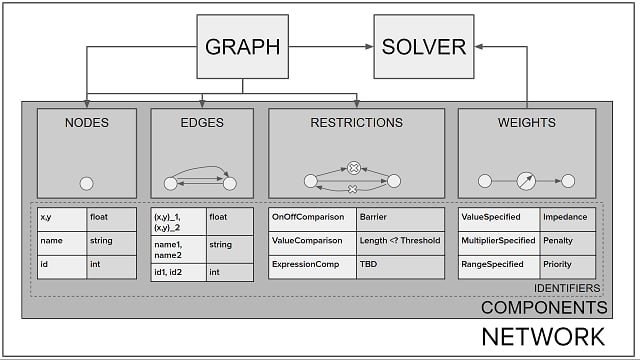
Solvers
Kinetica has several different solvers available for presenting solutions to various types of graph problems. Note that some solvers are only available to /solve/graph and likewise for /match/graph. Consult Solving a Graph or Matching a Graph for more information on the desired operation.Solve Graph Solvers
Match Graph Solvers
Components and Identifiers
Graph components (e.g., nodes, edges, weights, and/or restrictions) must be defined with varying combinations of the identifiers listed in the tables below. Components for create, solve, query, and match operations can be identified in three ways:-
Aliasing existing table columns, e.g.,
table_name.column_name AS WKTPOINT -
Using expressions, e.g.,
ST_LENGTH(wkt) AS VALUESPECIFIED -
Using constant values, where strings & WKTs are single-quoted, non-decimal
numbers will be given an int or long type according to their size
(or can be coerced to long by using an
Lsuffix, like1L), and decimal numbers will be given the double type; e.g.:{0} AS ONOFFCOMPARED{1L, 2, 3L, 4, 5} AS ID{1.1, 12.345689, 123.456789456789} AS NODE1_X{'name1', 'name2'} AS NAME{'POINT(10 15)'} AS WKTPOINT
There are separate identifiers and combinations for
/solve/graph, /query/graph, and
/match/graph. See below for
/solve/graph
identifiers; see the associated Querying a Graph and Matching a Graph
sections for their respective endpoint identifiers.seattle_road_network has columns WKTLINE (a wkt column),
TwoWay (an integer column), and time (also an integer column);
these columns could be identified via
/create/graph like so:
Create Graph Example
Identifiers with
string as a supported type can be any string
column type, e.g., char1 - char256 or unrestricted string.
Identifiers with wkt as a supported type can include optional z-level
values for the provided WKT shape but note that graphs only support z-levels
ranging from -4 to +5.Nodes
Nodes represent fundamental topological units of a graph. Nodes can be defined with an integer ID, a string name, or geospatial information, e.g., WKT point (POINT(X Y [Z])) or XY pair. Nodes are optional, as the start and
end points of an edge can implicitly be used as nodes.
Edges
Edges represent the required fundamental topological units of a graph that typically connect nodes. Edges can be defined with an integer ID, string name, or geospatial information, e.g., WKT point (POINT(X Y [Z])), line
(LINESTRING(X1 Y1 [Z1], X2 Y2 [Z2])), or XY pairs. An edge can be
implicitly drawn between two nodes. If an edge is defined using WKT
linestrings, the graph server is capable of splitting many linestring segments
into multiple, separate linestrings, thus creating one edge per linestring
segment.
Weights
Weights represent a method of informing the graph solver of the cost of including a given edge in a solution. Weights can be defined using an integer ID, string node names, or spatial information (LINESTRING(X1 Y1 [Z1], X1 Y1 [Z1])) and a static cost value or a cost
multiplier. Each edge is associated with one weight, but there can be many
edges between two nodes in a graph with directionality (EDGE_DIRECTION),
allowing for many different weights along the same edge, which can have useful
applications in real-world examples, e.g., different lanes between two
junctions may have different speeds of travel.
For graphs that define edges using complex WKT linestrings (e.g., linestrings
with more than two points), weights are applied consistently to each segment
of the linestring. For example, if LINESTRING(0 0, 1 3, 4 5) is provided as
an edge source and a weight of 5 is assigned to that source, the
resulting graph would have two edges, LINESTRING(0 0, 1 3) and
LINESTRING(1 3, 4 5), that would both have a weight of 5. See
Fitting Data for more information.
If
DIRECTION is specified for an edge in a directed graph,
the weight will be the same going in each direction.Currently,
FACTORSPECIFIED will only affect the cost if the
edge has a VALUESPECIFIED already established. This means that
FACTORSPECIFIED should only be used in
/solve/graph or in conjunction with a
VALUESPECIFIED during /create/graph.Restrictions
Restrictions represent a method of informing the graph solver which edges and/or nodes should be ignored for the solution. Restrictions can be defined using an integer ID and a value or as a switch (on or off).
When using
VALUECOMPARED, solvers will not use the given node or
edge if the current cost is less than the restriction value. When
using ONOFFCOMPARED, solvers will not use the given node or edge if
the ONOFFCOMPARED value is set to 0 (off).Identifier Combinations
For each component, there’s a minimum set of identifiers that must be used to properly create a graph. Each component’s identifier combinations must reference columns from the same table, e.g., the node combination ofID and
NAME must both use the same table. The columns must also not be
nullable. Identifier types across components should match where possible.
WKT identifiers can be matched to X/Y identifiers (and vice versa) within
a user-specified tolerance (
merge_tolerance under the /create/graph
endpoint’s options map). Using ID or NAME identifiers relies on
exact matching. The WKTLINE identifiers will use the line’s start and end
points to map to an XY pair or WKTPOINT.Node Identifier Combination Example
ID. The following edge combination would match correctly with the
node combination; note that matching node point(s) to edge endpoint(s)
requires two edge endpoints to make an implicit edge between the points:
Edge Identifier Combination Example
The above example is not the only edge combinations available for the
node
ID identifier combination. See the Edges
section below for other combinations."") in
the respective array, e.g.:
Query Identifier Combination Example
Query Identifier Combination Group Matching Example
Nodes
IDID,NAMEID,WKTPOINTID,X,YNAMENAME,WKTPOINTNAME,X,YWKTPOINTX,Y
LABELLABEL_KEYPARTITION_BOUNDARY
Edges
ID,NODE1_ID,NODE2_IDID,NODE1_ID,NODE2_ID,DIRECTIONID,NODE1_NAME,NODE2_NAMEID,NODE1_WKTPOINT,NODE2_WKTPOINTID,NODE1_X,NODE1_Y,NODE2_X,NODE2_YID,WKTLINEID,WKTLINE,DIRECTIONNODE1_ID,NODE2_IDNODE1_NAME,NODE2_NAMENODE1_WKTPOINT,NODE2_WKTPOINTNODE1_X,NODE1_Y,NODE2_X,NODE2_YWKTLINEWKTLINE,DIRECTION
LABELLABEL_KEYPARTITIONWEIGHT_VALUESPECIFIED
Weights
EDGE_ID,VALUESPECIFIEDEDGE_ID,FACTORSPECIFIEDEDGE_WKTLINE,EDGE_DIRECTION,VALUESPECIFIEDEDGE_WKTLINE,VALUESPECIFIEDEDGE_WKTLINE,FACTORSPECIFIEDEDGE_NODE1_NAME,EDGE_NODE2_NAME,VALUESPECIFIEDEDGE_NODE1_NAME,EDGE_NODE2_NAME,FACTORSPECIFIEDEDGE_NODE1_ID,EDGE_NODE2_ID,VALUESPECIFIEDEDGE_NODE1_ID,EDGE_NODE2_ID,FACTORSPECIFIEDWKTPOINT,FACTORSPECIFIED
FROM_EDGE_ID,TO_EDGE_ID,VALUESPECIFIED
Restrictions
EDGE_ID,ONOFFCOMPAREDEDGE_ID,VALUECOMPAREDEDGE_LABEL,ONOFFCOMPAREDEDGE_NODE1_ID,EDGE_NODE2_ID,ONOFFCOMPAREDEDGE_NODE1_NAME,EDGE_NODE2_NAME,ONOFFCOMPAREDEDGE_WKTLINE,EDGE_DIRECTION,ONOFFCOMPAREDEDGE_WKTLINE,EDGE_DIRECTION,VALUECOMPAREDEDGE_WKTLINE,ONOFFCOMPAREDEDGE_WKTLINE,VALUECOMPAREDNODE_ID,ONOFFCOMPAREDNODE_ID,VALUECOMPAREDNODE_LABEL,ONOFFCOMPAREDNODE_NAME,VALUECOMPAREDNODE_NAME,ONOFFCOMPAREDNODE_WKTPOINT,ONOFFCOMPAREDNODE_WKTPOINT,VALUECOMPARED
FROM_EDGE_ID,TO_EDGE_ID,ONOFFCOMPARED
Using Labels
Labels are a type of identifier that provide additional context to a node or edge and can act as a target for a query, among other things. Labels are paired with another identifier in several valid combinations listed above, but each unique label must be part of its own combination; i.e., there cannot be two labels in the same identifier combination. For example, this is a valid multi-label configuration:Valid Multi-Label Configuration
Invalid Multi-Label Configuration
LABEL values can be used in graph queries, matches, & solves.
Node / Edge Labels
TheLABEL node identifiers &
edge identifiers are used
to provide additional string-based information about a node or edge
respectively, similarly to the node NAME (and other related) identifiers.
Multiple labels can be applied to the same node or edge.
The LABEL_KEY node identifiers &
edge identifiers are used to create groupings
of corresponding LABEL identifier values. Any node or edge with a label
that is part of a label key group will also have that label key applied to
it as an additional LABEL value.
LABEL_KEY values can be used in graph queries, matches, & solves.
Restriction Labels
TheNODE_LABEL and EDGE_LABEL
restriction identifiers are used to
restrict the value set defined as node & edge LABEL respectively. These
restrictive identifiers must follow an already-defined node or edge LABEL;
i.e., they cannot be used on their own at graph creation time. They are used in
restriction combinations just like other
restriction identifiers.
For example, if the relation between two people is used as the edge
LABEL when creating a graph:
Edge Identifier Combination
family relation label can be restricted during the subsequent
query using the EDGE_LABEL restriction identifier, meaning that the query
will not traverse any family relationship edges when moving from person
node to person node:
Restriction Identifier Combination Example
Using Turn-based Weights & Restrictions
Turn-based weights and restrictions are used to add a cost to solutions utilizing turn types implemented during graph creation or modification. If theadd_turns option
is set to true during /create/graph or /modify/graph operations,
dummy pillowed edges will be added to each intersection of edges in a graph
to mimic realistic turns. These dummy edges will not have any weight by
default and will have the coordinates of their origin point. The available turn
types are as follows:
- Left turns — turning left from one edge on to another
- Right turns — turning right from one edge on to another
- Intersection — continuing through an intersection of edges (e.g., a stoplight)
- Sharp turns — turning sharply left or right or a u-turn; a sharp turn or
u-turn attribution is determined by the angle of the turn (the
turn_anglesetting)
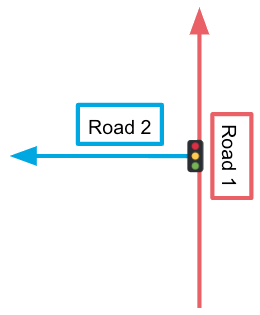
add_turns set to
false, the edges might look like this:
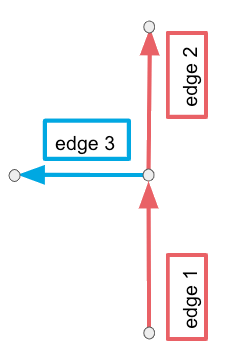
add_turns set to true, the edges might look like this instead (note the
two additional dummy edges designated by the dotted lines):
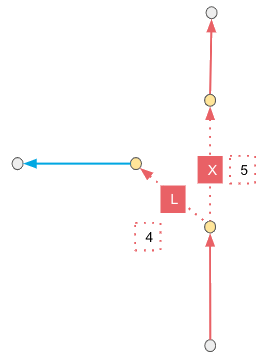
L and the X associated with the dummy edges designate a left turn
and intersection respectively, but these attributions could change depending on
the turn angle set. A solution containing the left turn from road 1 on to road
2 using this graph instead would incorporate
edge 1 —> edge 4 —> edge 3.
Once turns have been enabled and the turn angle has been set, turn penalties
can be incurred via the /solve/graph or the
/match/graph endpoints using two methods:
-
Setting penalties uniformly per turn type across the graph using the
left_turn_penalty,right_turn_penalty,intersection_penalty, orsharp_turn_penaltyoptions -
Setting penalties on a per-edge basis using the following
weight identifier combinations:
FROM_EDGE_ID,TO_EDGE_ID,VALUESPECIFIED -
Setting restrictions on a per-edge basis using the following
restriction identifier combinations:
FROM_EDGE_ID,TO_EDGE_ID,ONOFFCOMPARED
Creating a Graph
Creating a graph is serviced by the /create/graph endpoint; this involves reading from tables with annotated component identifiers and drawing relationships between given nodes and/or edges on a graph, taking into account nodes or edges between nodes that should be favored or ignored.Though it’s recommended edges and weights are kept in the same table,
it’s not required.
- name for the graph
- if the graph is directed or not
- edges
- weights (for most solver types)
Nodes and restrictions are not required to create a graph. If nodes
are included, however, they should be kept in a separate table from edges
and weights. If restrictions are included, they can exist in either the
nodes table and/or edges/weights table(s) or in an entirely separate
table.
Directed Graphs
Whether a graph is directed or not can determine how a graph is solved or queried. Using Components and Identifiers and Identifier Combinations for context, edges connect two nodes together (“node 1” and “node 2”). When a graph is directed, these nodes that comprise a given edge have an implicit direction: “node 1” to “node 2”. Regardless if these nodes have a spatial context, Kinetica will treat “node 2” as if it must be traveled to directly from “node 1” (whatever their underlying values may be:Jim and George ,
POINT(0 0) and POINT(9 10), 32 and 45, etc.).
For example, given the below non-directed graph:
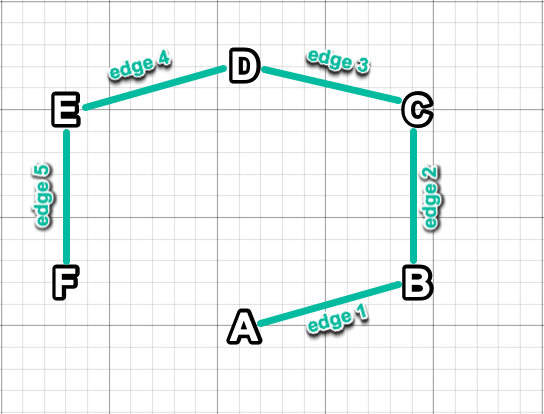
F to node A would
result in a SOLVERS_EDGE_PATH of F, E, D, C, B, A. Querying for
other nodes attached to node E would result in two adjacencies: F and
D.
On the other hand, given the below directed graph:
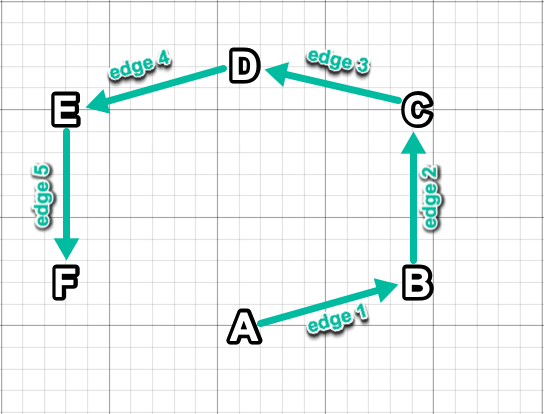
F to node A would
be unsuccessful because there are only edges going toward F (and none
leading away from F and subsequently toward A). Querying for
other nodes attached to node E would result in a single adjacency: F.
Modifying a Graph
Modifying a graph is serviced by the /modify/graph endpoint; this involves using given node(s), edge(s), weight(s), restriction(s), and option(s) to update an existing graph. All parameters and options available to/modify/graph are also available to /create/graph; as such, many of the
same principles apply to using /modify/graph.
Requirements for modifying a graph include:
- name for the existing graph
- components/identifiers and options used to modify the graph
Solving a Graph
Solving a graph is serviced by the /solve/graph endpoint; this involves using given source node(s), destination node(s), and any weights or restrictions from an existing graph to calculate a given solution type. Off-graph spatial locations are accepted in all solvers, with the results being corrected to snap locations. The calculated solution is then placed in a table in Kinetica; note that many concurrent solves over the same graph are possible. The source node determines from which node the graph solution routing is started; the destination node(s) determines at which node the graph solution will complete routes. Source/destination node(s) can be an ID, name, or WKT point. Requirements for solving a graph include:- name of the graph to solve
- solution type
Additional weights and restrictions beyond those defined in the graph
creation stage can also be provided. Any provided weights will be
added (in the case of
VALUESPECIFIED) to or multiplied by
(in the case of FACTORSPECIFIED) the existing weight(s).
Consult Components and Identifiers for formatting and specifications.Non-Batch Solving
Non-batch solving is utilized exclusively with every solver except forSHORTEST_PATH, in which case the length of the source and destination node
lists will determine if non-batch or Batch Solving is utilized. If
the source and destination lists do not match and the SHORTEST_PATH
solver is specified, batch solving will be used. If the source and destination
node lists match in length (and SHORTEST_PATH is the specified solver),
non-batch solving will be used. This means that the first source index would
only be matched with the first destination index, the second source index to
the second destination index, etc.
For example, if you attempt to solve three unique sources (node_1,
node_2, and node_3) to three unique destinations (dest_1,
dest_2, dest_3) by only listing each source and destination once
(calling /solve/graph with source_nodes set to
["node_1", "node_2", "node_3"] and destination_nodes set to
["dest_1", "dest_2", "dest_3"]), it would yield a result set like this:
Batch Solving
If using theSHORTEST_PATH solver, multiple sources can be routed to
multiple destinations using batch solving. A batch will be defined by each
unique source node visiting each destination node provided which will yield
a Cartesian product.
For example, if you wish to batch solve two unique sources (node_1,
node_2) each routing to three unique destinations (dest_1,
dest_2, dest_3), you’d list each source and each destination, noting
that the solution will automatically map node_1 and node_2 to
dest_1, dest_2, and dest_3 individually. A call to
/solve/graph with source_nodes set to
["node_1", "node_2"] and destination_nodes set to
["dest_1", "dest_2", "dest_3"] would yield a result set like this:
node_1,
node_2, node_3) to three unique destinations (dest_1,
dest_2, dest_3) (or n sources to n destinations for that matter),
you’ll need to list out all 9 combinations manually, e.g.,:
Source & Destination Node Definitions When the Lists Are the Same Size
Remember, if the source and destination nodes lists match in
length, non-batch solving
is used.
Querying a Graph
Querying a graph is serviced by the /query/graph endpoint; this involves querying a graph for adjacent nodes (if provided edges) or adjacent edges (if provided nodes) using integer IDs, names, or WKT information. Additional adjacent rings around the specified nodes can also be queried. Results can be exported to a table in Kinetica. Requirements for querying a graph include:- name of the graph to query
- a list of edge or node IDs, names, or WKTs to query
Additional restrictions beyond those defined in the graph
creation stage can also be provided. Query restrictions can utilize any of
the restriction identifiers, including the unique
LABEL identifiers.Query Identifiers
Nodes or edges to be queried can be identified using any of the query-specific identifiers below.Consult Components and Identifiers and Identifier Combinations for general information on
identifiers and combinations. Note that the same
limitations that apply to
/create/graph and /solve/graph
identifiers also apply to /query/graph identifiers
Query Identifier Combinations
To properly query a graph using identifiers, there’s a minimum set of identifiers that must be used. Each identifier combination must reference columns from the same table, e.g., the combinationNODE1_ID and
NODE2_ID must both use columns from the same table. The columns
must also not be nullable.
Nodes
The following combinations will query for edges adjacent to the node associated with the given information:NODE_IDNODE_NAMENODE_WKTPOINT
NODE_LABEL
HOP_ID
Edges
The following combinations will query for nodes adjacent to the edge associated with the given information:EDGE_IDEDGE_WKTLINENODE1_ID,NODE2_IDNODE1_NAME,NODE2_NAMENODE1_WKTPOINT,NODE2_WKTPOINT
EDGE_LABEL
HOP_ID
Using Query Identifiers
A node identifier can be used to identify the source of a query, returning features connected to that node within the provided number of rings:Query Node Identifier Example (Single Key Search)
Query Node Identifiers Example (Multiple Key Search, X OR Y)
A rings value of
1 will return nodes connected directly to
nodes that match the provided query exactly; in this case, the
query would return movies connected to Al Pacino and
actors/directors connected to The Godfather.Query Edge Identifiers Example (Single Key Search)
The
restriction & rings options do not apply when querying on
edges, so only exact matches with edge identifiers are possible.Implicitly defined nodes, e.g., from graphs defined with just
edges and/or weights, cannot be queried.
Node / Edge Labels
TheNODE_LABEL and EDGE_LABEL
query identifiers are not paired with other
query combinations; they are used to
retrieve only the nodes and/or edges associated with a given label.
For example, a node label could be used to find the directors of thrillers:
Query Node Label Example
Query Edge Label Example
Target Labels
TheTARGET_NODE_LABEL query identifier is
always paired with another query combination to define a source-destination
relationship and pathing for a query. This identifier also must follow an
already-defined node LABEL. Note that an adjacency output table will have
two additional columns if the TARGET_NODE_LABEL identifier is used:
PATH_ID- an ID that helps identify the different paths taken to arrive at the query target if there is more than one adjacency for a given query.RING_ID- an ID that helps identify the steps taken to arrive at a query target. TheRING_IDcan also be referred to as the hop ID or number of hops it took to arrive at the query target
rings of 3, a starting node of Jean Reno and a
target node of drama; one could find actors & directors involved in dramas
that have also acted in or directed Jean Reno movies:
Query Target Node Label Example
Target Node Label Node Results
- Jean Reno acted in Ronin
- Robert DeNiro acted in Ronin
- Robert DeNiro acted in the drama The Godfather
Target Node Label Edge Results
Using Hops
Queries can make use of hop-based filtering—matching only those nodes or edges at a certain hop-distance from the source node. The number associated with theHOP_ID label tells the query at how many
moves away from the source node or edge the paired query identifier should be
matched. For instance, a HOP_ID of 3 paired with a NODE_LABEL of
actor will only return results where the node 3 hops from the source has a
label of actor.
To traverse directed (one-way) edges in the reverse direction for a given hop,
make the HOP_ID a negative number. For instance, a HOP_ID of -2
will allow directed edges that are 2 hops from the source to be crossed in
either direction. In contrast, the force_undirected option allows all
directed edges to be traversed in either direction, regardless of distance from
the source.
The following is an example query that returns the titles and directors of
movies in which James Spader has acted, given an appropriately configured graph
of actors, directors, & movies/shows. Here, the query starts with the James
Spader actor node and uses the sequence of HOP_ID filters to:
- move to all the nodes in which James Spader has acted in the 1st hop
- filter out any 1st-hop nodes which aren’t a
MOVIE(e.g., TV shows) - find the director nodes connected to those movies in the 2nd hop; note the
-2for theHOP_IDallows edges from the director to the movie they directed, which are one-way edges from director to movie, to be traversed in reverse in order to find the director of the movie
Query by Hop ID Example
Finding Common Labels
To find labels shared by both the source & target nodes in a query result, as well as labels shared by edges along the result path, use thefind_common_labels option. This will return a LABELS column in the
response edge list, or LABELS columns in both the edges & nodes output
tables if adjacency_table is specified. The LABELS column will contain
all labels that the edges along the result path have in common; and, when
adjacency_table is given, all the labels that the source & target nodes have
in common.
Matching a Graph
Matching a graph is serviced by the /match/graph endpoint; this involves matching a directed route implied by a given set of latitude/longitude points to an existing underlying road network graph using a given solution type. The solution is then calculated and output to two tables (consult /match/graph for more information):- A table containing track information and the mean square error score — the lower the number, the more accurate a match.
- A table containing the coordinate information and how it relates to the track information and segment from the underlying graph.
- name of the graph to match
- sample points
- solution type
Match Identifiers
Mapping a graph to a table requires a set of sample points. Sample points must be provided to the /match/graph endpoint using the unique identifiers below.Consult Components and Identifiers and Identifier Combinations for general information on
identifiers and combinations. Note that the same
limitations that apply to
/create/graph and /solve/graph
identifiers also apply to /match/graph identifiers
Records with a timestamp of
0 for the TIME column will be ignored
when calculating the solution.Match Identifier Combinations
To properly match a graph using identifiers, there’s a minimum set of identifiers that must be used. Each identifier combination must reference columns from the same table, e.g., the combinationWKTPOINT and TIME
must both use columns from the same table. The columns must also not be
nullable. The valid match identifier combinations per
match graph solver are as follows:
Markov Chain
X,Y,TIMEWKTPOINT,TIMEX,Y,TIME,TRIPIDWKTPOINT,TIME,TRIPID
If using the
TRIPID identifier to match the graph, all trip IDs will be
used in the solution.Match Batch Solves
ORIGIN_WKTPOINT,DESTINATION_WKTPOINT,OD_ID
Match Loops
IDNAMEWKTPOINT
Using no identifier combination will result in loops being searched for
across the entire graph
Match OD Pairs
ORIGIN_WKTPOINT,DESTINATION_WKTPOINT,OD_TIMEORIGIN_WKTPOINT,DESTINATION_WKTPOINT,OD_TIME,OD_ID
Match Supply Demand
A supply and demand combination are used in conjunction with each other to match suppliers to demand. Reference Identifier Combinations for using multiple combinations syntax.Demand Combinations
DEMAND_ID,DEMAND_WKTPOINT,DEMAND_SIZE,DEMAND_REGION_IDDEMAND_ID,DEMAND_WKTPOINT,DEMAND_SIZE,DEMAND_REGION_ID,PRIORITY
DEMAND_PENALTYDEMAND_SIZE2(must be paired with a supply combination usingSUPPLY_SIZE2)
Supply Combinations
SUPPLY_REGION_ID,SUPPLY_WKTPOINT,SUPPLY_ID,SUPPLY_SIZE
SUPPLY_ODDEVENSUPPLY_PENALTYSUPPLY_SIZE2(must be paired with a demand combination usingDEMAND_SIZE2)
Showing a Graph
Using /show/graph will provide detailed information about a graph, including number of nodes and edges in the graph, whether the graph is directed or persisted, and more.Deleting a Graph
Deleting a graph is serviced by the /delete/graph endpoint; this involves providing a graph name to delete the graph from the graph server (memory) and persist (if applicable).Managing Permissions for a Graph
Graph permissions can be managed either through SQL or through the native API.Examples
For detailed usage of the graph capability, see Guides:Limitations and Cautions
- Groups of valid identifier combinations must be from the same table, e.g.,
node
ID&NAMEmust reference columns from the same table - Node, edge, weight, and optional restriction identifiers should be matched to yield a useful graph (node ID —> edge NODE1_ID and edge ID —> weights EDGE_ID, etc.)
- Groups of valid numerical identifier combinations must be the same type, e.g.,
if edge
IDis identified from anintcolumn, both edgeNODE1_ID&NODE2_IDmust also beint - Graphs cannot be created using columns with the
nullableproperty - If no
IDidentifier is provided, weights will be matched with edges by table row, e.g., the first record in the weight table will be used for the first record in the edge table (should the weights and edges be separate). If two weights are specified for the same edge, the weights are added (if both are using theVALUESPECIFIEDidentifier) or multiplied (if one or both are using theFACTORSPECIFIEDidentifier) together. - A node or edge can have up to 64 unique labels.