

Prerequisites
The prerequisites for running this solve graph example are listed below:- Graph server enabled
- Python API
- Solve graph script
- D.C. shape CSV file
Python API Installation
Depending on the target operating system, a Python virtual environment may need to be installed first: The native Kinetica Python API is accessible through the following means:Python Virtual Environment
A Python virtual environment is necessary to install in an operating environment where Python is externally managed.-
Install a Python virtual environment:
-
Activate the Python virtual environment:
PyPI
-
Install the API:
-
Test the installation:
If Import Successful is displayed, the API has been installed as is ready for use.
Git
-
In the desired directory, run the following, but be sure to replace
<kinetica-version>with the name of the installed Kinetica version, e.g.,v7.2: -
Change directory into the newly downloaded repository:
-
In the root directory of the unzipped repository, install the Kinetica API:
-
Test the installation (Python3 is necessary for running the API example):
Data File
The example script references the dc_shape.csv data file, mentioned in the Prerequisites, in the current local directory, by default. This directory can specified as a parameter when running the script. Thedc_shape dataset is a HERE dataset and is analogous to most road network
datasets you could find in that it includes columns for the type of road, the
average speed, the direction of the road, a WKT linestring for its geographic
location, a unique ID integer for the road, and more. The graph used in the
example is created with four columns from the dc_shape dataset:
-
link_id— a sharded integer column composed of unique IDs for each road segment mapped within this dataset -
shape— a WKT linestring composed of points that make up various streets, roads, highways, alleyways, and footpaths throughout Washington, D.C.; this column is also part of an inline calculation for distance as weight during graph creation -
direction— an integer column that conveys information about the directionality of the road, with forward meaning the direction in which the way is drawn in OSM and backward being the opposite direction:0— a forward one-way road1— a two-way road2— a backward one-way road
-
speed— an integer column that represents the average speed traveled on a given road segment; this column is also part of an inline calculation for distance as weight during graph creation
Script Detail
This example is going to demonstrate solving for the shortest path with varying turn-based penalties and restrictions between source points and destination points located within a road network in Washington, D.C.Constants
Several constants are defined at the beginning of the script:-
SCHEMA— the name of the schema in which the tables supporting the graph creation and solve operations will be createdThe schema is created during the table setup portion of the script because the schema must exist prior to creating the tables that will later support the graph creation and match operations. -
TABLE_DC— the name of the table into which the D.C. road network dataset is loaded -
GRAPH_DC— the D.C. road network graph -
SOLUTION_GRAPH_DC_1/SOLUTION_GRAPH_DC_1/SOLUTION_GRAPH_DC_3— the D.C. road network graph shortest path solution tables
Constant Definitions
Table Setup
Before the graph can be created, the D.C. shape dataset is loaded from a local CSV file. First, the D.C. shape table is created using the GPUdbTable interface:Create D.C. Shape Table
Populate D.C. Shape Table
Graph Creation
One graph is used for the shortest path solve graph example utilized in the script:GRAPH_DC, a graph based on the dc_shape
dataset (the CSV file mentioned in Prerequisites).
The GRAPH_DC graph is created with the following characteristics:
- It is directed because the roads in the graph have directionality (one-way and two-way roads)
- It has no explicitly defined nodes because the example relies on implicit nodes attached to the defined edges
-
The edges are identified by
WKTLINE, using from WKT LINESTRINGs from theshapecolumn of thedc_shapetable. Each road segment’s directionality (DIRECTION) is derived from thedirectioncolumn of thedc_shapetable. Each edge is associated with an ID from thelink_idcolumn. Rather than separately define weights, each edge has its weight (WEIGHT_VALUESPECIFIED) calculated inline as the length of the entireshapecolumn’s LINESTRING (in meters) divided by the number of points in the LINESTRING minus 1 divided by the average speed used to traverse the LINESTRING. -
It has no inherent
restrictionsfor any of the edges in the graph -
It utilizes the following options:
- It will be replaced with this instance of the graph if a graph of the same
name exists (
recreate) - The graph will register dummy edges around each intersection of edges
generated from the data to represent turns (
add_turns)
- It will be replaced with this instance of the graph if a graph of the same
name exists (
Create D.C. Shape Graph
Shortest Path
No Turn Penalties or Restrictions
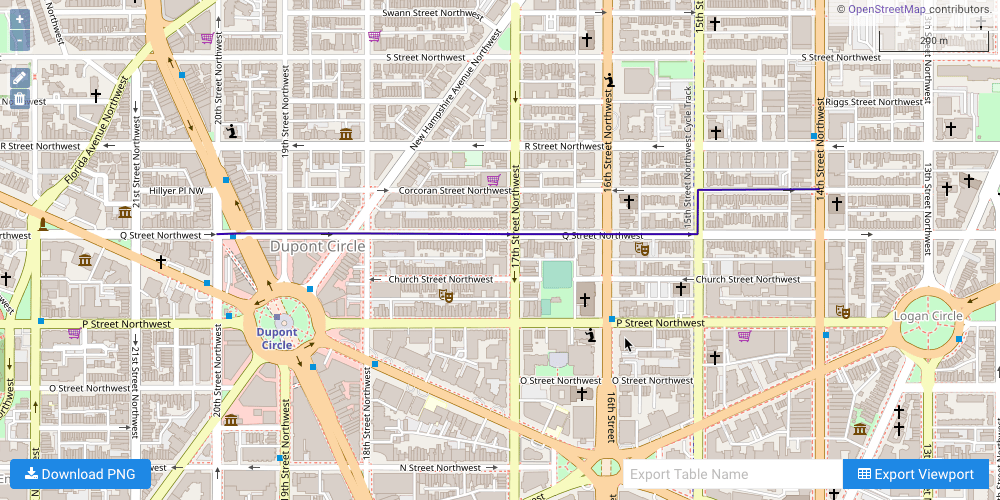
The first example illustrates a simple shortest path solve from a single source node to a single destination node. First, the source node and destination node are defined.The source and destination node are the same for each example.
Define Beginning & Ending Points
GRAPH_DC graph is solved with the solve results being exported to
the response:
Solve Graph for Shortest Path without Penalties or Restrictions
Solve Graph for Shortest Path without Penalties or Restrictions Solution
Intersection Penalty
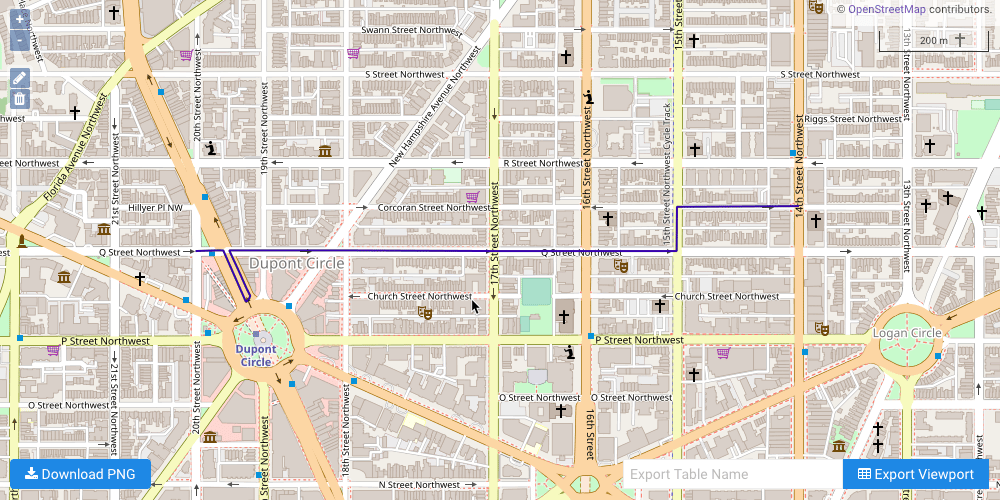
The second example illustrates a shortest path solve from a single source node to a single destination node, but this time traveling through an intersection of two-way roads will incur an additional cost. TheGRAPH_DC graph is solved
with the solve results being exported to the response and an intersection
penalty of 20 seconds:
Solve Graph for Shortest Path with Intersection Penalties
Solve Graph for Shortest Path with Intersection Penalties Solution
Turn Restriction
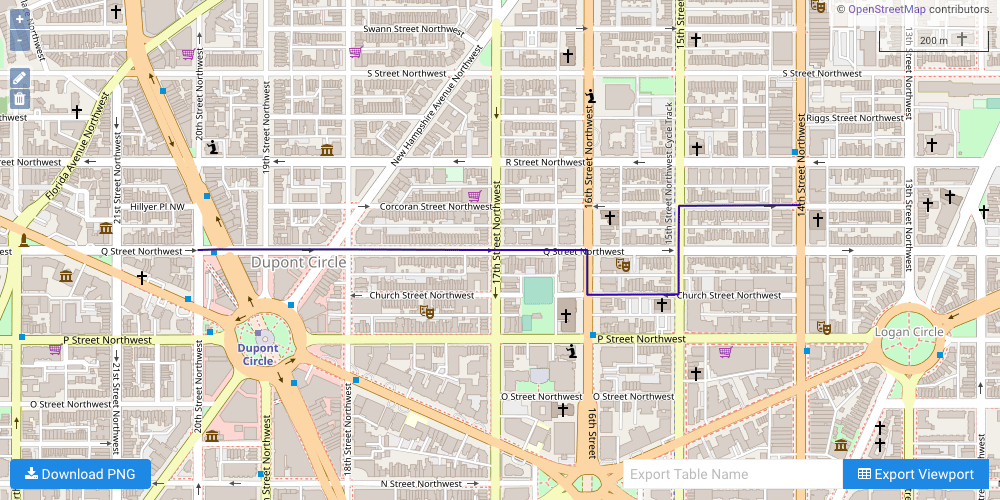
The third example illustrates a shortest path solve from a single source node to a single destination node, but this time a single turn from Q Street on to 15th Street is restricted. TheGRAPH_DC graph is solved with turns from
road segment ID 18352169 (Q Street) to road segment ID 18352166 (15th
Street) being restricted and the solve results being exported to the response:
Solve Graph for Shortest Path with Turn Restrictions
Solve Graph for Shortest Path with Turn Restrictions Solution
Download & Run
Included below is a complete example containing all the above requests, the data files, and output. To run the complete sample, ensure that:- the solve_graph_dc_shortest_path_turn.py script is in the current directory
- the dc_shape.csv file is in the current directory or use
the
data_dirparameter to specify the local directory containing it
Run Example