

Pre-requisites
An HA installation requires the following components:- Two or more clusters with matching Kinetica installations managed by KAgent
- Two nodes (across the clusters) have RabbitMQ installed
- etcd
- The KAgent UI
Configuration
Enable HA
HA is enabled on a ring using the KAgent UI. To enable HA using KAgent:-
Log into the KAgent service with a web browser:
- From the left menu, click Manage.
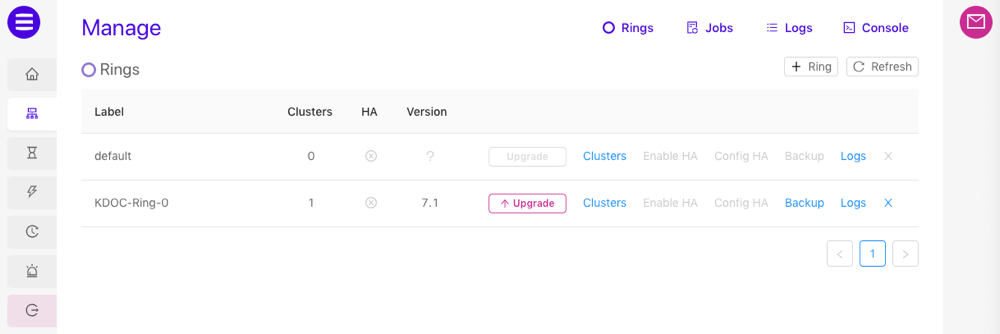
- On the Rings page, next to the ring containing your clusters, click Enable HA.
- Click Enable to confirm setup. The High Availability package will be installed on each cluster and automatically configured.
-
Click Close. HA is now enabled for the ring.
Config HA
KAgent exposes the most important High Availability configuration settings via the KAgent UI. Information about the settings can be found in the table below.
To update the settings:
-
Log into the KAgent service with a web browser:
- From the left menu, click Manage.
- On the Rings page, next to the ring containing your clusters, click Config HA.
- Adjust the settings as necessary.
- Click Update.
APIs
Any client API connection made to a cluster within an HA ring will automatically be configured to fail over from one cluster in the ring to another in the event of an outage. A client API connection can be configured manually to fail over from one cluster to another in a set of clusters that are not part of an HA ring by specifying the cluster URLs at the time of connection. The enabled failover mode (active/active or active/passive) is governed by whether a primary URL is specified or implied as follows:- Active/Active - No primary URL is specified and more than one URL is specified
- Active/Passive - A primary URL is specified, or a single URL is specified
C++
Active/Active Configuration
To instantiate a Kinetica connection object with failover in C++, pass a comma-delimited list of head node URLs to the constructor:If you provide a single URL to the
GPUdb constructor, the failover mode
will instead be Active/Passive and the URL will be treated as the primary
URL.Active/Passive Configuration
To designate a cluster from the list to always attempt to go to first, specify a primary URL:Java
Active/Active Configuration
To instantiate a Kinetica connection object with failover in Java, pass a comma-delimited list of head node URLs to the constructor:If you provide a single URL to the
GPUdb constructor, the failover mode
will instead be Active/Passive and the URL will be treated as the primary
URL.Active/Passive Configuration
To designate a cluster from the list to always attempt to go to first, specify a primary URL:Python
Active/Active Configuration
To instantiate a Kinetica connection object with failover in Python, pass a list of head node URLs to the constructor:If you provide a single URL to the
GPUdb constructor, the failover mode
will instead be Active/Passive and the URL will be treated as the primary
URL.Active/Passive Configuration
To designate a cluster from the list to always attempt to go to first, specify a primary host: